Transforming Legacy Systems with REA: From Maintenance to Modernization (Part 3 of 5)
Part 3 of 5. The six-step transformation journey — discover, reverse engineer, analyze and plan, modernize, integrate and align, evolve — applied to the legacy codebase you inherited, with named anti-patterns, honest costs, and the exit criteria for each step.
By Dr. Sanju Abraham, Fractional CTO, investor, multiple exits. Published November 3, 2026. Part 3 of a 5-part series: How REA (Reverse-Engineer Anything) Will Transform Software Development.
New to the series? Part 1 — What Is Reverse Engineering, and What Is REA? defined classical reverse engineering (recovering architecture from a binary without source) and introduced REA (Reverse-Engineer Anything) as the discipline that generalizes it to any opaque artifact — legacy service, dependency, competitor product, incident, market. Part 2 — REA Tools and the Five-Step Pipeline named the composed tool stack (Ghidra, radare2, Frida, Wireshark, Markdown) and the five-step pipeline (deconstruct, analyze, visualize, insight and roadmap, enhance) that turn the discipline into weekly practice. Part 3 (this piece) is the first and highest-leverage application: a legacy codebase you inherited. Part 4 — reverse-engineering dependencies, competitors, APIs, and incidents. Part 5 — how AI coding tools reshape the economics of every step.
Key takeaways
- A “legacy codebase you inherited” is any production system you now own and did not design — acquisition, team departure, vendor exit, or the engineer who wrote it moved on five years ago. The defining property is not age; it is the absence of a current engineer who can defend a change to it from first principles.
- The standard “maintain-only” posture compounds badly. Each quarter of maintenance-only operation moves the system further from current platforms, grows the hiring moat, raises the cost of the next change, and raises the risk that the next change is forced (a dependency CVE, a cloud-platform EOL, a compliance requirement) rather than chosen. Doing nothing is not neutral; it is a slow negative compound.
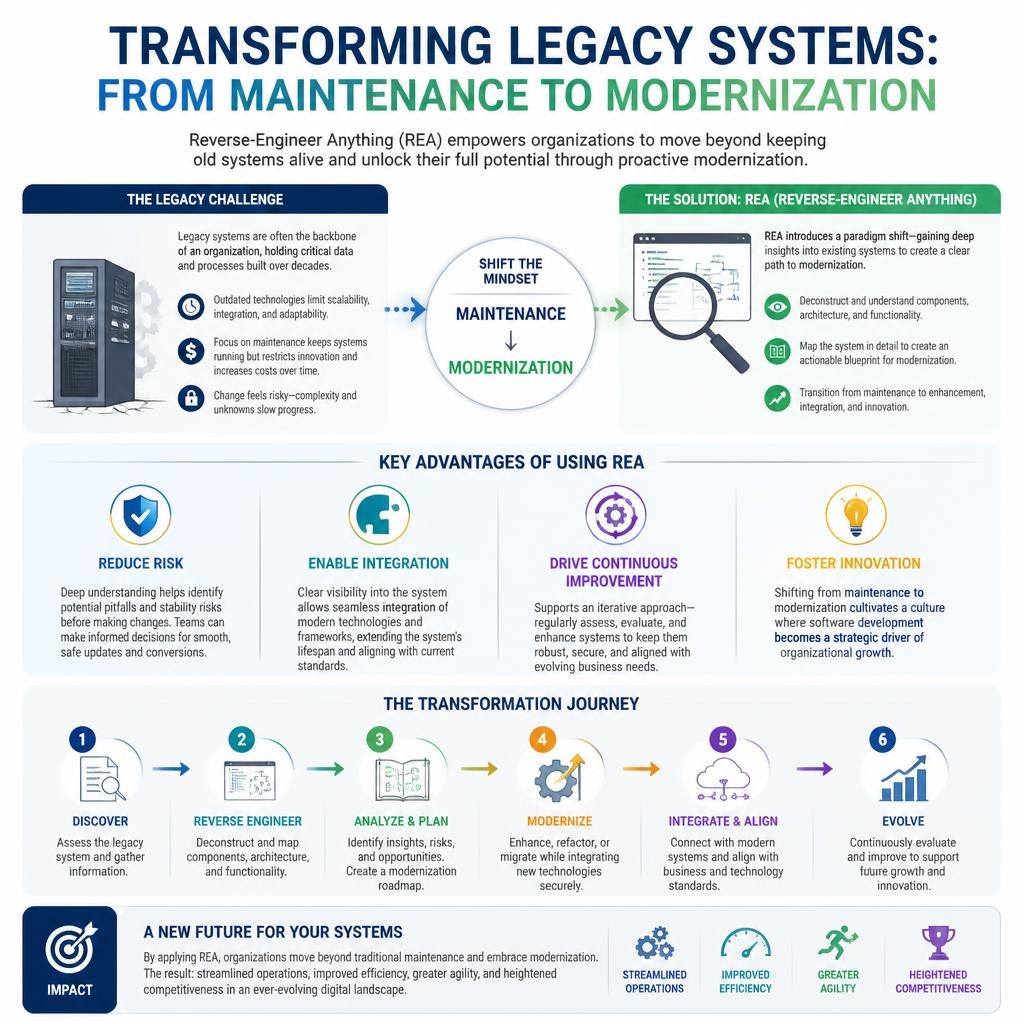
- The six-step transformation journey from the infographic — discover, reverse engineer, analyze and plan, modernize, integrate and align, evolve — maps cleanly onto the Part 2 REA pipeline. Steps 1-3 are REA on the inherited artifact. Steps 4-6 are the modernization that REA makes defensible. Running steps 4-6 without steps 1-3 is the single most common and most expensive mistake in legacy work.
- The four load-bearing advantages — reduce risk, enable integration, drive continuous improvement, foster innovation — each have a specific REA move behind them. They are not vague benefits; they are named outcomes you can set exit criteria for.
- Honest cost for a first REA pass on an inherited mid-complexity service (50-200K LOC): 2-4 engineer-weeks for discover + reverse engineer + analyze, producing a committed design doc. First real modernization change on top of that doc: 2-6 weeks. Second change: days. The compounding is the whole argument.
The short answer: Legacy modernization fails when it starts at step 4 (modernize) without first running steps 1-3 (discover, reverse engineer, analyze and plan). The six-step transformation journey in the infographic above is a correct ordering; most teams skip to step 4 under schedule pressure and ship a confident rewrite of a system they did not actually understand. The REA discipline from Part 1 and the five-step pipeline from Part 2 are what make steps 1-3 fast enough to actually run. For an inherited mid-complexity service, the full six-step journey is a quarter of work the first time and weeks the second time, and the compounding reduces risk, enables integration with current systems, drives continuous improvement, and finally fosters innovation — in that order, because any other order fails.
What exactly is a “legacy codebase you inherited”?
A legacy codebase you inherited is any production system you now own and did not design. Age is the common signal, not the definition. The operative property is the absence of a current engineer who can defend a proposed change from first principles — which happens for several non-age reasons as well.
- Acquisition inheritance. A deal closed, the acquired team’s engineers have mostly left or will leave within 12 months, and their systems are now your systems. This is the most common path to a legacy inheritance in 2026 and the one with the hardest timeline.
- Team departure. The two or three engineers who built a system have moved on. The code is three years old, not fifteen, but no one left can defend why a given module exists.
- Vendor exit. A SaaS vendor is sunsetting, you have 12 months to migrate off, and the only reference implementation is the vendor’s black-box product. The inherited “codebase” is the behavior you have to reproduce.
- Internal silo. A system was built by a sibling team, that team was reorganized, and you inherited operational ownership without the design context.
- Classical legacy. The system is 10-25 years old, written in a language or on a platform the current team does not use, and the original authors are no longer at the company.
Each case has the same working definition: production matters, source is available or recoverable, and no engineer on the current team can explain the system end to end from a whiteboard. This is the condition REA addresses — and it is more common in 2026 than ever, driven by the acquisition rate, the half-life of engineering tenures, and the SaaS vendor consolidation of the last three years.
Why does the maintain-only posture make a legacy inheritance worse over time?
Maintenance-only is not a neutral choice; it is a slow negative compound. Every quarter of maintenance-only operation makes the next change more expensive, less safe, and more likely to be forced rather than chosen. The compounding is predictable and the numbers are ugly.
- Platform drift. The runtime, the OS, the database, the cloud services the system depends on each move forward on their own schedules. A system standing still is moving backward relative to its supported platforms. The deprecation notices accumulate; the migration cost per quarter grows.
- Dependency drift. Transitive dependencies accumulate CVEs. The gap between “the version you ship” and “the version with security fixes” widens. At some point the gap is wide enough that the fix is not a patch but a rewrite of the integration.
- Hiring moat. The talent pool for the stack narrows every year. The team that can defend changes to a 2008 ASP.NET Web Forms application in 2026 is a different and smaller team than it was in 2016.
- Documentation decay. Even the documentation the system had erodes — the Confluence page is outdated, the design-decision commit messages are from engineers who left, the architectural intent is now an oral tradition no one still tells.
- Change aversion feedback loop. Each small change feels more dangerous than the last because the understanding is shallower. The team ships fewer changes. Each change is now bigger because the backlog grew. The bigger changes feel more dangerous. The cycle tightens.
The result after four to eight quarters of maintenance-only operation is a system that nobody wants to touch, nobody can confidently change, and nobody can afford to replace — and the only way out is a forced migration triggered by an outside event (a CVE, an EOL, a compliance deadline, a performance cliff). Forced migrations are the most expensive kind. REA on an inherited system is the discipline that gives a team the option to choose its migrations rather than have them chosen.
What is the six-step transformation journey the infographic names?
Discover → Reverse Engineer → Analyze and Plan → Modernize → Integrate and Align → Evolve. The infographic above names the six steps; this section says what each one is, what exit criterion counts as “done,” and which Part 2 pipeline moves implement it.
- Step 1 — Discover. Assemble the catalog: what services, what databases, what jobs, what integrations, what deployment pipeline, what observability. This is pre-REA inventory, before any one component is deeply understood. Exit criterion: a committed
docs/legacy-inventory.mdlisting every production artifact, where it runs, who called it last quarter, and who last changed it. Honest cost: 3-5 engineer-days for a mid-complexity inheritance. - Step 2 — Reverse Engineer. Run the Part 2 pipeline — deconstruct, analyze, visualize — on each inventory item that will take any change in the next two quarters. For most inheritances this is a prioritized subset, not the whole catalog. Exit criterion: a committed per-system design doc with architecture, interfaces, data model, and known unknowns. Honest cost: 2-4 engineer-weeks per non-trivial system. The free tool stack from Part 2 covers every move.
- Step 3 — Analyze and Plan. With the per-system docs in hand, build the modernization roadmap: what gets strangler-fig replaced, what gets rewritten, what gets wrapped, what gets left alone (not every legacy system should be modernized). Exit criterion: a committed roadmap doc with sequenced work, named risks, named preconditions, and a realistic cost estimate. Honest cost: 1-2 engineer-weeks for a system of 3-6 services.
- Step 4 — Modernize. Execute the roadmap. The specific technique — strangler fig, parallel run, blue-green cutover, port-and-shim — depends on the system; the roadmap from Step 3 names which applies where. Exit criterion: the planned change is in production and the design docs from Step 2 are updated to reflect the new state. Honest cost: highly variable, but 2-6 weeks per sequenced increment for a well-planned mid-complexity service.
- Step 5 — Integrate and Align. Connect the modernized component to the rest of the current environment — current auth, current observability, current data pipelines, current deployment system. This is the step that converts a modernized island into a usable part of the current platform. Exit criterion: the modernized component is behind the same identity, logging, and deploy pipeline as everything else. Honest cost: 1-3 weeks per component, lower for the second and later ones because the integration patterns are shared.
- Step 6 — Evolve. Re-run the lightweight version of the pipeline quarterly against each inherited system — not a full REA pass, but a targeted re-read against the current state. The goal is to catch drift before it compounds, exactly the problem that produced the inheritance in the first place. Exit criterion: a quarterly delta doc. Honest cost: 1-2 engineer-days per system per quarter.
Running steps 4-6 without steps 1-3 is the single most common and most expensive mistake in legacy work. The familiar failure mode is a six-month rewrite that ships behavior different from the original, breaks downstream consumers nobody knew existed, and ends up as a second legacy system beside the first. REA on steps 1-3 is what makes steps 4-6 defensible.
How does the five-step REA pipeline from Part 2 map onto a legacy codebase?
Cleanly, with one named adaptation per step. The five-step pipeline from Part 2 was described for the general case. Here is how it specializes for an inherited source-available legacy system.
- Deconstruct → Fresh checkout plus history mining. You usually have source, so the deconstruct step is not disassembly; it is
git log --stat --allplusgit log -S<keyword>plus the IDE’s “find usages” tool plusctags. The output is a working proxy for a design doc: the sequence of commits, the active files, the dead files, the modules that have been rewritten three times (that is a signal), the modules nobody has touched in five years (that is a signal too). - Analyze → Static plus runtime observation on a replay. Static call graphs from the IDE or language-native tooling. Dynamic observation on a replay or a shadow run — not production — using the same instrumentation vocabulary from Part 2 (strace, dtrace, syscall tracers, the language’s profiler). The output is a bag of behavior facts the design doc will cite.
- Visualize → Sequence diagrams for the top five flows. Not an exhaustive architecture diagram. Pick the three to five user-facing or business-critical flows the system actually serves and sequence-diagram each one, end to end, naming every component the flow touches. Mermaid is sufficient. The visualization step is where most legacy REA runs underinvest; the sequence diagrams are what make the design doc stand up under contact with reality.
- Insight and roadmap → The system’s design doc, committed next to the code. This is the artifact every subsequent step references.
docs/architecture/system-overview.mdanddocs/architecture/decision-log.mdcommitted inside the system’s own repository. Not a Confluence page. Not Notion. Not a slide deck. The anti-pattern is a central architecture wiki that drifts away from the code; the correction is to keep the doc in the repo so it diffs cleanly with changes. - Enhance → The first real change, with tests to pin recovered behavior. The first change after REA should be small, visible, and selected to validate the design doc. Add characterization tests that pin the behavior you now believe is correct; make the small change; observe whether the tests held. If the tests held, the design doc is probably right. If the tests surprised you, the design doc has a gap; fix the doc before the next change.
The adaptation preserves the shape of the Part 2 pipeline exactly. The specialization is in the tool choices per step, not in the structure.
What are the four load-bearing advantages, and what REA move produces each?
The four advantages the infographic lists — reduce risk, enable integration, drive continuous improvement, foster innovation — are not vague benefits. Each has a specific REA move behind it and a specific outcome you can set an exit criterion for.
- 1. Reduce risk → Characterization tests tied to the design doc. The design doc from Step 2 names the behaviors the system is supposed to exhibit. Characterization tests that pin those behaviors turn each future change from a guess into a verified diff. The exit criterion is specific: for each top-five flow, a characterization test suite that fails when the flow changes. The outcome is that the modernization work in Step 4 lands without the “I don’t know what I just broke” penalty that normally gates work on inherited code.
- 2. Enable integration → A named interface boundary around the inherited system. REA produces a clear picture of what the inherited system expects as input and produces as output. That picture is what lets a modern component sit next to it and talk to it. The exit criterion is a published interface contract (OpenAPI for HTTP, Protobuf for RPC, SQL views for shared data, whatever the system actually speaks) that current engineers can code against without reading legacy code.
- 3. Drive continuous improvement → A living design doc updated with every meaningful change. The design doc is the ledger of understanding. Keeping it current — a lightweight re-read every quarter, a doc update on every substantial change — is what prevents the inheritance from re-aging. The exit criterion is that the doc’s
updatedDateis never more than one quarter stale while the system is actively changed. - 4. Foster innovation → The team’s shared mental model, maintained in the open. The hardest thing to recover for an inherited system is not the code; it is the engineering judgment to make non-obvious changes to it. The design doc, the characterization tests, and the per-flow sequence diagrams together constitute a shared mental model the team can argue over, extend, and build new features on top of. The exit criterion is less concrete but easy to recognize: an engineer who was not on the original team can propose a non-trivial new feature and defend the proposal in a design review.
Each advantage is real; each has a named REA move; each has an exit criterion. Vague benefits are what let legacy modernization programs run for years without delivering; named outcomes are what let a team finish.
What anti-patterns kill a legacy REA engagement most often?
Six anti-patterns account for the majority of failed legacy modernization engagements. Each is well-intentioned, well-documented in the industry, and still catastrophic when it meets reality. Naming them is the first defense.
- The rewrite jump. Skipping steps 1-3 and starting a greenfield rewrite because “the legacy code is bad enough to replace.” The rewrite ships behavior different from the original, breaks consumers nobody knew existed, and takes 3x the estimate. Correction: run steps 1-3 first, every time, non-negotiably.
- The architecture astronaut. Running Step 2 forever without producing a committed design doc, because the picture “isn’t complete yet.” Correction: ship the Step 2 design doc as a v0.1 at the two-week mark with the known unknowns listed in a dedicated section, and iterate the doc with the team.
- The strangler fig that eats itself. A long-running strangler-fig migration that becomes a parallel codebase operated indefinitely because no cutover is forced. Correction: name a cutover date in the Step 3 roadmap and defend it; sunset the strangled component.
- The characterization-test skip. Modernizing (Step 4) without characterization tests to pin behavior, trusting the design doc alone. Correction: no Step 4 change without characterization tests for the flows the change touches.
- The documentation-only output. A six-month engagement that produces beautiful docs and zero production changes. The team loses faith in REA. Correction: force a small, visible Step 4 change at the end of Step 3, scoped so it validates the design doc.
- The frozen inheritance. Running the full six steps once, then stopping. The inheritance re-ages into a second legacy system. Correction: Step 6 is non-optional; a quarterly cadence is the floor.
Each anti-pattern has a correction, and the corrections are inexpensive compared to the anti-patterns. The engagements that fail do so by refusing an inexpensive correction, not by hitting a problem no one anticipated.
When should you walk away from REA on an inherited system instead?
Four conditions where the correct answer is to walk away from the inherited system entirely, not run REA on it. The REA discipline is the right default; it is not the right choice in every case. Honest advice is to recognize these cases early.
- The system has fewer than 90 days of operational life remaining. A system being retired this quarter does not merit a four-week REA pass. Document the migration path, honor the sunset date, do not reverse engineer.
- The system’s current behavior is clearly wrong and the correction is simpler than preservation. Not every legacy behavior should be preserved. A clearly wrong behavior (a bug that persisted for years, a design that compliance would reject today, a security posture that is indefensible) should be replaced, not characterized and preserved.
- A credible commercial replacement exists at acceptable cost. When a vendor’s current product covers the inherited system’s capabilities at defensible cost and switching cost, buy-vs-build-vs-REA favors buy. REA is only competitive against buy when the inherited system has differentiating logic worth preserving.
- The organization will not fund steps 4-6. If leadership will fund REA (steps 1-3) but not the modernization it enables (steps 4-6), the REA work produces docs that go stale. Better not to start. REA is only load-bearing when the organization is willing to act on the design docs it produces.
Walking away is a legitimate output of Step 1. The Discover step inventory should mark each system with one of four dispositions: REA + modernize, replace, retire, or leave alone. The ratio varies by inheritance; a healthy ratio for an acquisition inheritance is roughly 40% REA + modernize, 20% replace, 20% retire, 20% leave alone. REA-ing 100% of an inherited catalog is a sign that the Discover step was skipped.
Frequently asked questions
How do I know whether a system qualifies as “inherited” if the original engineers are still at the company? The test is not tenure; it is defensibility. Can an engineer on the current team defend a proposed change to the system from first principles — explain what the change does, why it is safe, what it affects downstream — without consulting the original authors? If yes, the system is owned. If no (even if the authors still exist and can be asked), the system is effectively inherited and should run through the REA process to transfer defensibility to the current team.
What if the inherited system has no source code at all, only a running binary? Then Step 2 (Reverse Engineer) uses the binary tool chain from Part 2 — Ghidra, radare2, Frida, Wireshark — rather than the source-plus-IDE tool chain described in this piece. The structure of the six-step journey is unchanged; the Deconstruct phase is harder and slower, so budget an extra 2-4 engineer-weeks for Step 2. The output is the same: a committed design doc the current team can defend.
How do I pick which systems from the inventory to run REA on first? Three signals, in order. First: which systems are scheduled to take a change in the next two quarters (planned or forced)? Those must go first; the REA pays off in those changes. Second: which systems have the highest revenue or operational dependency? Those are the ones where a bad change would be most expensive. Third: which systems have the smallest current understanding? Those have the most to gain from REA. Prioritize by max of the three signals, not sum.
Is a strangler-fig migration the right default for Step 4? Strangler fig is the right default for a long-running production system that cannot have downtime and whose consumers are many and unknown. It is overkill for a system with a few named consumers that can be migrated together in a weekend. The Step 3 roadmap names which technique applies where; the common techniques are strangler fig, parallel run with reconciliation, blue-green cutover, and port-and-shim. Pick per component, not per inheritance.
How much can AI coding tools accelerate this process in 2026? Substantially for Steps 1-3 (discover, reverse engineer, analyze), modestly for Step 4 (modernize), minimally for Step 5-6 (integrate, evolve). A Claude Code or Codex session running headless Ghidra against a binary, or walking the source tree with the IDE’s find-usages tool, drafts a credible first-pass design doc in hours rather than days. The human job shifts to verification and gap-filling. Part 5 of this series will quantify the shift across the four tools benchmarked in my prior 15-part series on AI coding tools.
What is a reasonable team size for a legacy REA engagement? Two to three engineers plus one engineering lead who owns the design docs, for a mid-complexity inherited system (3-10 services, 50-500K LOC total). The two engineers run the pipeline; the lead reviews and merges the design docs. Larger teams on a single REA engagement are usually a signal of insufficient prioritization — splitting the inheritance across smaller teams per system runs faster and produces better docs.
What’s the single most important thing to get right in the first week? The inventory, from Step 1. An honest, complete catalog of what you actually own — with named owners (per system, not per team), named consumers, named deployment pipelines, and named known risks — is the foundation every subsequent step builds on. Skipping or rushing Step 1 means every later step touches the wrong set of systems. The inventory is boring; it is also the most load-bearing single artifact in the whole engagement.
What’s next in this series
Part 4 — Reverse-engineering dependencies, competitors, APIs, and incidents. The REA pipeline runs the same shape on each — a misbehaving dependency the vendor is slow to fix, a competitor product that claims a capability affecting a deal, an API with no documentation, a production incident still half-understood 48 hours in. The adaptations per artifact type, with named tools and honest costs. Then Part 5 closes the series on how AI coding tools (Claude Code, Codex, Cursor, Opencode) reshape every step’s economics.
If you have inherited a system — through an acquisition, a team departure, or a vendor sunset — and need help running a real REA engagement on it so the next change is defensible rather than terrifying, that is a core part of what I do as a Fractional CTO. See the Fractional CTO page or get in touch directly.