The Role of Language Models in AI Coding Tools (Part 3 of 15)
Part 3 of 15. How large language models actually power Opencode, Claude Code, Codex, and Cursor — what the model does, where the tool starts, and why that line matters for every pick in the series.
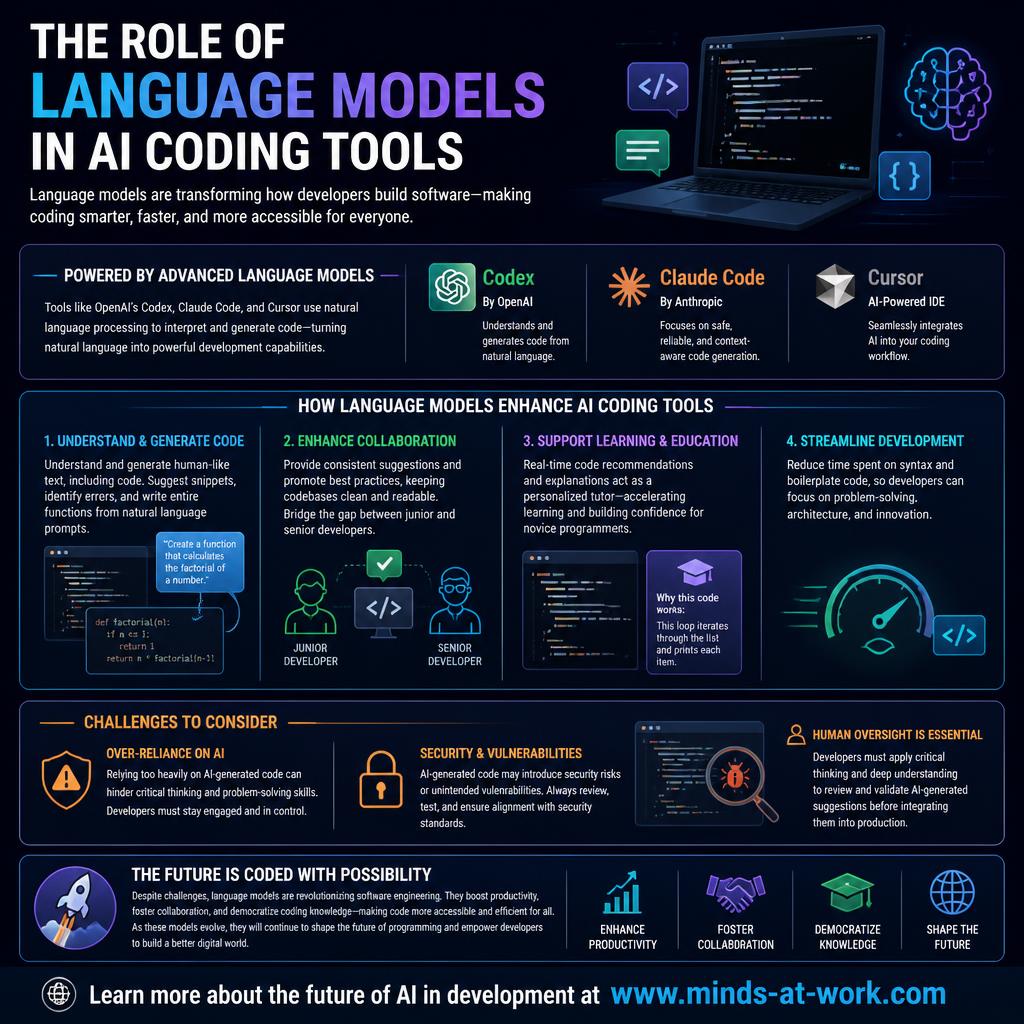
By Dr. Sanju Abraham, Fractional CTO, investor, multiple exits. Published October 19, 2026. Part 3 of a 15-part series: Comparing Opencode, Claude Code, Codex, and Cursor: Is There a Clear Winner?
New to the series? Part 1 — AI Code Generation and Developer Productivity — frames the “five-variable pick.” Part 2 — Claude Code vs Codex vs Opencode vs Cursor: An Overview — profiles each tool. This piece opens the comparison axes by looking at the layer underneath all four: the language model.
Key takeaways
- A large language model is the engine, not the whole car. The LLM reads, writes, and explains code. The tool wraps the model with context, tool use, UI, and safety — and those wrappers are where the four products in this series actually differ.
- The model does four jobs well: generate code from natural language, read unfamiliar code and summarize it, flag likely bugs, and refactor across files. The product above the model does the rest — file I/O, shell access, diff review, sandboxing, cost control.
- Model choice drives capability; wrapper choice drives workflow. Codex rides GPT. Claude Code rides Claude. Opencode rides whichever model you configure. Cursor rides a mix. Same category, different trade-offs.
- The three honest risks are over-reliance, security exposure, and skill atrophy. They apply to all four tools because they come from the model, not the wrapper — the wrapper can only mitigate, not eliminate.
- The practical test is “where does the model end and the product begin?” Teams that confuse the two end up swapping tools when a model update would have fixed the problem (or the reverse).
The short answer: A large language model (LLM) is a statistical system trained on enormous text and code corpora that predicts the next token given a context window. In an AI coding tool, the LLM is the engine that turns an English instruction into a code change or a code explanation; the tool itself is a wrapper that gives the model file access, shell access, tool use, and a review surface. All four tools in this series — Opencode, Claude Code, Codex, and Cursor — share that architecture. They differ in which model they call, how much context they stuff into it, what tools they let it use, and how they surface its output to the developer. Those four differences are most of what the next twelve parts compare.
What is a language model, and why does the distinction matter?
A language model is a probability distribution over sequences of tokens, trained on text and code, that predicts the next token given everything before it. That is a boring technical definition. The useful version: the model is a very fast, very well-read collaborator that has never seen your codebase, cannot run commands on its own, and only knows what you put in front of it.
The distinction matters because every real complaint about AI coding tools reduces to one of three things:
- A model limit. The model does not know a recent API, hallucinates a function that does not exist, or is miscalibrated on a specialized stack. Swapping tools without swapping models rarely fixes this.
- A wrapper limit. The tool does not give the model enough context, forgets a file after a few turns, or does not let the model run tests. Swapping tools often fixes this.
- A workflow limit. The developer accepts diffs without reading them, or runs an agent with shell access on sensitive data. No model or wrapper fixes this.
The next twelve parts of this series spend most of their time on the second and third. This part is about the first — what the model actually brings to the table, so later parts can honestly separate “the LLM did this” from “the product did this.” For a related framing of what a model should and should not decide for you, see the companion piece We stopped asking AI to “write” and started asking it to “decide”.
What four jobs do language models do well inside a coding tool?
Four jobs sit squarely inside the model’s strengths in late 2026: generate code from natural language, read and explain unfamiliar code, flag likely bugs, and refactor across files. Everything else the tool advertises is either a wrapper feature or a pleasant surprise.
- Generate code from natural language. The job the category was built on. “Write a function that validates an email address against RFC 5322” produces a usable draft on all four tools. Quality scales with model size and training recency.
- Read and explain unfamiliar code. A developer joining a new codebase can ask the model to summarize a file, trace a request through handlers, or explain a regex. This is where models earn their keep for onboarding — and where longer context windows pay off.
- Flag likely bugs. Paste a stack trace or a failing diff; the model will enumerate the three most probable causes with better-than-random hit rate on well-trodden stacks. Weaker on bespoke frameworks and anything behind an unusual compiler.
- Refactor across files. With tool use (read file, write file, grep), the model can rename a symbol, migrate between two APIs, or apply a code-style rule consistently across hundreds of files. This is where agentic coding earns its name.
Three honest limits sit next to those four strengths. The model does not run your tests — the wrapper runs the tests and feeds the result back. The model does not know your codebase — the wrapper reads files and puts them in context, one chunk at a time. The model does not own your choices — architectural judgment, API design, security review, and the decision to ship stay with the developer.
Which language model powers each of the four tools?
Each of the four tools makes a different call on model choice, and that call is the biggest single driver of its capability ceiling.
- Claude Code → Claude. Anthropic’s own tool runs on the Claude Opus and Sonnet model families, selectable per task. Long-context reading (hundreds of thousands of tokens) is the flagship capability. Documented at claude.com/claude-code.
- Codex → GPT. OpenAI’s agent runs on the current GPT model family (GPT-5-codex and siblings), with model selection per task in the CLI and the cloud agent. Documented at openai.com/codex.
- Opencode → whatever you point at. SST’s open-source agent is model-agnostic by design: Claude, GPT, Gemini, Groq, local Ollama, anything with an OpenAI-compatible API. The project repo at github.com/sst/opencode ships provider configs for the main vendors.
- Cursor → a hybrid. Anysphere ships its own small, fast models for autocomplete and quick operations (“cursor-small”), and routes heavier Composer and Agent work to frontier Anthropic and OpenAI models under the hood. Pro users can pick per task; cursor.com lists the current roster.
The practical consequence: two tools can disagree on the same task because they are calling two different models. A failure in Claude Code and a success in Codex might be a Claude-vs-GPT story, not a Claude-Code-vs-Codex story. Later parts of this series take care to say which it is.
For readers who want a deeper look at where language models fit in agent architectures, the companion piece Where decision models fit in an agent stack sits one layer deeper.
How does the model enable collaboration across skill levels?
The quieter productivity story is that language models equalize the on-ramp. A junior developer and a senior developer can both ask the model to explain a file, and both get a usable answer — the senior reads it faster and catches the model’s mistakes, but the junior gets further on their own than they would have unaided.
Three concrete patterns show up in late-2026 teams:
- Shared vocabulary. When a model explains code the same way to everyone, teams converge on common names for the same patterns. Code review stops needing a translation layer between juniors and seniors.
- Faster escalation. Juniors who used to lose an hour on a stacktrace now get a short-list of likely causes in thirty seconds. The hour that remains is the one they genuinely need senior help on — not the one spent googling the error.
- Context-preserving handoffs. The model can summarize a long investigation thread into three sentences, so the next developer picking up a ticket does not re-run the first two hours of work.
None of these patterns require a specific vendor. All four tools support them to some degree, and the practical quality depends more on the underlying model than on the wrapper. For the broader frame of how this fits a small or mid-market business, see AI strategy for SMB owners.
How should language models fit into developer learning and education?
The honest answer is “as a tireless assistant, not as a replacement teacher.” A model will patiently explain the same regex ten times without judgment, which is a real win for learners. It will also confidently teach the wrong thing on topics it is weak at, which is a real cost.
Three heuristics help early-career developers and bootcamp students use the model well:
- Ask the model to show its work. “Explain this line by line” produces more teachable output than “fix this.” The second asks the model to do the work; the first asks it to teach.
- Verify the small things. Standards, syntax, and library APIs are places models hallucinate most confidently. For anything load-bearing, read the primary docs.
- Practice unaided on fundamentals. Data structures, algorithms, debugging without hints, and reading legacy code are muscles the model will happily substitute for. Keeping them trained is a career-shaping choice.
The companion piece Do you need to be a developer to use a decision API? addresses the inverse case — when the no-code side of the equation goes too far.
What are the honest risks of leaning on language models?
Three risks follow directly from how models work, so no wrapper can fully eliminate them — only mitigate them.
- Over-reliance and skill atrophy. The convenience of a working answer in two seconds is addictive. Developers who stop practicing unaided debugging get worse at it. The mitigation is deliberate practice without the model, especially for mid-level engineers who have the most to lose.
- Security vulnerabilities. Models reproduce the patterns they were trained on, including insecure ones. SQL injection, path traversal, broken crypto defaults, and secret-leaking logs all show up in model output when the surrounding prompt invites them. The mitigation is static analysis in CI, security review of agent-generated changes, and never letting a model write to production without a human sign-off.
- Hallucinated APIs and standards. Models invent functions, flags, headers, and HTTP response codes that look plausible but do not exist. The mitigation is “verify at the primary source” for any claim load-bearing enough to ship, and tool use (actually run the code, actually read the file) over pure prose answers.
A fourth risk sits one level higher: model drift between versions. The exact same prompt against this quarter’s model and last quarter’s model can produce materially different code. Teams building production workflows on a specific model should pin the version and re-test on upgrade, exactly the way they would with a dependency. For a related framing on calibration, see The calibration feature nobody is talking about.
A clean, product-forward dashboard-style infographic on an off-white background with three columns labeled RISK, SIGNAL YOU'LL SEE, and MITIGATION. Three rows, each a soft shade (pale slate, pale sand, pale emerald): row 1 OVER-RELIANCE — 'devs stop reading diffs' — 'pair review, unaided debugging practice'; row 2 SECURITY — 'SQL injection, secret leaks in logs' — 'SAST in CI, human sign-off before merge'; row 3 HALLUCINATED APIS — 'calls to functions that do not exist' — 'tool use + primary-source verification'. A short tagline above: 'the model-level risks, honestly named'. Clean, flat, geometric. Palette: off-white background, pale slate borders, pale emerald accent, pale sand accent, navy ink. Linear or Stripe editorial feel. No AI robots.
- Aspect ratio: 16:9
- Source size: 1280 × 720 px (sharp on retina at 760 px display width)
- Format: PNG
- Target file size: under 500 KB
Save to /public/images/blog/<slug>/, then set
src and alt on this <MediaFigure /> to swap it in. Keep the ratio prop so the browser reserves the right space.
Where is the language-model layer heading next?
The practical trend for the next two quarters is specialization, not scale. Model vendors are shipping smaller, cheaper, task-specific models (code autocomplete, bug triage, test generation) alongside the frontier generalists, and the AI coding tools are learning to route per task.
Three specific moves to watch:
- Small, fast models for interactive work. Cursor already does this with cursor-small for autocomplete; the pattern will spread. The win is latency — a 100 ms suggestion beats a 2 s suggestion for in-flow coding, even if the 2 s one is marginally better.
- Larger, slower models for background work. Codex’s cloud agent and Claude Code’s long-context runs point to a split where quick questions go to a fast local model and long tasks go to a heavier, cloud-hosted one. The wrapper picks per task.
- Fine-tuned task models. Expect model vendors to ship coding-specialized models that trade general knowledge for better test writing or safer refactors. Opencode’s model-agnostic design is already positioned for this; the vendor-locked tools will catch up by adding model selection menus.
The one honest unknown is how much of the gain in the next year comes from the model layer versus the wrapper. The last three years were a model-dominant era. The next three may belong more to the wrapper — exactly why this series spends twelve parts comparing wrappers rather than models.
Frequently asked questions
What is a language model in the context of AI coding tools?
A language model is a statistical system trained on large amounts of text and code that predicts the next token given a context. Inside an AI coding tool, the language model is the engine that turns a natural-language instruction (“write a function that …”) into generated code, or that reads a block of code and explains or refactors it. The tool itself — Opencode, Claude Code, Codex, Cursor — is a wrapper that gives the model file access, tool use, and a UI for review.
Does Claude Code use the same language model as Codex?
No. Claude Code runs on Anthropic’s Claude model family (Opus and Sonnet variants); Codex runs on OpenAI’s GPT model family (GPT-5-codex and siblings). The model is the single biggest driver of each tool’s capability ceiling. A task that fails in Claude Code and succeeds in Codex may be a Claude-vs-GPT difference as much as a Claude-Code-vs-Codex one. The rest of this series takes care to say which it is.
Can I use any language model with Opencode?
Mostly, yes. Opencode is model-agnostic by design and ships with provider configs for Anthropic, OpenAI, Google, Groq, and local models through Ollama. If a model exposes an OpenAI-compatible API, Opencode can usually call it with a config entry. This flexibility is Opencode’s main structural advantage over the vendor-locked tools in this series; the trade is that enterprise features (SSO, audit, billing) are what you build on top.
What are the main risks of using language models for coding?
Three risks are intrinsic to the model layer and therefore apply to every tool in this series. First, over-reliance — developers who always accept the first plausible diff lose unaided debugging skill. Second, security vulnerabilities — models reproduce insecure patterns from training data. Third, hallucinated APIs — models invent functions, flags, and standards that look plausible but do not exist. The mitigations are human review, static analysis, and verifying load-bearing claims against primary sources.
How do language models help junior developers?
They act as a tireless explainer. A junior developer can ask the model to walk through a file, trace a request, or explain an error without worrying about taking a senior’s time. The model is also patient with repeated questions on fundamentals, which lowers the social cost of not-yet-knowing. The risks (confident wrong answers, substitution for practicing fundamentals) are real but manageable with the “show your work” and “verify the small things” heuristics in the body of this piece.
Will language models replace developers?
No, not in the shape the question usually imagines. The parts of software engineering the model handles well — generating code, explaining code, flagging likely bugs, refactoring across files — are the parts that used to take time but did not require judgment. The parts that pay the most — architecture, product judgment, debugging novel systems, owning a shipped feature — are the parts the model is weakest at. The net effect across the industry is more product shipped per developer, not fewer developers.
How often do the models powering these tools change?
Frequently enough that any specific capability claim should be re-verified against vendor documentation before a procurement decision. The major labs (Anthropic, OpenAI, Google) ship model updates every one to three months, and the wrapper tools pick up the new models within weeks. This is why the five-variable pick — editor, codebase, team shape, cost ceiling, security posture — stays stable while any specific model-level comparison needs refreshing on publication.
If you are picking an AI coding tool for a team in the next ninety days and the model-versus-wrapper distinction decides whether a vendor swap or a model swap fixes the problem, that is the exact shape of a one-hour Fractional CTO call. For more pieces in this series as it publishes, follow the AI Strategy archive; the broader frame on where AI fits in a small or mid-market software business sits in AI strategy for SMB owners.