Code Completion Compared: Opencode, Claude Code, Codex, Cursor (Part 6 of 15)
Part 6 of 15. How Opencode, Claude Code, Codex, and Cursor stack up on four code-completion modes — inline tab, chat edits, agentic multi-file edits, and autonomous background tasks.
By Dr. Sanju Abraham, Fractional CTO, investor, multiple exits. Published October 22, 2026. Part 6 of a 15-part series: Comparing Opencode, Claude Code, Codex, and Cursor: Is There a Clear Winner?
New to the series? Part 1 — AI Code Generation and Developer Productivity. Part 2 — Overview of the four tools. Part 3 — The Role of Language Models. Part 4 — Deep Learning Foundations. Part 5 — Training Data and Code Quality — explains what shapes the suggestion itself. This part turns that into the first head-to-head comparison: how each tool surfaces completions in practice.
Key takeaways
- “Code completion” is four different jobs now, not one. Inline tab completion, chat-style edits, agentic multi-file edits, and autonomous background runs — any serious comparison has to score each tool on each mode.
- Cursor leads inline tab completion. The purpose-built “Cursor Tab” model predicts jumps across lines and files, not just the next token. No terminal-first tool matches it today.
- Claude Code and Codex trade blows on agentic multi-file edits. Claude Code wins on long-context reads and explicit diffs. Codex wins on long autonomous runs and the cloud agent that works while you don’t.
- Opencode wins on model freedom. Its completion quality on any single mode is “as good as the model you plugged in” — bring Claude Sonnet, bring GPT, bring a local model. That trade is the whole pitch.
- No single winner across all four modes. Which tool “wins” at completion depends on which mode you spend most of your day in, which is a scenario question — covered end-to-end in Parts 12–14.
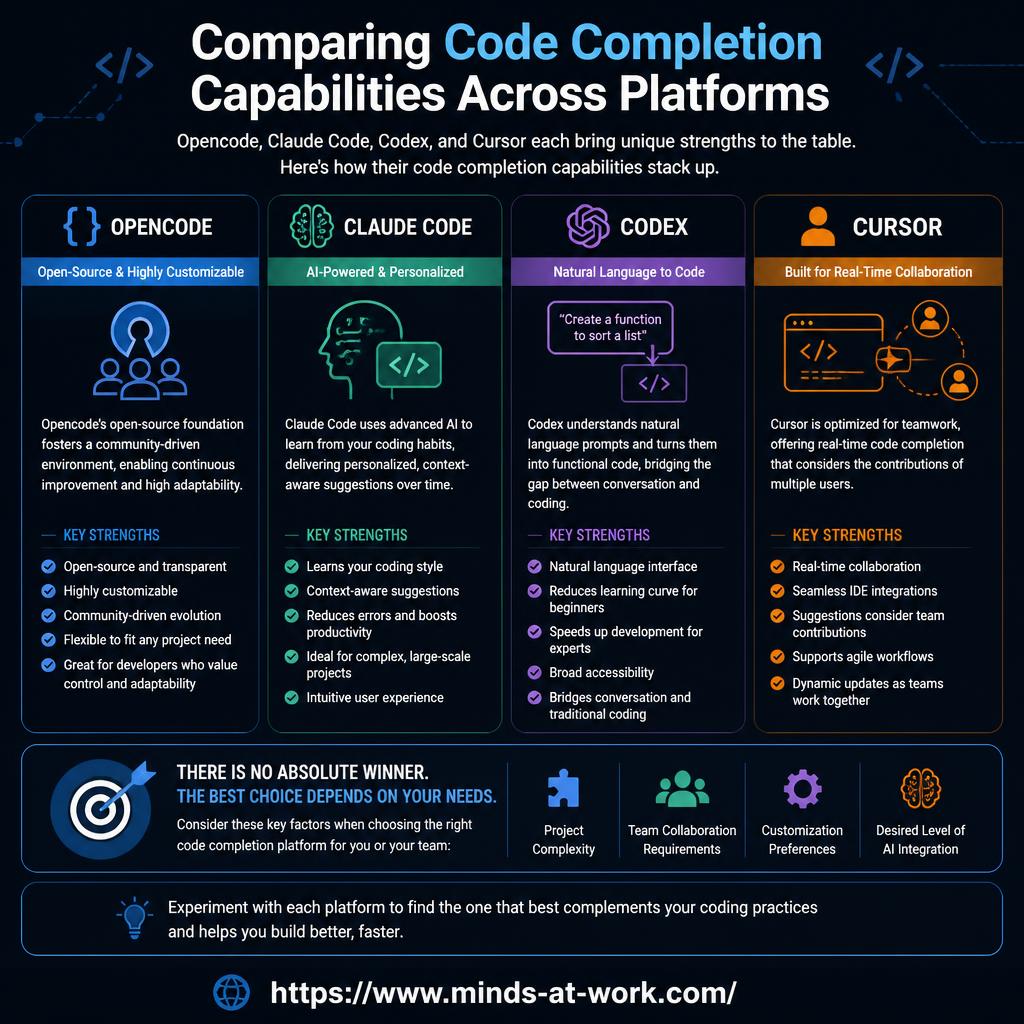
The short answer: In late 2026, AI code completion has split into four distinct modes: inline tab completion (ghost text as you type), chat edits (describe a change, review a diff), agentic multi-file edits (give an agent a task, it reads and writes across the repo), and autonomous background tasks (hand off a 10+ minute job to a cloud agent). Cursor owns the inline-tab mode with its purpose-built Cursor Tab model. Claude Code and Codex trade blows on agentic multi-file edits — Claude Code for terminal-first long-context work, Codex for cloud-backed long runs. Opencode is the model-agnostic terminal agent — its completion quality mirrors whichever model you point it at. The honest answer to “which tool has the best code completion?” is “it depends on which of the four modes you live in.” The rest of this piece scores each tool on each mode.
What are the four modes of code completion in 2026?
The old “autocomplete vs. chat” split is a 2023 framing. Late-2026 teams use at least four distinct completion modes, often in the same hour, and each tool in this series is strong on some and weak on others.
- Inline tab completion. Ghost text that appears as you type and that you accept with Tab. The classic Copilot UX, now extended beyond “next token” to “next edit” (Cursor Tab predicts where to jump next, not only what to type).
- Chat edits. You describe a change in prose; the tool returns a diff or a replacement block; you accept, reject, or iterate. Works inside an editor sidebar or a terminal pane.
- Agentic multi-file edits. You describe a task (“add rate limiting to all public endpoints”); the agent reads files, writes files, runs tests, and surfaces a reviewable PR-shaped change. This is where “agentic coding” earns its name.
- Autonomous background tasks. You hand off a long-running job (“port this service from Express to Fastify”) and the agent runs in a sandbox for 10+ minutes while you do other work. Codex’s cloud agent is the clearest instance in late 2026.
Every serious comparison of AI code completion should score each tool on all four. The rest of this piece does exactly that. For the companion piece on where completions sit inside the broader agent architecture, see The Role of Language Models in AI Coding Tools (Part 3).
How does inline tab completion compare across the four tools?
Cursor is the clear leader on inline tab completion in late 2026. The others are closing the gap, but Cursor shipped a purpose-built model for this mode and it shows.
- Cursor — Cursor Tab. Anysphere’s custom small model, trained specifically for in-editor tab completion. It predicts not just the next token but the next edit — including jumps to a different line, a different function, or a different file. The round-trip latency is tuned to feel instant. Documented at cursor.com/features.
- Claude Code — IDE plugin. The VS Code and JetBrains plugins ship inline suggestions, powered by Claude’s smaller model variants to keep latency reasonable. Quality is strong; the jump-prediction is not as sharp as Cursor’s.
- Codex — IDE extension + CLI. OpenAI’s IDE extension exposes GPT-family completions inline. Latency is competitive on the small-model variants; the agent mode is the real investment.
- Opencode — not applicable in the same shape. Opencode is a terminal-native agent, not an in-editor completion engine. Teams that want inline tab completion from Opencode’s model freedom typically pair Opencode (for agentic terminal work) with Cursor or a Copilot-style extension (for inline).
The practical implication: developers who spend most of their day inside an IDE and value tab-key velocity should default to Cursor. Developers who live in a terminal get less value from inline-tab mode no matter which tool they pick.
How does chat-style editing compare?
Chat edits are the mode where all four tools converge most closely. Any wrapper around a frontier model can do this well; the differences come from UX and context handling, not model capability.
- Cursor — Composer and inline chat. Composer gives a chat window that can span multiple files; inline chat lets you ⌘K a block and describe a change. Both share the editor’s project context.
- Claude Code — terminal chat with diffs. The terminal is the chat; every suggested change comes back as an explicit diff you accept, reject, or edit. The long-context strength of Claude is clearest here on larger files.
- Codex — CLI and IDE chat. The chat surface is split between the local CLI and the IDE extension; both show diffs for review.
- Opencode — terminal chat with diffs. Similar in shape to Claude Code’s terminal mode; the difference is you choose the model. The agent prints a diff; you accept or reject.
Honest assessment: for one-shot chat edits (“rewrite this function to be async,” “add a comment explaining this regex”), the four tools feel more similar than different. The quality gap you perceive is more often a model gap than a wrapper gap — see Part 3 on separating the two.
How does agentic multi-file editing compare?
This is where the comparison gets interesting. All four tools support agentic multi-file edits, but they handle planning, tool use, and review very differently.
- Claude Code — plan-first agent with explicit diffs. The agent typically plans the change, reads the files it needs, writes the edits, and surfaces diffs for review. Long-context reading means fewer “I lost track of your file” moments on bigger projects.
- Codex — tool-use agent with sandbox. Strong on tool use; the agent iterates on failing tests until they pass. The local CLI runs in your project; the cloud agent runs in a sandboxed environment.
- Opencode — pluggable agent. The agent loop is similar to Claude Code and Codex, but the model is whatever you configure. On the right model (Claude Sonnet, GPT-5, DeepSeek-V3-Coder), the agentic quality is competitive; on a weak local model, it degrades predictably.
- Cursor — Composer Agent. Agent mode inside Composer can read and write across the whole workspace; the UX stays inside the editor rather than a terminal. Strong fit for developers who already live in Cursor.
Which one actually wins depends on team shape. Terminal-centric teams split between Claude Code (if locked into Anthropic) and Opencode (if model-agnostic matters). IDE-centric teams default to Cursor. Teams that want hands-off background runs look at Codex, covered in the next section.
Which tool handles autonomous background tasks best?
Codex is the clear leader on autonomous background tasks in late 2026, because it is the only tool that shipped a managed cloud sandbox as a first-class product.
- Codex Cloud. OpenAI’s cloud agent runs long tasks (porting a service, writing migration scripts, bulk refactors) in an isolated sandbox for ten minutes or several hours. You hand off the task, close the window, come back to a PR-shaped result. Documented at openai.com/codex.
- Claude Code. No comparable managed cloud agent as of late 2026. Long tasks run locally in your terminal; you can leave the terminal, but the agent runs on your machine, not Anthropic’s.
- Opencode. No managed cloud by design — Opencode is a local agent. Teams that want background work on Opencode build it themselves (e.g., run Opencode inside a CI job or a self-hosted sandbox).
- Cursor. Background mode is adjacent but less emphasized than Composer and Agent inside the IDE. The strength is interactive, not fire-and-forget.
The practical consequence: teams whose workload includes “run this task for twenty minutes while I’m in a meeting” default to Codex. Teams that prefer to see every step live default to one of the other three. For a related frame on where autonomous runs fit in the agent stack, see Decision models in an agent stack.
When should each tool win on code completion?
Pick by the mode you spend most of your day in. The rest of the series applies the five-variable pick to the broader decision.
- Default to Cursor when you work inside VS Code, value tab-key velocity, and want the IDE to be the center of gravity. Inline tab completion is Cursor’s strongest card.
- Default to Claude Code when you work in a terminal, want Anthropic’s long-context reading, and need enterprise controls (SSO, audit, usage reporting). Chat edits and plan-first agentic edits are Claude Code’s strongest cards.
- Default to Codex when your workload includes handing off long tasks to a background agent, you already pay for OpenAI, and the cloud sandbox is the differentiator. Autonomous background tasks are Codex’s strongest card.
- Default to Opencode when model freedom is a hard requirement, when you want the agent inside your perimeter, or when your stack favors a model (DeepSeek-V3-Coder, Qwen Coder) that the vendor-locked tools do not expose. Chat edits and pluggable agentic edits are Opencode’s strongest cards.
For teams that split time across modes: many late-2026 teams pair Cursor (for inline tab inside the IDE) with Claude Code, Codex, or Opencode (for terminal-based long tasks). The combined bill is justified when the two tools own non-overlapping modes.
A clean, product-forward 'pick-by-mode' infographic on an off-white background. Four pill-shaped tiles arranged in two rows, each a soft shade: pale slate 'INLINE TAB IN AN IDE → Cursor', pale emerald 'TERMINAL + ENTERPRISE → Claude Code', pale blue 'LONG BACKGROUND TASKS → Codex', pale sand 'MODEL FREEDOM → Opencode'. A thin emerald rule connects them. Short tagline above: 'Pick by the mode you spend most of your day in'. Palette: off-white background, pale slate borders, pale emerald accent, pale blue accent, pale sand accent, navy ink. Linear or Stripe editorial feel. No AI robots.
- Aspect ratio: 16:9
- Source size: 1280 × 720 px (sharp on retina at 760 px display width)
- Format: PNG
- Target file size: under 500 KB
Save to /public/images/blog/<slug>/, then set
src and alt on this <MediaFigure /> to swap it in. Keep the ratio prop so the browser reserves the right space.
Frequently asked questions
Which AI coding tool has the best code completion in 2026?
There is no single best tool across every completion mode. Cursor leads on inline tab completion with its purpose-built Cursor Tab model that predicts jumps across lines and files. Codex leads on autonomous background tasks with its managed cloud sandbox. Claude Code leads on terminal-first agentic edits with explicit diffs and long-context reads. Opencode leads on model freedom — its completion quality mirrors whichever model you point it at. Pick by the mode you spend most of your day in.
What is the difference between inline tab completion and agentic editing?
Inline tab completion is ghost text that appears as you type and that you accept with Tab — the classic Copilot UX, now extended to multi-line and multi-file jumps by Cursor Tab. Agentic editing is when you describe a task in prose and the agent reads files, writes files, and runs tests across the repo, surfacing a PR-shaped change for review. The two modes serve different workflows; most late-2026 teams use both.
Does Opencode support inline tab completion?
Not natively in the same shape as Cursor or the Copilot-style IDE extensions. Opencode is a terminal-native agent — its surface is the TUI, not the editor sidebar. Teams that want inline tab completion from Opencode’s model freedom typically pair Opencode (for terminal-based agentic work) with a separate IDE extension (Cursor, Copilot, or similar) for in-editor completions.
Is Cursor only an inline-completion tool?
No. Cursor’s inline tab is its strongest card, but Composer handles chat edits across multiple files, Agent mode drives multi-file autonomous edits inside the editor, and the ⌘K inline chat lets you select a block and describe a change. The IDE itself is the AI surface, and all four modes are first-class — Cursor just started from inline tab and extended outward.
What makes Codex strong at autonomous background tasks?
Codex Cloud is a managed sandbox: you hand off a task, close the window, and come back to a PR-shaped result. OpenAI runs the sandbox, isolates the agent from your other work, and reports back when done. Claude Code and Opencode run agents locally; Cursor’s background modes are less emphasized. If your workload includes “work on this for twenty minutes while I’m in a meeting,” Codex is the natural default.
Can I use more than one AI coding tool at once?
Yes, and many late-2026 teams do. The common pairings are Cursor + Claude Code (inline IDE completion plus terminal agent), Cursor + Codex (inline IDE completion plus cloud background runs), and Cursor + Opencode (inline IDE completion plus model-agnostic terminal agent). The combined bill is justified when the two tools own non-overlapping modes and the workflow actually spans both.
How much do code completion quality differences matter in practice?
Less than vendor marketing suggests on simple one-shot completions and more than most teams realize on sustained agentic work. For “write this function” prompts, all four tools now feel similar — the quality gap is dominated by the underlying model, as covered in Part 3. For “run this ten-step refactor across forty files” tasks, the agent loop and the context management of the wrapper decide most of the quality — a terrain where Claude Code, Codex, and Opencode’s wrappers each have distinct strengths worth testing on your own code.
If you are picking an AI coding tool for a team and the “which completion mode” question is genuinely load-bearing — because the team spends its days in different modes, or because a wrong default will cost months of friction — that is the kind of nuance a one-hour Fractional CTO call is for. For more pieces in this series as it publishes, follow the AI Strategy archive; the broader frame on where AI fits in a small or mid-market software business sits in AI strategy for SMB owners.