Meta Muse Review: What It Does and What It Costs (Part 2 of 18)
A plain-English look at Meta's Muse agent: how it works, what it costs, what reviewers found, and the privacy trade-offs.
By Dr. Sanju Abraham, Fractional CTO, investor, multiple exits. Published November 7, 2026.
This is Part 2 of 18 in the Personal AI Agents series. If you missed the setup, start with Part 1, the introduction.
The short answer: Meta Muse is an easy-to-start, capable personal AI agent with a generous free tier and a carefully designed approvals system. Reviewers across outlets agreed it works on routine tasks. They also agreed that the amount of personal context it gathers is the real cost. If you try it, start small and keep approvals on.
Meta’s Muse is the personal AI agent most people have heard of. Meta advertises it where people already spend their time. Vox’s Adam Clark Estes called it the market leader. He cited one estimate of more than 8 million downloads in its first month.
TIME, in an October analysis, put its user count at 4 million. The two numbers measure different things, and neither is official. Both say that a lot of people tried it quickly.
Muse is also the agent that has drawn the loudest privacy debate. That makes it a useful first case study. It shows what a polished consumer agent can do, and what it asks in return. As of the coverage cited here, which runs from September to November 2026, this is the picture.
Meta Muse at a glance
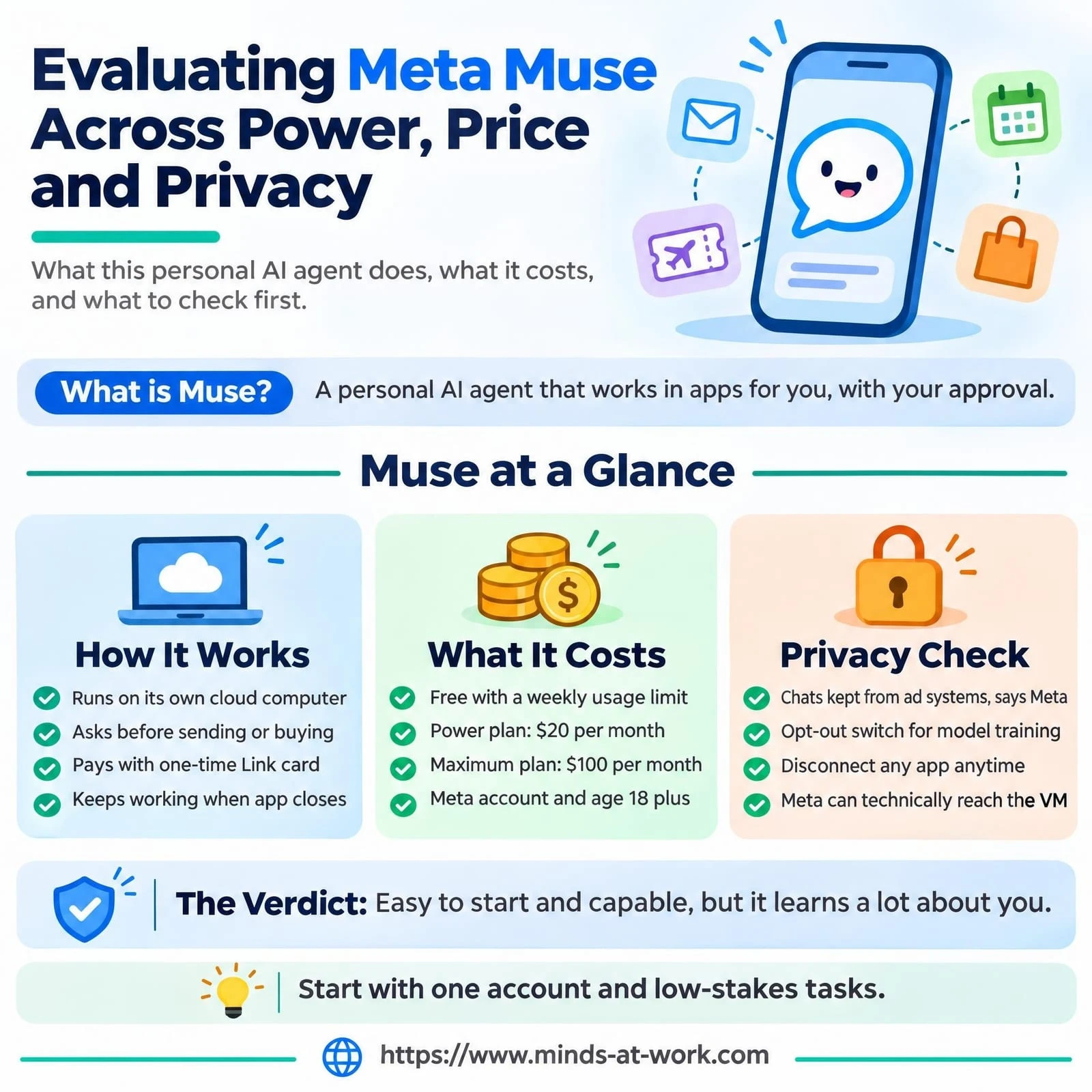
These are the facts most readers look for first, as of the September to November 2026 coverage cited in this article. Meta Muse is a personal AI agent that takes actions for you and asks your approval first. The list covers the maker, the price, where it runs, the reviewer verdict and the privacy catch. The sections below give the sources and the caveats.
- Maker: Meta; launched in the US in early September on iOS, Android, the web and WhatsApp, according to TechRepublic
- What it does: Sends email, fills forms and buys things, and asks your approval first
- Where it runs: On its own cloud computer, which Meta calls Muse Secure VM
- Price: Free with a weekly usage limit; the Power plan costs $20 a month and the Maximum plan $100 a month, according to Meta’s help center
- Reviewer verdict: Strong on well-defined tasks, weaker when a service such as Amazon blocks it
- Main risk: The amount of personal context it gathers; Meta acknowledges the Muse Secure VM is not technically inaccessible to the company
- Availability: The US first; the UK from November 24, per the BBC
- My starting advice: The one-account start: free tier, one connected account, public web tasks, approvals on
What is Meta Muse?
Meta Muse is a personal AI agent from Meta, built to take actions for you rather than just chat. According to TechRepublic, it launched in the US in early September on iOS, Android, the web and WhatsApp, with support for Meta’s AI glasses planned. It runs on Muse Spark, Meta’s latest AI model.
Meta’s help center describes it as a personal AI agent that takes actions and helps get things done with your direction. It can also be connected with other apps and services.
If you have used a chatbot, the difference is simple. A chatbot tells you how to reschedule the dentist. Muse is meant to open your calendar, find a gap and propose the change, then wait for your approval. For the wider picture of how agents differ from chatbots, see Part 1 of this series.
How does Meta Muse work?
Muse works through three design choices: its own cloud computer, a plan-and-check-back loop, and a separate system that watches what it sends out. The first two shape what Muse can do. The third shapes what it is allowed to send. The sections below take them in that order, starting with where Muse runs.
Where does Muse run, and how does it plan?
Muse runs on a dedicated cloud virtual machine, which Meta calls Muse Secure VM. That is a computer that lives in a data center rather than on your phone. Per TechRepublic, it has access to a browser, a file system and a terminal. That lets it navigate websites, fill out forms and build small tools for a task. You don’t need to keep your phone awake for it to keep working.
Muse also plans and checks back. Meta says Muse can break a large goal into steps and monitor progress. It returns when something changes or it needs your approval.
What watches what Muse sends out?
Meta’s Sentinel layer is a separate system that controls what Muse can send to the internet and to connected services. When an action needs approval, the request appears in Muse’s own interface. Muse does not have to interpret a chatty “sure, go ahead.” That keeps approval outside the agent’s own judgment. TechRadar’s reviewer noted that Muse’s email connector also filters out one-time tokens, password-reset links and login links.
You can customize Muse by naming it, choosing an avatar and adjusting how proactive it should be. It also has an Ideas tab filled with small tasks it could do. Vox suggested the tab helps new users get past the blank-page problem. Many people don’t know what to ask for.
What can Meta Muse actually do?
Muse can send emails, book travel, fill out forms, lower bills and make purchases. According to TechRepublic’s launch coverage, it can also create documents, PDFs, web pages and interactive “Artifacts” such as spending trackers or study guides. Meta’s subscription page lists phone calls as part of the paid plans’ allowances, so Muse can place calls as well.
For shopping, Muse uses Link by Stripe. Link creates a one-time-use card, so your actual payment details aren’t exposed to the website. TechRepublic reported that Meta says Muse is the first AI agent covered by Link’s purchase protections.
What did reviewers actually see?
What reviewers actually saw is more mixed than the feature list:
| Outlet | What happened | Verdict |
|---|---|---|
| The Verge | Asked to sort a Gmail inbox, Muse deleted thousands of promotional emails. On Amazon it noticed other items in the cart, asked whether to remove them, and bought only the workout tops. Google sign-in was glitchy on mobile and only worked on a laptop. | A pleasant surprise, with rough edges |
| TechRadar | Muse found an unopened power-company email, offered to reply, and produced a draft for approval within a minute. | Incredibly useful, yet handing over a digital life felt deeply uncomfortable |
| The BBC (UK launch, November 24) | Muse found train tickets but couldn’t book them through the cheaper app the reviewer used, and said to book manually. It also reported that Amazon has blocked Muse from its marketplace, citing data security concerns, and that the agent didn’t seem to know and spent an hour saying it was still waiting for a page to load. | Helpful but awkward |
What pattern do the reviews show?
The pattern is a familiar one for agents in general. Muse is strong on well-defined tasks inside services that cooperate, and weaker when a service blocks or limits it. If you build or buy agents for a business, the same pattern shapes how you should scope them. That is the kind of call a Fractional CTO helps teams make.
How much does Meta Muse cost?
Muse is free with a usage limit, and the paid plans raise a weekly allowance. According to Meta’s help center, the Power plan costs $20 per month and the Maximum plan costs $100 per month. The table shows what each tier includes.
| Plan | Price | Weekly allowance | Phone calls |
|---|---|---|---|
| Free | $0 | Usage-limited; refreshes weekly | Not listed |
| Power | $20 per month | 500M Muse tokens | 10 per day |
| Maximum | $100 per month | 3B Muse tokens | 20 per day |
Prices and limits are as of the September to November 2026 coverage cited in this article. Meta says they are in limited testing, so confirm them in Meta’s help center before you pay.
What is a token, and who can sign up?
A token is a small chunk of text the AI processes. Think of the allowance as a data plan. A typical user may never hit the free limit. TechRepublic said Meta expects most people to stay on the free tier.
Eligibility has a few requirements. You must be 18 or the age of majority where you live. You must be in a country where Muse is offered, and you must log in with a Meta account. Meta says subscriptions are in limited testing and aren’t available everywhere. Muse launched in the US first and, per the BBC, reached the UK on November 24.
Is Meta Muse safe and private?
Muse has drawn the loudest privacy debate of any consumer agent so far. It helps to separate what Meta says from what reporters found. The sections below list Meta’s claims first. Then they set those claims against the reporting from WIRED, TechRadar, The Verge, TIME and the BBC, so you can see where the two sides agree.
What does Meta say about Muse’s privacy?
Meta says Muse conversations and virtual machine data are not shared with its advertising systems. Credentials are kept in secure storage and kept away from the agent. You choose which services Muse can reach, you can disconnect them, and you can tell Muse to forget specific information.
Sensitive actions such as purchases and sending email can require explicit approval. The BBC reviewer found the permission requests constant by default, with settings to loosen them.
How do Meta’s claims compare with what reporters found?
The Muse privacy ledger is my shorthand for setting each Meta claim beside what reporters found:
| Meta’s claim or design | What reporters found |
|---|---|
| Muse data is not shared with advertising systems | TechRadar: browsing done on your behalf can still influence ads indirectly, because websites may treat Muse’s visits as yours |
| Credentials are kept away from the agent | TechRadar: the email connector also filters out one-time tokens, password-reset links and login links |
| You can tell Muse to forget information | TIME: asking Muse to forget doesn’t necessarily erase the original message |
| Company policy bars access to Muse data | WIRED via TechRepublic: the Muse Secure VM is not technically inaccessible to Meta |
| You choose what Muse can reach | The Verge: Instagram-linked interests were inferred from API data; you can disconnect Instagram in Accounts Center |
What did WIRED report about Meta’s access?
WIRED, as relayed by TechRepublic, reported that Meta acknowledges the Muse Secure VM is not technically inaccessible to Meta. Company policy bars access to users’ Muse data, but the machine itself is not locked against the company. In its launch announcement, Meta said it will introduce a Muse Confidential VM later this year. The whole VM, including your data and conversations, would be encrypted under a key only you hold.
TestingCatalog reported on October 20 that it was only partially implemented on the web and that the release date was unclear. I found no report that it has shipped, so treat the stronger guarantee as not yet available.
What did TechRadar and The Verge find?
TechRadar noted that Muse data isn’t shared with ad systems. Even so, browsing done on your behalf can still influence advertising indirectly. Websites may treat Muse’s visits as yours. TechRadar also reported that Meta says sanitized agent interactions and tool activity can be used to train future models. You can opt out with a switch in settings.
The Verge linked Muse to Instagram and Facebook. Muse then described specific interests that weren’t visible in the reporter’s Instagram settings. It said it read them “through the account’s API data.” A Meta spokesperson told The Verge that Muse can pull and infer interests from Instagram activity. Users can disconnect Instagram from Muse in Accounts Center.
What did TIME and the UK regulator say, and what does it add up to?
TIME analyzed Muse’s internal instructions and reported that it updates dossiers on users and on people they mention, including people who don’t use Muse. A Meta spokesperson did not dispute the findings. The spokesperson said Muse remembers what matters most to you, including information about others that you choose to share.
TIME also reported that asking Muse to forget something doesn’t necessarily erase the original message. The instructions tell the agent not to point that out.
The UK’s Information Commissioner’s Office, according to the BBC, urged consumers to weigh the pros and cons of AI agents. It noted that agents can make mistakes, and that mistakes can be magnified when the agent acts autonomously.
None of this proves misuse. Meta says Muse is designed for user control, and some of the transparency is real. Meta’s David Singleton wrote on X that users can see the markdown files Muse writes about how to serve them better. Still, if you are considering Muse, the practical takeaway is to treat it as something that learns a lot about you.
Who should use Meta Muse, and who should skip it?
Muse fits people who want a friendly agent inside apps they already use. They also need to accept Meta as the custodian of what it learns. It is a weaker fit if you handle confidential work or rely on a marketplace that blocks agents. Business owners weighing agents against a wider plan can read an AI strategy for SMB owners for the questions to settle before any tool choice. For builders, where decision models fit in an agent stack covers the engineering side.
Who is Meta Muse a good fit for?
Muse fits you if:
- You want a consumer-friendly agent that works inside apps you already use, including WhatsApp.
- You are comfortable with Meta as the custodian of what it learns, or you will limit it to low-stakes tasks.
- You like having an agent suggest things, and you are happy to tune how proactive it is.
Who should skip Meta Muse?
It is a weaker fit if:
- You handle confidential client information, since Meta says the VM isn’t technically inaccessible to the company.
- You dislike unprompted notifications. Vox’s reviewer found Muse sent suggestions about things he never asked for, including an apple-picking report based on a calendar invite.
- You rely on a marketplace that blocks agents, such as Amazon, per the BBC.
What is my verdict on Meta Muse?
Muse is a capable, easy-to-start agent with a generous free tier and a thoughtfully designed approvals system. Reviewers across outlets agreed that it works on routine tasks. They also agreed that the amount of personal context it gathers is the real cost.
The one-account start is a MAW framing for adopting any personal AI agent with limited risk. Give the agent one account and one kind of task. Then widen access only after you have seen what it learned. For Muse, the steps are:
- Start on the free tier.
- Connect one account.
- Run public web tasks first, as TechRadar advised.
- Keep approvals on for anything consequential.
- Look at what Muse has written about you in its file browser before you connect more.
The same checklist is a sensible starting point for any agent you try. More about the team behind it is on the About page.
Up next
In Part 3, I look at OpenAI’s dots, which takes a different route. Its always-on agents live inside ChatGPT, Slack and Teams rather than in a standalone app. To compare it with Muse side by side, keep the pricing and privacy sections of this article handy. You can also browse every installment in the Personal AI Agents category.
Frequently asked questions
These are the questions readers ask most often about Meta Muse. The answers cover what it is and whether it is free. They also cover whether it is safe to connect, whether it can buy things, how model training works and where you can use it. Each answer is a short version of the section above.
What is Meta Muse?
Meta Muse is a personal AI agent from Meta that takes actions for you instead of only answering questions. It can send emails, fill out forms, book travel and make purchases, and it asks for your approval on sensitive steps. It launched in the US in early September on iOS, Android, the web and WhatsApp. It runs on Meta’s Muse Spark model.
Is Meta Muse free?
Yes, with limits. Muse is free with a usage limit that refreshes weekly. According to Meta’s help center, the paid Power plan costs $20 per month for 500M Muse tokens a week and 10 phone calls a day. The same help center page lists the Maximum plan at $100 per month for 3B tokens and 20 calls a day. Meta says subscriptions are in limited testing and not available everywhere.
Is Meta Muse safe to connect to my email and accounts?
It depends on the stakes. Meta says Muse data is not shared with its advertising systems and that credentials are kept away from the agent. Meta also acknowledges its Muse Secure VM is not technically inaccessible to the company. Start with one account and low-stakes tasks, keep approvals on, and review what Muse has written about you.
Can Meta Muse buy things for me?
Yes. Muse can make purchases, and it uses Link by Stripe to create a one-time-use card so your real payment details aren’t exposed to the website. Sensitive actions such as purchases can require your explicit approval. Per the BBC, Amazon has blocked Muse from its marketplace, so shopping there may fail even when the agent tries.
Can I stop Meta Muse from using my chats to train models?
Partly. TechRadar reported that Meta says sanitized agent interactions and tool activity can be used to train future models, and that you can opt out with a switch in settings. Meta also says conversations and virtual machine data are not shared with its advertising systems. You can disconnect services, such as Instagram, from Muse.
Where can I use Meta Muse?
Muse launched in the US in early September on iOS, Android, the web and WhatsApp, with support for Meta’s AI glasses planned. Per the BBC, it reached the UK on November 24. You must be 18 or the age of majority where you live. You must also be in a supported country and log in with a Meta account.