Fred by Fireflies Review: A Notetaker Turned Work Agent (Bonus)
A plain-English look at Fred, the AI teammate from Fireflies: what it does across meetings, email and Slack, how seats and AI credits add up, and what to check before you connect it.
By Dr. Sanju Abraham, Fractional CTO, investor, multiple exits. Published November 28, 2026.
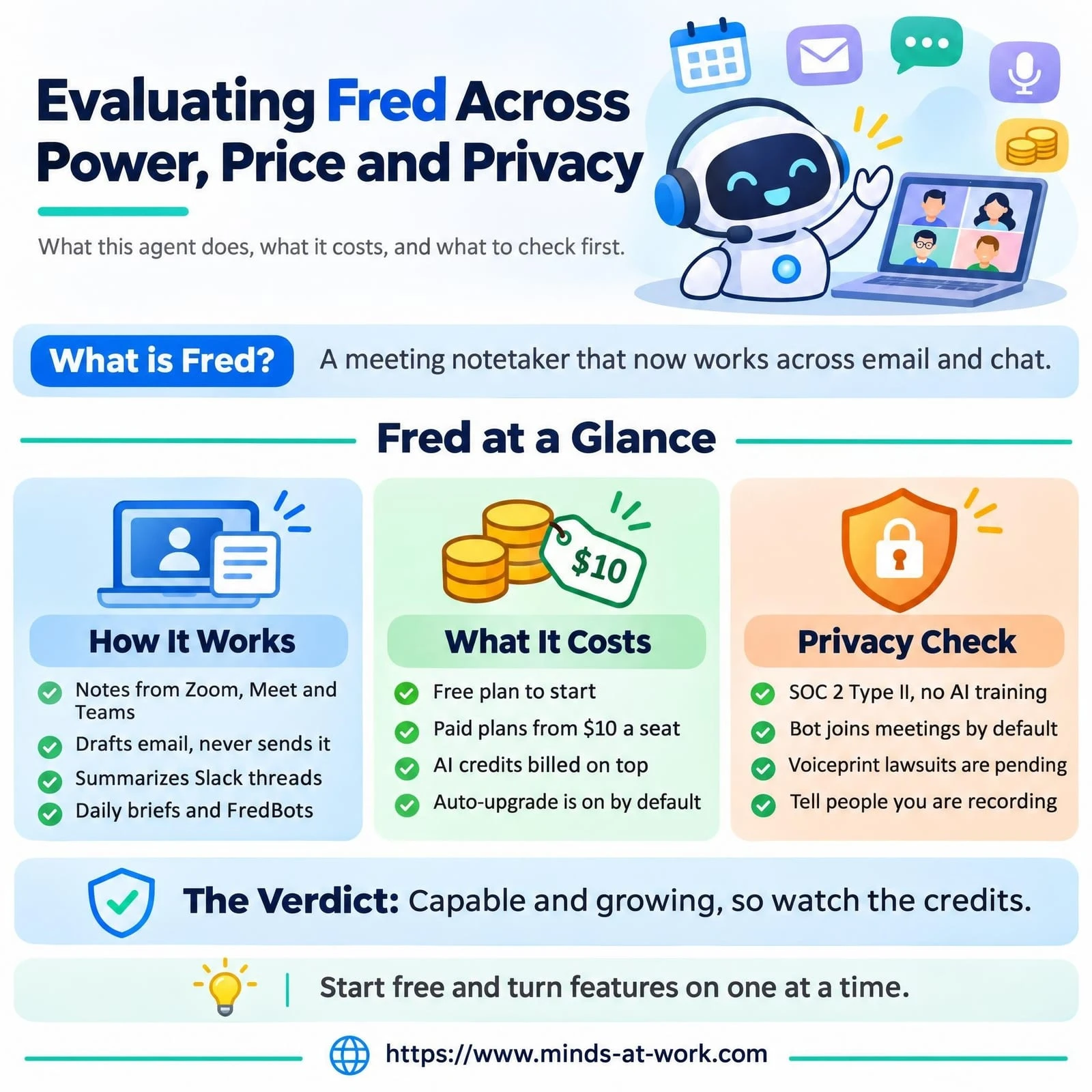
The short answer: Fred is a capable meeting tool that is growing into an agent. It follows clear rules about sending email, and it lists many security credentials. But as of November 28, 2026, it has a two-part bill that is hard to predict. It also has a bot that joins meetings by default and privacy lawsuits that no court has ruled on. So start on the free plan, turn off credit auto-upgrade and let Fred earn each new permission.
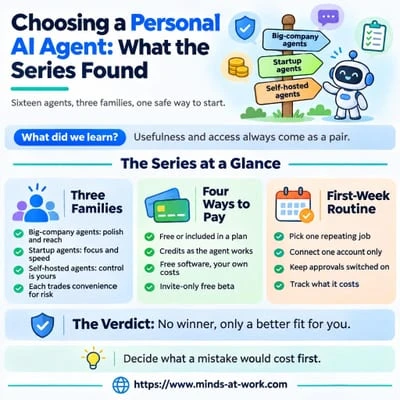
This is a bonus article in the Personal AI Agents series, added after the conclusion in Part 18. New to the series? Start with Part 1.
Fireflies launched the new Fred on November 11, 2026, while this series was still being published. So it gets a bonus article instead of a place in the numbered run. Fred fits that slot because it began as something most office workers have already met: the notetaker that shows up in a video call. Now the company wants it to sort your email, watch Slack, brief you each morning and take on recurring jobs. This article covers what Fred does today, what it costs and what to check before you hand it your calendar and your inbox.
Fred by Fireflies at a glance
These are the facts most readers look for first, as of November 28, 2026. Fred is the AI assistant inside the Fireflies meeting notetaker, and it now handles email and Slack as well. The list covers the maker, the price, the email rule, the meeting default and the open legal issue. The sections below give the sources and the caveats.
- Maker: Fireflies.ai Corp., San Francisco
- New Fred launched: November 11, 2026
- Free plan: Yes, with meeting notes and core features
- Paid plans: $10 to $39 per seat per month, according to VoxTested
- Second meter: AI credits, with auto-upgrade packs on by default
- Email: Drafts only; Fred never sends for you
- Meetings: Zoom, Google Meet and Microsoft Teams; joins all meetings by default
- Open legal issue: Voiceprint class actions, no ruling yet
- Tested by me: No
What is Fred by Fireflies?
Fred is the AI assistant inside Fireflies, a meeting notetaker made by Fireflies.ai Corp. of San Francisco. It started as a bot that takes notes in video calls. Since the November 2026 launch, it also sorts email, summarizes Slack threads, writes a daily brief and runs recurring jobs. It is mainly a work tool rather than a personal errand-runner.
Who is behind Fred?
Fireflies.ai Corp. is a venture-backed company with about 140 employees. According to the launch press release, Khosla Ventures and Canaan Partners back it. The company says in the same release that more than 20 million people in 1 million organizations use it, including teams at 75 percent of the Fortune 500. Those are the company’s own figures.
The release also says use of Fred for work beyond meeting notes grew 140 percent in six months. It adds that Fred completed nearly 100 million tasks in that time.
Where does the name Fred come from?
The name has a good story behind it. In a 2025 Business Insider report, CTO Sam Udotong said that in 2017 he and CEO Krish Ramineni took notes by hand in more than 100 meetings. Customers believed an AI bot called Fred was doing it. By late 2018 the real software had taken over. The company’s announcement post says Fred has now “got a promotion,” from AI notetaker to AI teammate.
How is Fred different from the other agents in this series?
Fred is closer to Viktor in Part 11 and Lindy in Part 9 than to a personal errand-runner. I include it because many people meet their first AI agent through a meeting bot. This one now reaches well past meetings.
How does Fred work?
You sign in with Google or Outlook and connect your calendar, and Fred starts from your meetings. From there you can connect more. Fireflies says Fred links to more than 240 apps, up from 100, including more than 100 connectors that use MCP. MCP is a common standard for plugging an AI assistant into other software.
What does Fred do in meetings, email and Slack?
Here is what the launch release and Fireflies’ help pages describe for everyday work:
- Meeting notes. Fred takes notes on Zoom, Google Meet and Microsoft Teams, either with a visible bot or, through the desktop app, without one. Live Assist answers questions and coaches you during the call.
- Daily brief and meeting prep. A morning summary comes from your calendar, past meetings, email and messages. A prep note before calls recalls earlier discussions and open action items.
- Email Assistant. Connect Gmail or Outlook, and Fred sorts new mail with labels, drafts replies and prepares follow-ups when a thread goes quiet.
- Slack Assistant. Tag Fred in a long thread to get a summary, or ask it to research something. You choose which channels it can work in, according to its Slack page.
What are AskFred, FredBots and Voice Agents?
These three features go beyond the basics, and the second and third were still rolling out at launch:
- AskFred. A search-and-chat box over your meetings, email, Slack and connected apps, with links back to the source. It also runs 200-plus ready-made skills, such as a sales scorecard or a board recap.
- FredBots. Recurring jobs that run on a schedule and keep context between runs. The FredBots page gives examples like “Every hour, check my calendar, email and meetings, and tell me what needs me.”
- Voice Agents. Fred takes calls for you, such as candidate screenings, early sales calls and user interviews, and sends summaries and scorecards. Fireflies said in September that this had already run more than 40,000 conversations.
There are also three free extras. Talk is voice typing in any app. Scheduler gives you booking links. Clips is a screen recorder that turns a recording into step-by-step instructions. A small phone-mounted recorder called Fly is planned for early next year.
What can Fred do well?
The most useful pieces are the plain ones. Fred already sat in your meetings, so its email drafts can include what you promised to send. That is a real advantage over an inbox tool that has never heard the call. Fireflies’ keynote recap puts it the same way: because Fred was in the meeting, the follow-up already includes what you promised to send.
What does independent testing show so far?
I did not run Fred myself, and the new features are only weeks old, so hands-on testing by others is thin. The Artificially Nerdy news write-up mostly summarizes the launch. It advises trying the free tools first and checking credit costs before you cancel any paid app. The most detailed independent review of the notetaker itself comes from HappyScribe, which sells a competing transcription service, so read it with that in mind. The reviewer found the bot sometimes stayed on a call after they left. Their new account also already listed meetings from a former employer that other people had recorded.
How much does Fred cost?
Fireflies charges per seat, and every admin or member you add counts as one. The press release says paid plans start at $10 per user per month billed annually. The free plan covers meeting notes and core features, including scheduling, voice typing and screen recording. Fireflies’ own pricing page does not show dollar amounts in the text I could read. So the plan figures below come from third-party trackers that read it on November 25 to 27, 2026, including VoxTested.
What does each plan cost?
| Plan | Billed annually (per seat, per month) | Billed monthly | One-time AI credits |
|---|---|---|---|
| Free | $0 | $0 | 20 |
| Pro | $10 | $18 | 20 |
| Business | $19 | $29 | 30 |
| Enterprise | $39 (annual only) | Not offered | 50 |
Pro adds the Email Assistant, AI Skills, Voice Agents and all integrations. Business adds unlimited storage, team analytics and longer recordings. Enterprise adds single sign-on, audit logs, custom retention and private storage. All the prices above are from VoxTested.
How do AI credits work?
I call this the two-meter bill, a MAW framing: a per-seat price on one meter and shared AI credits on the other. Fireflies’ credits guide says standard transcription and note-taking do not use credits. Advanced features do: AskFred on live calls, the Personal Assistant bundle, and email drafts and follow-ups. The charge is set by the task.
The plan credits in the table are a one-time pool shared by the whole team. When a paid plan’s pool runs out, Fireflies’ credits guide says it automatically subscribes you to a $5-a-month pack of 50 credits. If that runs out too, it moves you up a tier. The same guide lists packs up to $600 a month for 10,000 credits. You can turn auto-upgrade off in Settings, then Billing. The guide also says Daily Digest and Meeting Prep are on by default and use credits. So they can drain the pool without you asking for anything.
Why is the real monthly cost hard to predict?
I did not find a per-task price list in the pages I read. That makes the real monthly cost of heavy email and Slack use hard to predict. FredBots and Scheduler were still rolling out as of the launch, with waitlists, and the release says Fly should arrive early next year. So check what your account has before you plan around a feature.
What should I know about Fred’s privacy and security?
Fireflies publishes a long list of security credentials. They are worth knowing, but several other details matter more than the badges. This section covers the credentials first. Then it covers the points I would check before connecting Fred to real work, using Fireflies’ own pages and third-party reports, which I name each time.
What security credentials does Fireflies list?
Fireflies lists SOC 2 Type II, ISO 42001 and GDPR on its security page and home page. SOC 2 Type II is an independent audit of a company’s security controls. ISO/IEC 42001 is a standard for managing AI responsibly. The company also lists HIPAA support for Enterprise customers who use private storage and sign a business associate agreement.
It says it does not use your meetings to train AI models and that its AI vendors are barred from doing so. Administrators control access and retention, and Enterprise customers can keep supported data in their own cloud storage.
What should I check about email, joining and recording?
- Email stays in your hands. The Email Assistant guide says it never sends email for you. Drafts land in your inbox for review, and it only processes mail that arrives after you connect it. There is one small mismatch. The same guide says it cannot edit or delete your existing emails, but a Fireflies office-hours recap says its rules can move, label or trash messages. Test the rules on a spare account before you trust them.
- The bot joins a lot by default. Fireflies’ help guide, as quoted by Reline, a competing notetaker, says Fireflies is set to join all meetings by default once you connect a calendar. Fireflies’ terms, as read by Anarlog, put the job of getting every participant’s consent on the account holder.
- Calls and recordings. Voice Agents handle calls for you. Fireflies itself tells Fly users to make sure everyone knows when they are being recorded and to follow local rules.
What do the voiceprint lawsuits claim?
A voiceprint is a digital model of how a person’s voice sounds. The Illinois Biometric Information Privacy Act lists voiceprints among biometric identifiers. Proposed class actions under that law claim the notetaker captured voiceprints of meeting participants without consent. On the CourtListener docket I could read, Fireflies’ motion to dismiss was fully briefed on August 26, 2026, with no ruling. Scribbl’s tracker reported the same on October 19.
These are allegations, and Fireflies denies them. Scribbl, which competes with Fireflies, quotes its trust center as saying it does not create, store or process voiceprints. It also quotes its privacy policy as saying service providers may extract voice data in some cases.
How does Fred compare with the agents so far?
Fred sits between the work agents and the personal ones in this series. These four comparisons show where, and each one points back to the full review.
- Against Viktor (Part 11): Viktor lives in Slack or Teams and is built around a team’s shared context. Fred starts from meetings and adds email and Slack on top, so it knows what was said in a call.
- Against Lindy (Part 9): both bill in credits. Fred charges a seat price plus credits on top, so you track two meters.
- Against Microsoft Autopilot (Part 7): Autopilot is in preview for companies that already pay for Microsoft’s Copilot. Fred works with Gmail or Outlook, Zoom, Meet or Teams, and anyone can sign up for the free plan today.
- Against Perplexity Computer and Spiritt (Parts 13 and 12): those build documents, tools and apps on a cloud computer. Fred’s strength is context from your conversations, with computer use arriving through FredBots.
What should I do before I start?
None of these steps is hard, and each one limits a risk covered above: the credit meter, the default recording and the email rules. Do them in this order, and add one new feature at a time.
- Begin with the free plan and the free tools, and turn on one feature at a time.
- Turn auto-upgrade off in Billing, and switch off Daily Digest and Meeting Prep until you want them.
- Change the calendar setting so Fred joins only the meetings you pick, and tell people when it is recording.
- Connect email last, and try the rules on a spare inbox first.
- Keep Fred out of any Slack channel with private or regulated material.
If you are weighing a tool like this for a business, the same discipline applies to any pilot. My AI strategy guide for SMB owners covers how to scope an experiment. A Fractional CTO can help you decide who should run it and with what data.
Who is Fred for?
Fred suits some readers well and others poorly. The two lists below show which group you are likely in, based on how you work and how much cost and consent risk you can accept.
Fred fits you if:
- You spend your day in calls and want notes, follow-ups and a morning brief from one tool.
- You use Gmail or Outlook with Slack and want an assistant that has heard your meetings.
- You are comfortable watching a credit meter.
It’s a weaker fit if:
- You need a fixed monthly cost.
- You meet often with people who have not agreed to be recorded, or you work in a regulated field without the Enterprise setup.
- You want a personal errand-runner rather than a work tool.
What do critics say about Fred?
The case against Fred is mostly about cost, consent and thin testing. The HappyScribe reviewer found the bot sometimes stayed on a call after they left. Proposed class actions allege voiceprint collection without consent, which Fireflies denies. The credit meter makes the monthly cost hard to predict. And most reports on the new features are weeks old and come from Fireflies or its competitors. On the other hand, Fireflies says Fred never sends email on your behalf, lists SOC 2 Type II and says it does not train AI models on your meetings. Both views can be true at once.
What is the verdict?
Fred is a capable meeting tool that is growing into an agent. It follows clear rules about sending email and lists many security credentials. But it also has a two-part bill that is hard to predict, a bot that joins meetings by default and pending lawsuits that no court has ruled on. If you try it, start free, keep the credit and consent settings tight, and let it earn each new permission.
Why isn’t Fred in the Part 18 comparison table?
I left Part 18’s comparison table alone, since its 16 rows cover personal agents and Fred is a work agent. If I added it, Fred would sit beside Viktor and Lindy. It would be a fit for people who live in meetings and want one tool across them, their email and their team chat.
Frequently asked questions
These are the questions readers ask most often about Fred by Fireflies. The answers cover what it is, what it costs, whether it sends email for you, whether it joins every meeting and whether it counts as a personal AI agent. Each one uses the same sources as the sections above, so the figures and caveats match.
What is Fred by Fireflies?
Fred is the AI assistant inside Fireflies, a meeting notetaker made by Fireflies.ai Corp. After its November 11, 2026 launch it also sorts Gmail or Outlook email, summarizes Slack threads, writes a daily brief and runs recurring FredBots jobs. It is mainly a work tool rather than a personal errand-runner, so it fits people who spend their days in calls.
How much does Fred cost?
Fireflies has a free plan. Paid plans start at $10 per seat per month billed annually and rise to $19 for Business and $39 for Enterprise, according to third-party trackers. On top of that, advanced features such as email drafts spend AI credits. When a paid plan’s credits run out, Fireflies’ credits guide says it automatically buys a $5 pack unless you turn auto-upgrade off.
Does Fred send emails for me?
No. Fireflies’ Email Assistant guide says Fred never sends email on your behalf. It sorts new mail with labels, drafts replies and prepares follow-ups, and the drafts wait in your inbox for review. It only processes mail that arrives after you connect it. Test any rules on a spare inbox first, because a separate recap says rules can move, label or trash messages.
Does Fred join every meeting?
By default, yes. Fireflies’ help guide, as quoted by a competitor, says it is set to join all meetings once you connect a calendar. You can change that setting so it joins only meetings you pick. Fireflies’ terms put the job of getting every participant’s consent on the account holder, so tell people when Fred is recording.
Is Fred a personal AI agent like the others in this series?
Not quite. Fred is mainly a work agent, closer to Viktor and Lindy than to a personal errand-runner. It starts from your meetings and adds email, Slack and scheduled jobs on top. I include it as a bonus because many people meet their first AI agent through a meeting bot, and Fred now reaches well past meetings.