NanoClaw Review: One Container for Every Agent (Part 16 of 18)
A plain-English look at NanoClaw: why it runs each agent session in its own container, how to set it up, and the limits its own security page admits.
By Dr. Sanju Abraham, Fractional CTO, investor, multiple exits. Published November 21, 2026.
The short answer: NanoClaw is a free, self-hosted assistant that gives every agent session its own Docker container. A tricked agent therefore reaches only what you handed it. It suits people who are comfortable installing Docker and asking a coding agent to change the code. Its own security page admits that a manipulated agent can still use everything you granted it, so treat the containers as one layer of defense, not all of it.
This is Part 16 of 18 in the Personal AI Agents series. Missed the last one? Read Part 15, on Hermes Agent.
NanoClaw exists because its creator liked what OpenClaw could do but did not trust himself to understand it well enough to give it access to his life. His answer was to build something much smaller and to put every agent in its own sealed box. It is the most security-minded of the self-hosted agents in this series. It is also honest about where that protection stops.
NanoClaw at a glance
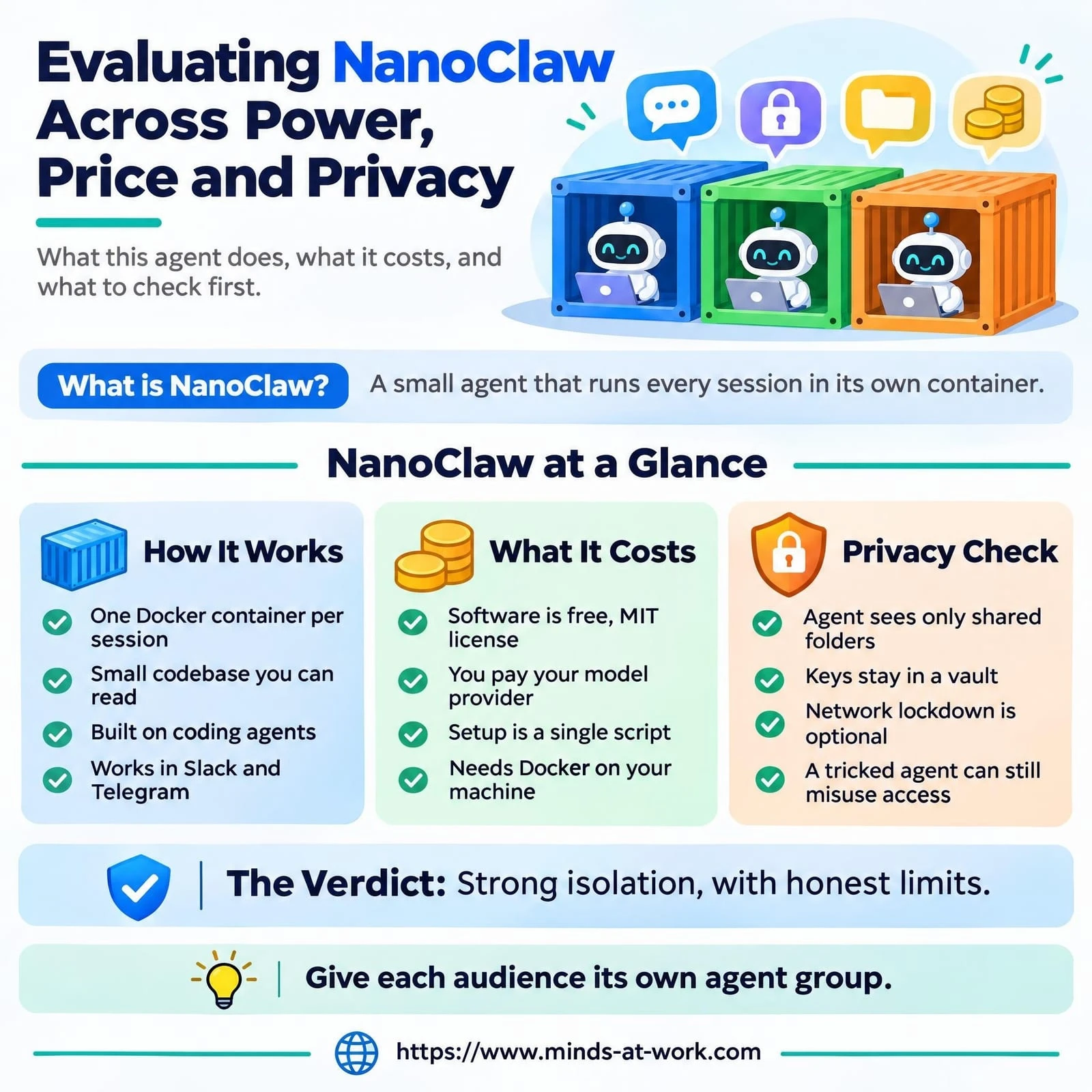
These are the facts most readers look for first. NanoClaw is a free, open-source assistant that runs on your own machine and gives each agent session its own Docker container. The list covers the maker, the cost, the requirements, the isolation and the stated limits. The sections below give the sources and the caveats.
- Maker: NanoCo, named as the creator in Docker’s announcement; Gavriel Cohen is the person behind it
- Cost: Free and MIT licensed, per its GitHub page; you pay the model provider behind the coding agent you choose
- Runs on: macOS or Linux with Docker; Windows needs WSL2
- Isolation: One Docker container per session, with no host home directory, no
.sshfolder and no Docker socket, according to its security documentation - Size: About 29,300 lines of runtime code, according to NanoClaw’s own website
- Main risk: A manipulated agent can still message its contacts, spend with the credentials you granted and write to its own memory
- Unit of damage: The agent group, not the single chat
- Independent testing: Thin; one hands-on walkthrough from The New Stack
What is NanoClaw?
NanoClaw is a free, open-source assistant that runs on your own machine and talks to you through chat apps. Its GitHub page describes it as “your own always-on AI assistant: self-hosted, open source, lightweight,” with each agent running in its own container. It is MIT licensed, and the repository was created on January 31, 2026. The same repository shows about 31,000 stars at the time of writing.
Who built NanoClaw, and why?
The project’s company is NanoCo, which Docker’s announcement names as the creator of NanoClaw. The person behind it is Gavriel Cohen. In a February interview with The New Stack, Cohen said he built NanoClaw in a weekend after setting up OpenClaw, then called Clawdbot. He had several worries:
- OpenClaw had added a small software package he had written months earlier.
- It stored all of his WhatsApp messages in a local database, not just those from the groups he had chosen.
- Its code had grown to roughly 350,000 lines in a matter of weeks, generated with AI and with little oversight, as he told The New Stack.
His main objection was architectural. An agent in a family chat and an agent connected to a work project ran in the same environment, separated only by application-level rules. TechCrunch’s profile of Cohen tells a similar story. It cites estimates of about 800,000 lines for OpenClaw by March, so the size of that codebase depends on when and who you ask. Part 14 covers OpenClaw itself.
How does NanoClaw work and how do you set it up?
The README says setup is a short script: you clone the code and run bash nanoclaw.sh. The script installs Node and pnpm, and it installs Docker if it is missing. It also sets up a credential gateway, fetches or builds the agent image and pairs your first chat app.
NanoClaw needs macOS or Linux, and Windows users need a Linux layer called WSL2. Chat apps include Slack, Microsoft Teams, Telegram, Discord, WhatsApp, Signal and iMessage, and you can also chat from the terminal.
How does NanoClaw isolate each conversation?
NanoClaw puts each conversation in its own Docker container, a sealed box that sees only the folders you choose to share. Every active session gets one. According to NanoClaw’s security documentation, the container has no host home directory, no .ssh folder and no Docker socket. So the agent cannot see your home folder, your SSH keys or Docker itself.
NanoClaw also uses a coding agent as its brain. It runs Claude through the Claude Agent SDK by default, and the README lists Codex, Cursor and OpenCode as alternatives. Docker’s announcement says NanoClaw wraps that engine with scheduling, memory, chat connections and routing.
How do you change NanoClaw?
You change NanoClaw by changing its code. The README says “No configuration sprawl. Want different behavior? Modify the code,” and the project expects you to do that by asking a coding agent. For a non-developer that is either a clever shortcut or a barrier, depending on how comfortable you are with the idea.
The codebase is small. NanoClaw’s website compares the two projects at about 200 runtime TypeScript files and 29,300 lines for NanoClaw, against 3,680 files and more than 434,000 lines for OpenClaw. The same comparison counts 12 direct dependencies against 70. These are the project’s own numbers, but the direction is not in doubt. NanoClaw is far smaller, which makes it far easier for one person, or one coding agent, to read.
What can NanoClaw do?
NanoClaw covers the same ground as the other self-hosted agents: chatting through your messaging apps, scheduled tasks, memory across sessions, and coding and file help inside its sandbox. The README highlights a feature for teams. With a free NanoClaw account, setup provisions each agent its own Slack app. You can then spawn teammates from chat, each with its own bot identity, container and memory.
What does hands-on coverage show?
Independent hands-on coverage is limited. The New Stack’s David Eastman walked through setting it up with Claude and Slack in March. He found the idea of an app that is just the code you need intriguing, but he still stressed that this whole area remains problematic. He wrote that he did need to “play engineer” to get everything working, and he found the Slack setup painful.
He also noted that NanoClaw’s WhatsApp connection relies on an unofficial method that Meta discourages. His walkthrough is the closest thing to an outside test that I found, so weigh it more heavily than the project’s own pages. The rest of what is published comes from the project itself and from a partner announcement.
What did Docker announce?
The partner is Docker. On March 13, Docker and NanoCo announced that NanoClaw could run inside Docker Sandboxes, which use lightweight virtual machines (MicroVMs) so that even a container escape would be contained. The announcement said NanoClaw had passed 20,000 stars and 100,000 downloads by then. It is a press release, so read it as a company’s account.
The project’s own hardening guide takes a narrower line. It says its isolation boundary is the Docker container and that it has no micro-VM runtime of its own. So the micro-VM layer is a Docker option to look for, not something NanoClaw’s own guide says it provides. Check which setup you are actually getting.
What does NanoClaw cost?
NanoClaw itself is free, so your costs are the computer, Docker and the model account behind the coding agent you choose. The table lists each item.
| Item | Detail |
|---|---|
| Software | Free, MIT license |
| Where it runs | Your computer or server, with Docker; Windows through WSL2 |
| Model costs | Paid to the provider behind the coding agent you choose |
| Setup | A script, with an AI coding agent available to help fix failed steps |
| Optional | A free NanoClaw account for provisioning Slack apps and a prebuilt agent image |
If a setup step fails, the README says the script can hand it to Claude Code to diagnose and retry. It uses Codex or OpenCode instead if you chose one of those. The core software works without an account. Setup does offer the free account by default, but answering no builds the agent image locally instead.
Is NanoClaw safe and private?
The project’s security page starts from a blunt assumption: prompt injection eventually succeeds, and the agent then acts as if the attacker wrote its instructions. The design therefore asks what a fully compromised agent could actually do. The table gives the project’s own description of each layer and where it stops.
| Layer | What it does | Where it stops |
|---|---|---|
| Container limits | Runs without administrator rights, drops extra privileges on every container, and caps how many processes it can start | Anything inside the container is still reachable by the agent |
| Credential gateway | Secrets stay in a vault on your computer, and a gateway adds them to outgoing requests | A compromised agent can use granted credentials, but cannot copy them out |
| Network lockdown | Cuts the agent off from the internet except through the gateway | Off by default, and tools that need direct internet access fail while it is on |
| Folder allowlist | Extra folders can be shared only if listed in a file outside the project; with no file, all extra mounts are blocked | Blocked patterns such as .ssh and .aws cannot be removed, but what you do allow is shared |
| Approvals | An unknown chat triggers an approval request to an administrator, and strangers can be dropped; credential use and package installs can also require approval | If no approver is reachable, the request is denied, and approvals depend on you answering well |
The security page recommends turning network lockdown on for untrusted audiences or high-value credentials. The hardening guide explains how. It also says that by default agent containers have normal outbound internet access.
What can a compromised NanoClaw agent still do?
The security page is candid about what the design does not solve. Anything the agent can legitimately do, it can do while manipulated.
A compromised agent can still message anyone in its permitted destinations, and it can read and delete its own group workspace. It can make authenticated calls with the credentials it was granted. It can also poison its own memory in ways that affect later sessions.
Every session within an agent group shares the same group folder, so the project says the real unit of damage is the group. It recommends separate groups for different trust domains, so that strangers’ chats never share a group with code or deploy credentials. That is an unusually plain statement, and a useful one.
How does NanoClaw compare with the agents so far?
NanoClaw differs from the other agents in this series mainly in where commands run and who looks after the sandbox. The table lines them up, and the notes after it explain the trade-offs.
| Agent | Where commands run | Who runs the sandbox |
|---|---|---|
| NanoClaw | A Docker container per session, by default | You |
| OpenClaw (Part 14) | The same environment for every agent, per Cohen’s critique | You |
| Hermes Agent (Part 15) | Your choice: your computer, Docker, SSH or a cloud sandbox | You, if you choose one |
| Manus and Perplexity Computer (Parts 10 and 13) | A cloud sandbox | The company |
How do the trade-offs play out?
- Against OpenClaw: NanoClaw was built as a reaction to it. It drops the huge feature set and puts the agent behind operating-system containers instead of in-app checks. In exchange you have fewer built-in features, and you customize by editing code.
- Against Hermes Agent: Hermes offers a learning loop and more places to run, and it treats a sandbox as something you choose. NanoClaw makes containers the default and keeps the feature list short. Read Part 15 for the Hermes side.
- Against Manus and Perplexity Computer: those give you a sandbox run by a company, covered in Part 10 and Part 13. NanoClaw gives you a sandbox you run yourself, with Docker as your own dependency.
What should you do before you start?
I use one rule for any agent that talks to more than one audience: give each audience its own group. That is the project’s own advice turned into a habit, and it costs nothing to follow.
- Run it on a machine you are happy to dedicate to it, and let the setup script install Docker.
- Create separate agent groups for separate audiences, and never mix a public chat with a group that holds your code or credentials.
- Turn on network lockdown if the agent will talk to strangers or hold valuable keys.
- Keep the folder allowlist short and read-only.
- Use a model account with a spending limit.
If you are deciding whether a self-hosted agent belongs in your business at all, the AI strategy guide for SMB owners is a better starting point than any one product. If you want help with the architecture, that is the kind of question a Fractional CTO handles. The full run of reviews is in the Personal AI Agents archive.
Who is NanoClaw for?
NanoClaw suits a narrow group of readers, and the two lists below show which side you are likely on. NanoClaw fits you if:
- You like the idea of an agent in a box and are willing to install Docker.
- You are comfortable asking a coding agent to change the software for you.
- You want a small codebase that you or a coding agent can read in full.
NanoClaw is a weaker fit if:
- You want a finished app with every feature included.
- You do not want to run Docker or manage a machine.
- You need independent testing before you trust the isolation. There is very little yet.
Verdict
NanoClaw is a thoughtful response to a real problem: it assumes the agent will be tricked and limits what a tricked agent can reach. The isolation is real and well documented. The project is also honest that a manipulated agent can still use whatever you gave it. If you try it, give each audience its own group and share as few folders as you can. Treat the containers as one layer, and not the whole defense.
Frequently asked questions
These are the questions readers ask most often about NanoClaw. The answers cover its price, its Docker requirement, how it handles your API keys, how it differs from OpenClaw and which chat apps it supports. Each one draws on the same sources as the sections above, so the figures and caveats match.
Is NanoClaw free?
The software is free and MIT licensed, so you pay nothing for NanoClaw itself. You do pay the model provider behind the coding agent you pick, and you supply the computer and Docker. A free NanoClaw account is optional. It adds Slack app provisioning and a prebuilt agent image, but the core software works without one.
Does NanoClaw need Docker?
Yes. The setup script installs Docker if it is missing, and each agent session runs in its own container. Windows users also need WSL2, a Linux layer inside Windows. NanoClaw’s hardening guide says its isolation boundary is the Docker container, with no micro-VM runtime of its own. Docker has announced a Sandboxes option built on lightweight virtual machines, though.
Can a prompt-injected NanoClaw agent steal my API keys?
According to NanoClaw’s security page, secrets live in a vault on your computer and a gateway adds them to outgoing requests. So a compromised agent cannot copy the raw keys out. It can still use the credentials it was granted, which means it can spend through them. Per-request approvals are the main brake where you turn them on.
How is NanoClaw different from OpenClaw?
NanoClaw was built as a reaction to OpenClaw. It runs each agent in its own container instead of relying on application-level rules. Its website reports about 29,300 lines of runtime code against more than 434,000 for OpenClaw. You get fewer built-in features and customize by editing the code, usually by asking a coding agent to do it.
Can I use NanoClaw with chat apps other than WhatsApp?
Yes. The README lists Slack, Microsoft Teams, Telegram, Discord, WhatsApp, Signal and iMessage, and you can also chat from the terminal. The New Stack’s David Eastman chose Slack for his test because NanoClaw’s WhatsApp connection uses an unofficial method that Meta discourages. Many channels are added on demand with skills such as /add-telegram.
Up next
In Part 17, I’ll look at Moltis, the last of the self-hosted agents. It is a single program written in a language called Rust. It is much smaller than OpenClaw in community and still labeled alpha. It also makes some bold claims about being secure by design, so Part 17 checks where each claim comes from.