OpenClaw Review: The Self-Hosted Agent That Started a Wave (Part 14 of 18)
A plain-English look at OpenClaw: its history, what it takes to run it yourself, and the exposed servers and poisoned skills security researchers found.
By Dr. Sanju Abraham, Fractional CTO, investor, multiple exits. Published November 19, 2026.
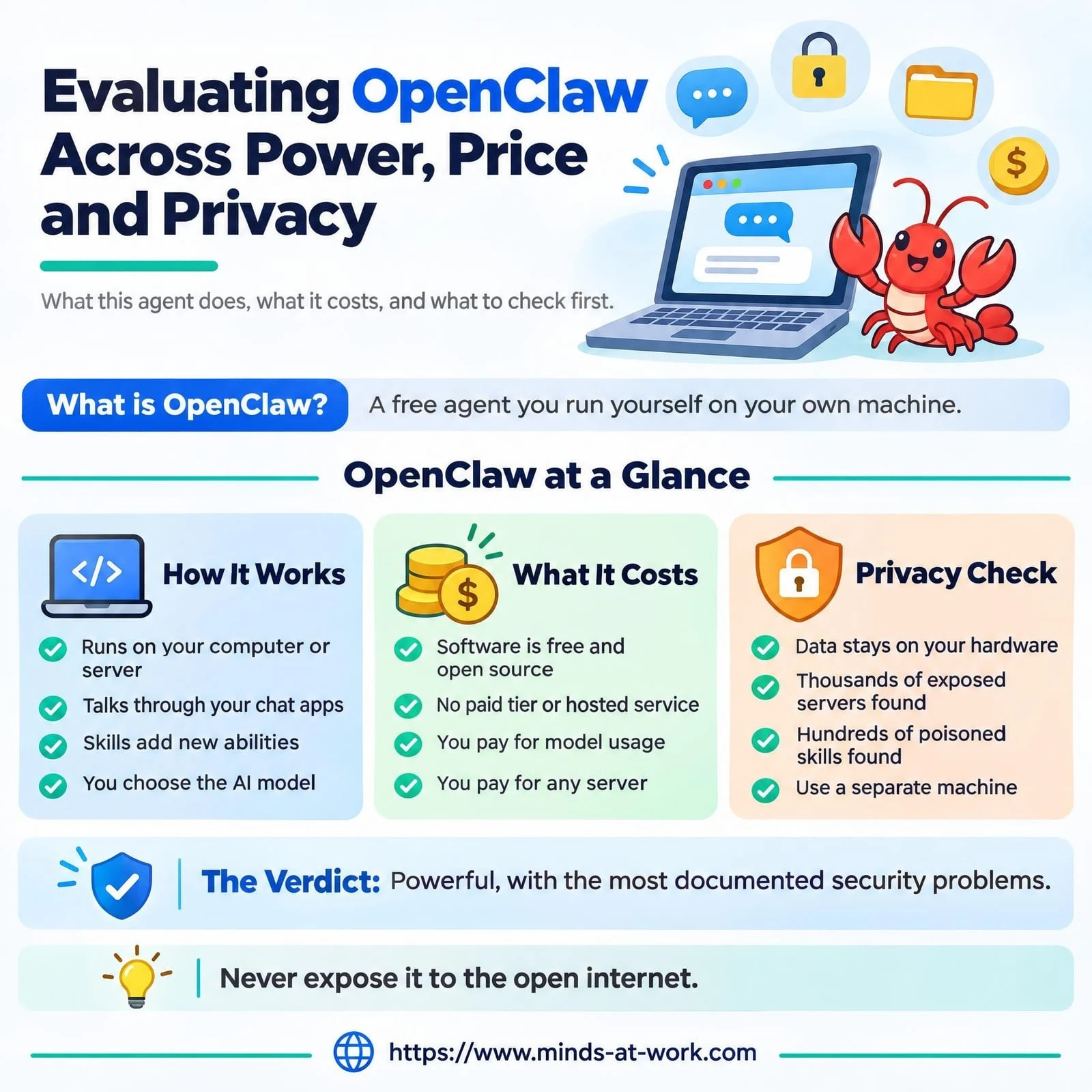
The short answer: OpenClaw is a free, open-source AI assistant that runs on your own computer or server. It takes instructions through your chat apps. It suits people comfortable with a terminal who want their data on hardware they control. As of November 19, 2026, it also has some of the most heavily documented security problems in this series. So it is a project to maintain, not an app to install and forget.
This is Part 14 of 18 in the Personal AI Agents series. Missed the last one? Read Part 13, on Perplexity Computer.
From this article on, the agents are ones you run yourself. There is no company running the software in its cloud and holding your data. You install it, you decide where it lives, and you are responsible for keeping it safe. OpenClaw started this wave and is the reference point for the next three parts, so it gets the most space.
OpenClaw at a glance
These are the facts most readers look for first, as of November 19, 2026. OpenClaw is an open-source assistant that you run on your own hardware. The list covers the cost, the owner, the security findings and the safest way to start. The sections below give the sources and caveats.
- What it is: A free, open-source AI assistant that runs on your own computer or server and takes instructions through chat apps
- Price: Free and MIT licensed, with no paid tier, according to the project’s README; you pay your AI model provider and any server you rent
- Who runs it: The OpenClaw Foundation, a 501(c)(3) non-profit with OpenAI among its donors, according to its July announcement
- Exposed servers: More than 30,000 distinct instances counted online, according to Bitsight
- Poisoned skills: 341 malicious skills among 2,857 in Koi Security’s first audit of ClawHub, according to The Hacker News
- Memory risk: In a peer-reviewed study, poisoning the agent’s state raised attack success from 24.6 percent to between 64 and 74 percent, according to the EMNLP paper
- Trust model: One trust boundary per gateway, not a hostile multi-tenant boundary, according to the security guide
- What to do first: Try it on a separate machine with disposable accounts, and read the security guide before the install guide
What is OpenClaw?
OpenClaw is a free, open-source assistant that runs on your own computer or server. It talks to you through the chat apps you already use. Its GitHub page lists Discord, iMessage, Slack, Teams, Telegram and WhatsApp plus more than 20 other channels. It also lists native apps for macOS, iOS, Android, Windows and Linux. The README says state, memory and credentials live on your hardware. Your prompts go to whichever AI model provider you configure. The project says it has no paid tier, hosted service or token.
Why does OpenClaw have several names?
The history is unusually colorful, and it explains why you will see several names online. Creator Peter Steinberger, an Austrian developer, started it as a weekend project, per his own account. It began as WhatsApp Relay and became Clawd in November 2025, a pun on Anthropic’s Claude. Steinberger wrote that Anthropic’s legal team politely asked the project to reconsider the name. It became Moltbot, and on January 29, 2026 it was renamed OpenClaw.
TechCrunch reported that it had passed 100,000 GitHub stars in just two months. At the time of writing, its repository shows more than 395,000.
Who runs OpenClaw now?
On February 15, TechCrunch reported that Steinberger was joining OpenAI. Sam Altman said OpenClaw would “live in a foundation as an open source project that OpenAI will continue to support.”
On July 8, the project announced that the OpenClaw Foundation is a 501(c)(3) non-profit. The foundation has hired its first full-time team. The post describes OpenAI as a major donor. It also says Steinberger “keeps making the calls, especially the technical ones.”
How does OpenClaw work?
You install a program called the Gateway. The README calls it the local control plane for sessions, tools, events and channel connections. It links the chat apps you choose to an AI model. Per the tools documentation, the agent can run commands, read and edit files, and operate a browser session. It can also search and fetch web pages and schedule work. The README describes a one-line install command that starts a setup wizard. It says the installer provisions a supported Node.js runtime when needed.
Which three ideas matter for a non-developer?
Three ideas matter if you are not a developer:
- You bring the model. The README says OpenClaw works with hosted and local model providers, and you pay the provider you choose. The software costs nothing, but usage costs vary with how much work you give it.
- Skills extend it. A skill is a bundle of instructions and code that teaches the agent a new ability. New capabilities are shared through ClawHub, a public marketplace, which turned out to matter a great deal for security.
- Memory persists. The memory documentation says OpenClaw writes plain Markdown files in the agent’s workspace. A long-term file called
MEMORY.mdis loaded at the start of a session. That is useful, but it also means something the agent read last week can still shape what it does today.
What can OpenClaw do?
The tasks are the ones you would expect from the agents earlier in this series: messages, calendars, travel, research, files and scheduled routines. TechCrunch described its promise as the “AI that actually does things,” such as managing a calendar and booking flights. The difference from the earlier agents is who does the hosting.
XDA Developers called Perplexity’s Computer a “cloud-based OpenClaw alternative.” That is a fair way to see the choice. It is the same kind of agent, either rented from a company or run by you.
OpenClaw’s own documentation is blunt about the limits of its trust model. Its security guide says it assumes one trust boundary per gateway, meaning one operator or a team who trust each other. It adds that this is not a hostile multi-tenant boundary for people who do not trust one another.
How much does OpenClaw cost?
The software itself costs nothing. You pay for the AI model provider you choose and for any server you rent. The table below sums up what the project’s README says. The larger cost is your attention, because setting it up safely takes more than running the installer.
| Item | Detail |
|---|---|
| Software | Free, MIT licensed |
| Platforms | macOS, Linux, Windows, with native apps for phones |
| Paid tier | None, per the project’s README |
| What you pay for | The AI model provider you choose, and any server you rent |
| Effort to start | An installer and a setup wizard, then careful security setup |
There is no sign-up and no waitlist, so you can start today. The practical cost is your attention, as the next section shows.
Is OpenClaw safe to run?
OpenClaw’s popularity and its power to act on your computer made it a target within weeks. These are the main findings, all from outside researchers. I group them into four problems: exposed servers, poisoned skills, a steady stream of flaws and memory poisoning. A last part covers what the project does about them.
How many OpenClaw servers were exposed?
A server exposed to the internet can be reached by anyone who finds it, which is why this count matters. Security firm Bitsight ran daily scans from January 27 to February 8, 2026. It counted more than 30,000 distinct OpenClaw instances exposed online. Bitsight notes that instances come and go, so this is a cumulative count, not a snapshot. It called exposing the service directly “the path of least resistance” for people who want remote access. It also found that authentication enforced no password strength, so even a single character was accepted as a valid token.
The security guide says a regular install listens only on the local machine. Container images, though, default to an exposed address, so the safe setting depends on how you install it.
How many ClawHub skills were poisoned?
A skill is a bundle of instructions and code, so a malicious one can do real harm. Koi Security audited all 2,857 skills on ClawHub and found 341 malicious ones. According to The Hacker News, 335 of them came from a single campaign it named ClawHavoc.
The research as republished on Palo Alto Networks’ blog was updated on February 16. By then the marketplace had grown to more than 10,700 skills, and the malicious count had risen to 824. The security firm Antiy reported at least 1,184 malicious skills as of February 5. The counts differ because each group used its own scope and timing.
Cisco tested a popular skill called “What Would Elon Do?” and concluded it was “functionally malware.” The skill silently sent data to a server controlled by its author.
What other flaws have been found?
A Texas A&M analysis of 470 security advisories found three waves of reports. The advisories were filed against OpenClaw between January 31 and April 15. The analysis showed how three separate moderate or high-severity flaws could combine into a path to remote code execution. That is a sign of heavy scrutiny as much as of weakness. It does mean you need to keep the software updated.
Can an agent’s memory be poisoned?
In a peer-reviewed study presented at EMNLP 2026, researchers tested a live OpenClaw instance. It was connected to services such as email and payments. The study found that poisoning any single part of the agent’s persistent state raised the average attack success rate. It rose from 24.6 percent to between 64 and 74 percent across four AI models. The authors concluded the weakness is inherent to the agent architecture, not tied to one model.
What does the project do about it?
The security guide describes conservative defaults. Most chat channels return a pairing code to unknown direct-message senders instead of processing their messages. An openclaw security audit command detects drift from those defaults. The README warns that tools run on your computer unless you configure sandboxing.
How does OpenClaw compare with the agents so far?
OpenClaw differs from the earlier agents mainly in who hosts it and who carries the security work. These three comparisons show where, and each one points back to the full review.
- Against Manus and Perplexity Computer: Manus in Part 10 and Perplexity Computer in Part 13 run in a company’s cloud. OpenClaw runs on hardware you control, so your files stay with you, and so does the job of locking it down.
- Against Instinct and Lindy: with Instinct in Part 8 and Lindy in Part 9, the startup holds your connected data and its policies apply. With OpenClaw there is no vendor policy to read, because you are the vendor. Your model provider’s terms still apply to what you send it.
- Against the big-company agents: Muse in Part 2 and its peers are run by large companies with their own security and support teams. OpenClaw gives you the pieces and expects you to use them.
What is the owner’s-duty check?
I call the practical test the owner’s-duty check, a MAW framing. Before you self-host an agent, name the person who will apply the next security update. Name the day they will do it as well. If the answer is “nobody in particular,” choose a hosted agent instead.
What should you do before you start?
None of these steps is hard. Each one limits a risk covered above: the exposed server, the poisoned skill and the over-trusted account. Do them in this order.
- Run it on a spare computer or a rented server, not the laptop that holds your photos, your tax files and your saved passwords.
- Keep the service on the local machine and reach it through a private network tool, and never expose it to the open internet.
- Use a separate email account and a low-limit payment method for anything you connect.
- Install skills sparingly and read what they ask you to run. Treat a skill that asks you to install something first as a warning sign.
- Run
openclaw security auditand keep the software up to date.
If you are weighing agents like this for a company, our AI strategy for SMB owners piece covers where to start. A Fractional CTO can help you decide which accounts an agent should ever touch. More pieces on choosing and governing AI tools live in the Personal AI Agents archive.
Who is OpenClaw for?
OpenClaw suits some readers well and others poorly. The two lists below show which group you are likely in. It is closer to a project than to an app, so the second list matters as much as the first.
OpenClaw fits you if:
- You are comfortable with a terminal or have someone who is.
- You want your data and memory to stay on hardware you control.
- You will treat it as a project to maintain, not an app to install and forget.
It’s a weaker fit if:
- You want something that works safely out of the box.
- You would connect your main email, banking or work accounts on day one.
- You do not want to track security updates.
Is OpenClaw worth trying?
OpenClaw proved how much people want an agent they own, and it is now stewarded by a foundation with OpenAI’s backing. It also has some of the most heavily documented security problems in this series, including exposed servers and poisoned skills. If you try it, treat it as an experiment on a separate machine with disposable accounts. Read the security guide before the install guide.
What is coming in Part 15?
In Part 15, I’ll look at Hermes Agent from Nous Research. It is an open-source agent built around the idea that it should get better the longer you use it. It does that by writing its own skills and memory. Like OpenClaw, it is something you run yourself, so the same questions about setup, cost and safety apply.
Frequently asked questions
These are the questions readers ask most often about OpenClaw. The answers cover whether it is free, who runs it now and whether it is safe to connect to your email. They also explain what ClawHub is and why Perplexity Computer is called an alternative. Each one uses the same sources as the sections above, so the facts and caveats match.
Is OpenClaw free?
Yes. OpenClaw is MIT licensed, and the project’s README says it has no paid tier, hosted service or token. You still pay the AI model provider you connect, because your prompts go to that provider. You also pay for any server you rent to run it. Usage costs depend on how much work you give the agent. Watch your provider’s billing page closely in the first weeks.
Who created OpenClaw, and who runs it now?
Peter Steinberger, an Austrian developer, created it. He joined OpenAI in February 2026, and OpenClaw moved to the OpenClaw Foundation. The foundation says it is a 501(c)(3) non-profit with a full-time staff and OpenAI as a major donor. Its July 2026 announcement says Steinberger still makes the calls, especially the technical ones.
Is it safe to give OpenClaw access to my email?
Not on day one. Researchers found exposed servers, malicious skills and flaws that can be chained. An academic study also showed poisoned memory raising attack success sharply. If you try it, use a separate email account, a low-limit payment method and a dedicated machine. Run the built-in openclaw security audit command. Then add connections one at a time.
What is ClawHub, and why does it matter?
ClawHub is the public marketplace where people share OpenClaw skills, which are bundles of instructions and code that add abilities. Koi Security found 341 malicious skills among 2,857 in its first audit, and later counts were higher. Install skills sparingly, read what they ask you to run, and treat any skill that asks you to install something first as suspicious.
Why is Perplexity Computer called an OpenClaw alternative?
XDA Developers called Perplexity’s Computer a cloud-based OpenClaw alternative. Both are agents that act on your behalf. Perplexity runs its agent in the company’s cloud, while OpenClaw runs on your own machine. The choice is the same kind of agent either rented from a company or run and secured by you.