Lindy Review: An AI Teammate You Pay for in Credits (Part 9 of 18)
A plain-English look at Lindy: how you ask it for work, how credits and plans work, and what its security pages do and do not say.
By Dr. Sanju Abraham, Fractional CTO, investor, multiple exits. Published November 14, 2026.
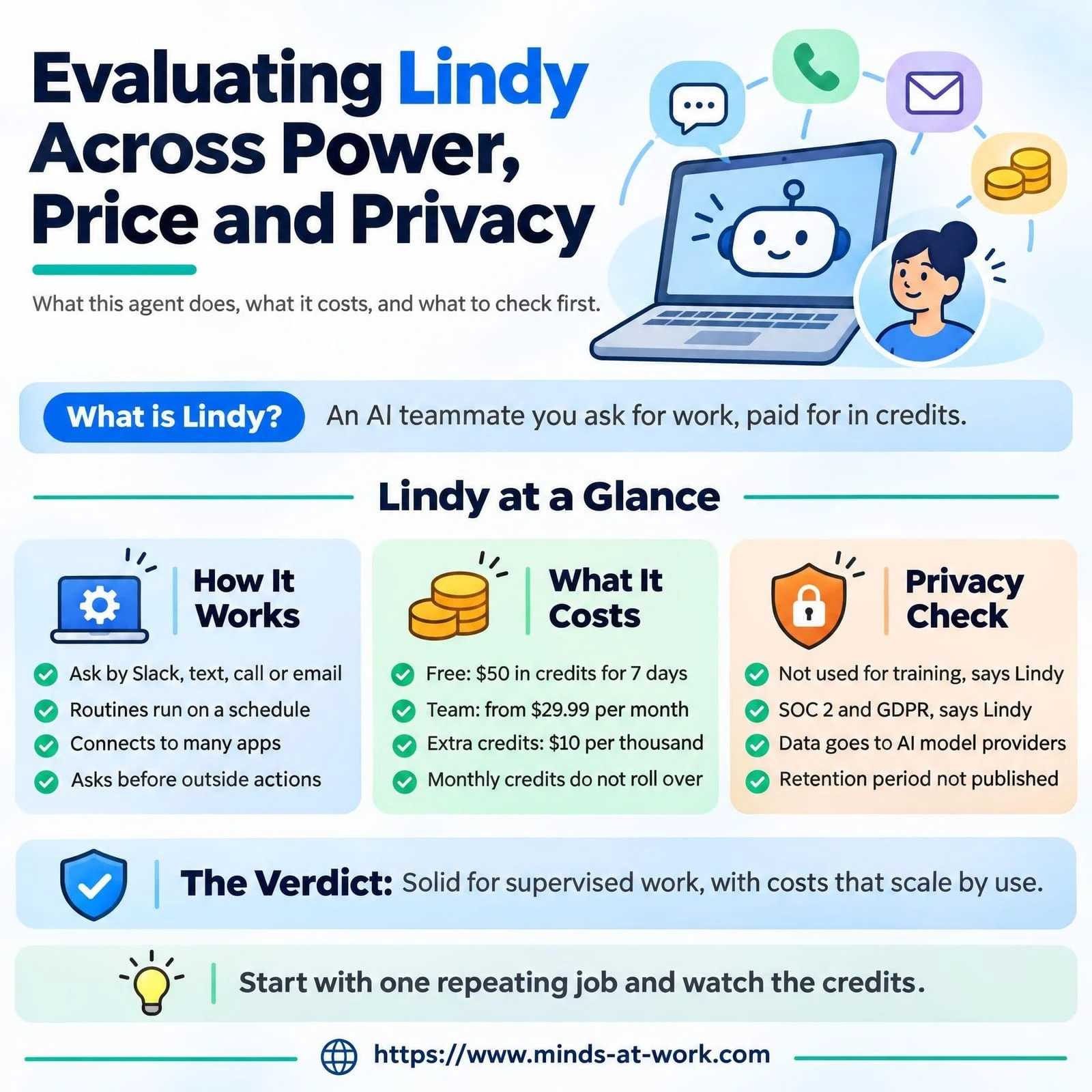
The short answer: Lindy is a work-focused AI agent you ask for jobs by Slack, text, call or email. It connects to your tools and asks before it acts outside your workspace. It charges in credits that scale with how big the job is. According to Lindy’s pricing page, the entry price is $29.99 a month. Heavy jobs can use up the included credits quickly, though. Try it on one repeating task before you commit to a tier.
This is Part 9 of 18 in the Personal AI Agents series. Missed the last one? Read Part 8, on Instinct.
Lindy is a different kind of startup agent from Instinct. It does not pitch itself as a personal helper that does your errands. Its homepage frames it as an AI employee that you ask for work, and its price list is built around teams.
It is a good example of an agent aimed at the work side of life. It also shows a pricing model you will see in several tools in this series: credits. A credit is a unit of usage that Lindy spends each time it does work for you. Details here are as of November 2026, checked against Lindy’s public pages.
Lindy at a glance
These are the facts most readers look for first, as of November 2026. Lindy is a work-focused AI agent you ask for jobs by Slack, text, call or email, and it charges in credits. The list covers the maker, the plans, the credit scale, the approval rule and what the public pages leave out. The sections below give the sources and the caveats.
- Maker: Crivello Corp, which does business as Lindy, according to its privacy notice
- What it does: You ask on Slack, text, voice memo, call or email, and it does the job using your connected apps
- Plans: Free with $50 in credits for 7 days, Team from $29.99 a month for 3,000 credits, and custom Enterprise pricing, according to Lindy’s pricing page
- Credit scale: About 2 to 250 credits for everyday asks, 250 to 1,000 for deep work and 1,000 to 2,500 for big builds, per the same pricing page
- Top-ups: $10 per 1,000 credits, according to the pricing page; monthly credits do not roll over, but top-up credits do
- Approvals: Anything with outside impact waits for your OK
- Reviewer verdict: Suited to supervised, repeatable work; some users report slow or failed tasks
- Not stated publicly: A data retention period, a SOC 2 report date or scope, or named encryption standards
What is Lindy?
Lindy is an AI agent aimed at work tasks. An AI agent is software that takes actions for you, such as drafting or booking, instead of only answering questions. Lindy is made by Crivello Corp, which does business as Lindy, according to its privacy notice.
Lindy’s product page says you can ask on any channel: Slack, a text, a voice memo, a call or an email. It then does the work using your Skills, Memory and Routines. A routine is a job that repeats on a schedule, such as a daily ad check or a weekly client report.
Lindy describes a gradual trust model on its homepage. Anything with outside impact waits for your OK, and once you trust it with a job it can run that job end to end. It also suggests jobs it could take on after looking at how you work.
How does Lindy work?
Lindy works as a simple loop, according to its quickstart documentation. You connect the tools a job needs, give Lindy the job, review its draft and approve anything that reaches outside your workspace. Jobs you want repeated then become routines. The five steps below follow the quickstart, and a second part covers the other ways in.
What are the five steps?
- You connect the tools your first job needs, from the Integrations page in the Lindy web app. Lindy’s homepage lists “3,000+ integrations + MCP.” MCP is a standard way for an agent to plug into other tools.
- You give Lindy the job. You pick a suggestion or describe what you want, such as “Every Monday, check which invoices are more than 14 days overdue and draft a polite reminder to each client,” or “Prep me for my 2 p.m. call.”
- Lindy does the work and shows you a draft. You review it and ask for changes in the same conversation.
- You approve anything that touches the outside world, since Lindy says anything with outside impact waits for your OK.
- Jobs you want repeated become routines that run on a schedule.
What other ways in does Lindy offer?
The quickstart lists the other ways in as optional extras. You can add Lindy to Slack and text it from your phone. You can also connect a Google or Microsoft account for inbox help, meeting prep and scheduling.
Lindy’s pricing page adds that you can pick the AI model for each task and text Lindy over iMessage. It also mentions computer use, which means Lindy can operate a computer as well as call apps. But it lists that feature inconsistently across plans, so check which plan includes it.
What can Lindy do, and what do jobs cost in credits?
Lindy’s pricing page gives a useful sense of scale by describing what a credit buys. I call the three tiers the job-size ladder, a MAW framing: everyday asks, deep work and big builds.
| Job size | Examples | Credits |
|---|---|---|
| Everyday asks | Answers, summaries, lookups, updates in your tools, closing out a meeting, drafting a reply | About 2 to 250 |
| Deep work | Researching a competitor and writing a report, triaging a day’s support queue, turning a week of calls into a proposal | About 250 to 1,000 |
| Big builds | Complex dashboards, decks built from CRM and analytics data, internal tools, heavy scheduled workflows | About 1,000 to 2,500 |
A quick reply or lookup is cheap, while a research report or a weekly workflow can use a thousand credits or more. This is my own rough calculation. Using the ranges on Lindy’s pricing page, three deep-work jobs at the top of the range would use the whole 3,000 monthly credits of the $29.99 plan. That does not make Lindy a poor value. It does mean you should try it on real work before committing to a tier.
What do reviewers say about Lindy?
I could open two third-party reviews, and neither is a major-outlet hands-on test. Notis’s Lindy review, last updated October 27, 2026, called Lindy good for solo operators and small teams running simple, supervised workflows in Google Workspace. It advised against production-heavy or unsupervised automation where a mistake actually costs you something. Notis sells a competing messaging-based assistant, so weigh that verdict accordingly.
Hack’celeration’s Lindy review scored it 3.5 out of 5 and rated value 3.0 and support 2.8. It reports no testing of its own. Its reliability concerns come from user reviews rather than its own tests. Those reviews mention slow or failed tasks and Slack replies slower than normal messages. They also mention a Gmail fault that burned thousands of credits in failed retry loops, and emails sent to the wrong thread. It sees Lindy as a fit for small teams that run on Slack and Google Workspace.
How much does Lindy cost, and when is it available?
Lindy publishes its prices, which is not true of every agent in this series. The table below shows the three plans as listed on Lindy’s pricing page. Larger Team tiers also exist, and the notes after the table cover seats, rollover and what happens when credits run out.
| Plan | Price | What you get |
|---|---|---|
| Free | $0 | $50 in credits, which last 7 days |
| Team | From $29.99 per month | 3,000 credits a month; pooled across the team; extra credits at $10 per 1,000; live onboarding |
| Enterprise | Custom | Adds HIPAA compliance with a signed BAA, SSO and SCIM, audit logs, dedicated support |
What details matter for a small business?
A few details from Lindy’s pricing page matter for a small business:
- Every active user in a workspace is billed, from $29.99 a month for 3,000 credits each, on one subscription with pooled credits. New teammates who join through Slack get a 7-day free trial before the seat is billed. Hack’celeration reports that anyone who @mentions Lindy in Slack takes a billed seat.
- Monthly credits do not roll over. Top-up credits do.
- If credits run out, Lindy pauses credit-using actions rather than sending a surprise bill. Admins can top up at $10 per 1,000 credits or raise the monthly allocation.
What will a month really cost?
So the headline $29.99 is a starting point, and the real cost depends on how much work you hand over. Lindy’s pricing page also lists larger tiers, from 4,000 credits at $39.99 up to 1,750,000 credits at $9,999.50. Credits make it hard to know up front what a month will cost, which is why a one-job trial is the safer start.
Is Lindy private and secure?
Lindy makes several privacy and security claims across its pricing page, security page, privacy notice and trust center. I list them below as Lindy’s own claims, and then note what the public pages leave out. Treat them as the company’s statements. A claim on a web page is not the same as an audit report you have read yourself.
What does Lindy say about security?
Lindy states the following on its pricing page and security page:
- Data is encrypted, never sold, and never used to train models.
- Lindy is SOC 2 and GDPR compliant. SOC 2 is an independent audit of a company’s security controls. The security page lists SOC 2 Type II, audited by Johanson Group, plus GDPR and PIPEDA compliance, and says every action Lindy takes is logged.
- Anything with outside impact waits for your OK, per the homepage. Notis adds that actions such as sending email or updating records require approval by default, which it calls a good default.
- For data from Google APIs, the privacy notice says Lindy does not use or share that data for AI training or evaluation.
Who else handles your data?
The privacy notice, last updated September 28, 2026, also lists the third-party companies Lindy shares data with. Under AI model and AI service providers it names Anthropic, OpenAI, Perplexity AI, Exa Labs, ElevenLabs and Deepgram. It lists cloud and infrastructure vendors too. If you connect your inbox, your messages may pass through some of them.
Lindy’s trust center goes further than its security page. It shows a subprocessor section, which names outside companies that handle your data on Lindy’s behalf. It currently shows logos for Atlas Cloud, Baseten, Stripe, Cloudflare and ElevenLabs. The trust center also lists a Data Retention Policy and a SOC 2 Type 2 document. It offers access to sensitive documents on request.
What is missing from the public pages?
Some details are still not visible on the public pages I opened. Neither the security page nor the trust center states a data retention period, a SOC 2 report date or scope, or named encryption standards. The security page says only that data is encrypted in transit and at rest. If you handle sensitive client data, asking for the SOC 2 report and the retention policy before connecting an inbox is reasonable.
How does Lindy compare with the agents so far?
Lindy compares with the earlier agents mainly on price model and focus. The three comparisons below each point back to the full review of that agent.
- Against Muse and Instinct (Part 2 and Part 8): those agents are free today and focus on personal errands. Lindy has a free trial that lasts a week, then charges, and focuses on work you do repeatedly.
- Against dots and Duet (Part 3 and Part 4): those two come bundled with an AI subscription you may already pay for. Lindy is a separate subscription, so it adds to your costs.
- Against Grok Bot (Part 6): both sell credits or usage pools and both are comfortable living in Slack. Lindy’s pricing page is clearer about what a job costs, with credit ranges for small, medium and large tasks.
How should you start with Lindy?
Start with one job and measure its credits. I call this the one-job credit trial, a MAW framing, and it follows Lindy’s own trust model:
- Start with the free credits and one repeating job, such as a Monday summary.
- Keep approvals on for anything that sends, posts or updates something outside your own workspace.
- After a few weeks, check how many credits that one job used and whether you would have caught a mistake before it left your outbox.
- Only then widen its permissions or give it a second job.
If you work with client data, ask for Lindy’s SOC 2 report and data retention policy first. If you are weighing agents like this for a company, our AI strategy for SMB owners piece covers where to start. A Fractional CTO can help you decide which accounts an agent should be allowed to read.
Who is Lindy for?
Lindy suits people with repeated work tasks and a tolerance for a usage meter. The two lists below show which group you are likely to be in. The deciding factors are where your work happens and how much you need a fixed monthly cost.
Lindy fits you if:
- You run a small team or work solo and have repeated tasks in Google Workspace or Slack.
- You want routines, such as a Monday invoice check, that you set up once.
- You like a published credit model and the option to pick the AI model per task.
It’s a weaker fit if:
- You want a free agent for personal errands. The free credits last 7 days.
- Your jobs are high-stakes and unsupervised, which Notis advises against.
- You want to know up front what a month will cost. Credits make that hard.
What is the verdict on Lindy?
Lindy is a straightforward work agent with approvals built in and clear plan tiers. The reviews I could open found it suited to supervised, repeatable work, with reliability complaints from some users. Treat the $29.99 entry price as a starting point and watch your credit use for a month.
The full series lives in the Personal AI Agents archive. It is written by Dr. Sanju Abraham of Minds at Work, a collective of operators, engineers and product leaders.
What is coming in Part 10?
In Part 10, I’ll look at Manus and its Cloud Computer, which gives an agent a persistent computer of its own. Lindy works through your connected apps, while Manus gives the agent a computer of its own. Manus also has a complicated ownership story involving Meta, so I’ll sort out what’s known.
What sources does this review use?
This review draws on Lindy’s own pages, its trust center and two third-party write-ups. Lindy’s claims are labelled as Lindy’s. The links below are the same ones used in the sections above, grouped by who wrote them.
- From Lindy: the homepage, product page, pricing page, security page, trust center, quickstart and privacy notice.
- From third parties: Notis and Hack’celeration, as summarized above.
Frequently asked questions
These are the questions readers ask most often about Lindy. The answers cover what it is, what it costs and how credits work. They also cover whether it trains on your data, whether it is safe to connect to email and who it suits best. Prices come from Lindy’s pricing page.
What is Lindy?
Lindy is an AI agent that works like a teammate you ask for jobs. You reach it by Slack, text, voice memo, call or email, and it does the work using your connected apps, memory and routines. It is made by Crivello Corp, which does business as Lindy, and it is aimed at small teams and solo operators rather than personal errands.
How much does Lindy cost?
According to Lindy’s pricing page, Lindy has a free plan with $50 in credits that last 7 days. The Team plan starts at $29.99 per month for 3,000 credits, with extra credits at $10 per 1,000. Enterprise pricing is custom. Every active user in a workspace is billed. Monthly credits do not roll over, so heavy use can cost more than the headline price.
How do credits work in Lindy?
Lindy spends credits each time it does work, and bigger jobs cost more. Its pricing page puts everyday asks at about 2 to 250 credits. It puts deep work at about 250 to 1,000, and big builds at about 1,000 to 2,500. If credits run out, Lindy pauses credit-using actions instead of sending a surprise bill.
Does Lindy train on my data?
According to Lindy, no. It says data is encrypted, never sold and never used to train models. Its privacy notice says Google API data is not used for AI training or evaluation. The notice also lists AI model providers such as Anthropic, OpenAI and Perplexity AI among the companies it shares data with. So your messages may pass through them.
Is Lindy safe to connect to my email?
Lindy says anything with outside impact waits for your OK, and it lists SOC 2 and GDPR compliance. Lindy’s trust center lists subprocessors, but the public pages I opened do not state a data retention period or the SOC 2 report scope. For sensitive client data, ask for the report and retention policy first, and keep approvals on.
Who is Lindy best for?
Lindy fits solo operators and small teams with repeated tasks in Google Workspace or Slack, such as a weekly invoice check. Notis called it good for simple, supervised workflows and a poor fit for unsupervised automation where a mistake is costly. If you want a free agent for personal errands, the 7-day free credits may not be enough.