Grok Bot Review: xAI's Cloud Computer Agent (Part 6 of 18)
A plain-English look at xAI's Grok Bot: how the shared cloud computer works, what it costs, and what its own documentation says about security.
By Dr. Sanju Abraham, Fractional CTO, investor, multiple exits. Published November 11, 2026.
This is Part 6 of 18 in the Personal AI Agents series. Missed the last one? Read Part 5, on Gemini Spark and Tasks. Next up is Part 7, on Microsoft’s Autopilot.
The short answer: Grok Bot is a team-oriented agent that gives you a roster of AI workers sharing a single cloud computer. It suits recurring work jobs you can teach once. It is included with The X Subscription from $30 a month. Its security design is candid but loose: the Bots share one set of logins, and a saved card is visible to the Bot. Try it on one reversible job and keep money, production systems and regulated data out of it.
The account setup is unusual. You sign in through Cursor, the coding-tool company, and the agent uses Cursor’s account and privacy settings. That detail matters for what happens to your data, so this article spends some time on it. For the wider picture, the Personal AI Agents series lists every part.
I call the company xAI throughout because that is how most coverage and the x.ai address refer to it. The naming is messier than that, and I cover it below.
One caveat before starting. Independent hands-on coverage is still thin. I found one detailed test and one practitioner write-up, both cited below. Much of the rest repeats launch announcements.
Grok Bot at a glance
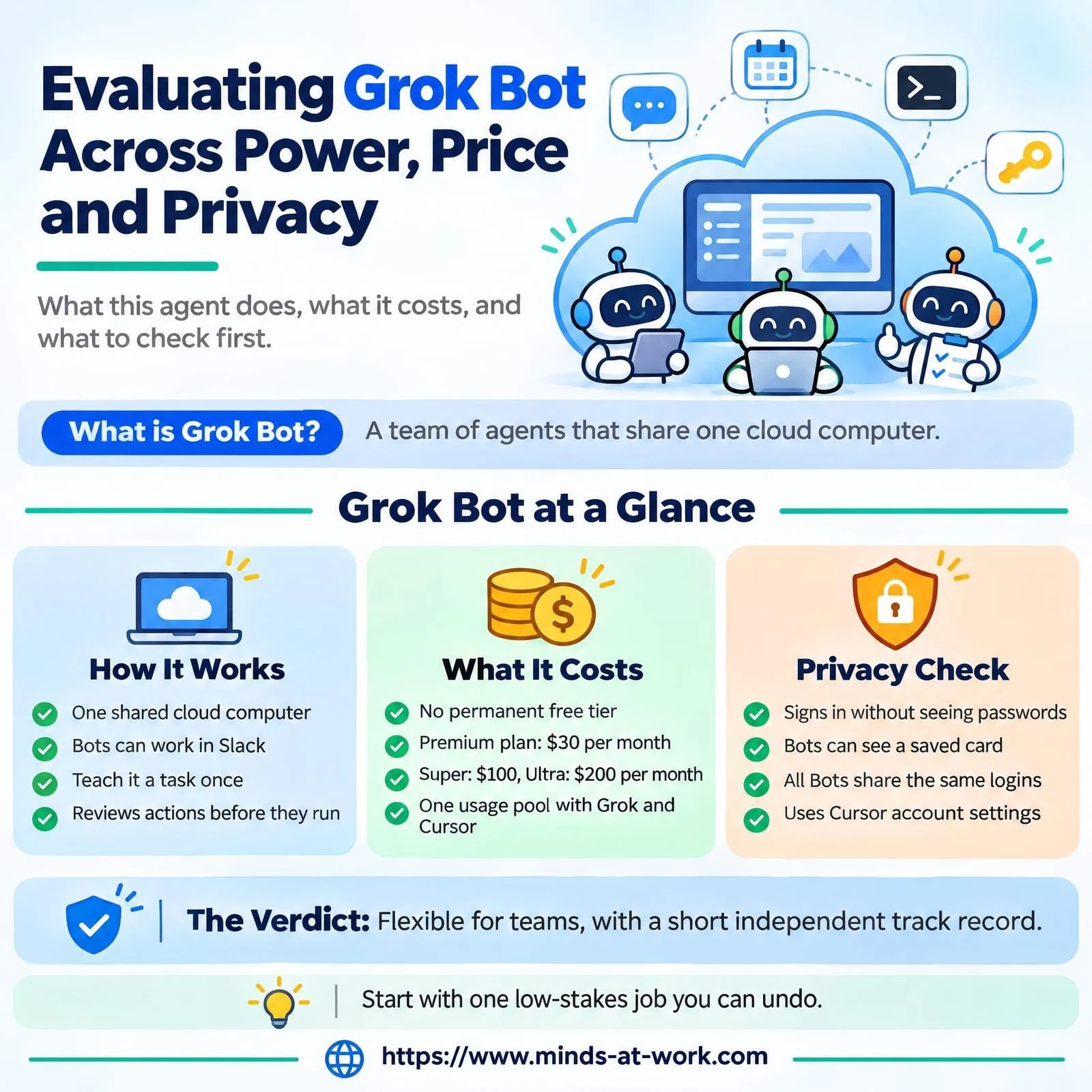
These are the facts most readers look for first, as of November 2026. Grok Bot is xAI’s agent that gives you a roster of Bots on one shared cloud computer. The list covers the maker, the price, the sign-in, the shared-computer risk, the saved-card catch and the evidence. The sections below give the sources and the caveats.
- Maker: xAI, though some sources use the names SpaceXSI or SpaceXAI
- What it does: Each Bot gets its own job on a cloud computer with a browser, a filesystem and a terminal, and Bots can work in parallel
- Price: Not sold on its own; included with The X Subscription Premium ($30 a month), Super ($100) and Ultra ($200), according to xAI’s pricing documentation, with no permanent free tier
- Sign-in: Through Cursor, so the agent uses Cursor’s account and privacy settings
- Main risk: All Bots share one computer, one set of logins and the same files; xAI’s documentation says not to use separate Bots as a security boundary
- Saved card: A Bot can see a card you save in the Vault; to approve every payment yourself, do not save the card
- Independent testing: Thin; in VelvetShark’s test, 40 of 67 real jobs finished without help
- Where it works: Slack, Microsoft Teams and calls on Google Meet, Zoom or Teams, as well as desktop and mobile apps
What is Grok Bot?
Grok Bot is xAI’s agent product. The product page describes it as “AI teammates you can give real work to,” and the documentation calls it a proactive AI teammate. Each Bot has access to a cloud computer with a browser, a filesystem and a terminal. Each Bot can have its own job, such as sales research or expense handling. Bots can work in parallel, hand tasks to each other and run around the clock.
Grok Bot is built as much for teams as for individuals. The product page shows Bots working in Slack and Microsoft Teams like teammates. They also join Google Meet, Zoom or Teams calls. According to xAI’s FAQ, there are apps for macOS, Windows, Linux, iPhone and Android. You can also chat with your Bots in X Chat.
DataCamp reported that the product launched on August 11, 2026 as a beta for the top subscription tiers. Engadget reported on November 8 that access had widened to more plans.
How does Grok Bot work?
Grok Bot works as a roster of Bots on one shared cloud computer, signed in through Cursor. The sections below cover the shared computer, how you teach a Bot, the Cursor account and the company name. Each one affects how much you can trust the setup. Keep the shared computer in mind as you read, because it explains most of the security points later in this article.
What does the shared cloud computer mean?
According to xAI’s approvals and security documentation, all of your Bots share one cloud computer assigned to your user account. Files, browser sessions and command-line credentials on that computer are available across your Bot roster. The documentation’s own advice is: “Do not use separate Bots as a security boundary.”
You teach a Bot by showing it. The docs say “Show it once, and it can take it from there,” and saved steps can be rerun later as skills. Ask a Bot to repeat a task and it becomes a routine that runs on the schedule you set. The docs also describe Bots acting unprompted, such as a morning mail sort that leaves drafts for your approval.
How do Cursor accounts affect your data?
The agent uses Cursor sign-in and Cursor’s data settings. The FAQ says Cursor’s Legacy Privacy Mode is not supported because Grok Bot requires cloud data storage. It also says deleting Grok Bot means deleting your Cursor account, with the data removed within 30 days.
What is the company called?
The branding differs by source. xAI’s announcement of The X Subscription carries the footer “SpaceX Super Intelligence LLC” and uses the brand SpaceXSI. The FAQ says Grok comes from SpaceXSI. Engadget, in contrast, calls the company SpaceXAI. Most other coverage still says xAI, so I do too.
What can Grok Bot actually do?
Grok Bot is a general computer-using agent, so it can work in any website you sign it into. The examples on xAI’s page are mostly work tasks: researching accounts and drafting outreach, working a support queue, reconciling data and preparing renewals.
For independent feedback, the sources below are the useful ones. Each is a single account, not a benchmark, so read them as signals rather than proof.
What did hands-on testers find?
- A hands-on test by VelvetShark ran 67 real jobs over five days. Forty finished without help, 14 finished after help, and 8 failed or were cancelled. The author noted that the Bots share one set of logins. A Bot meant to read a post ran a write command instead, so a post went out.
- A DEV Community post titled “Three Months With Grok Bot” by Bruce Zhang concluded that “the computer is shared, the login state is shared, the permissions are shared.” He wrote that the mistakes it makes have real consequences. In a flight-booking test, several travel sites would not open or would not show that day’s fares.
What did other reviewers say?
- Fello AI said it found no independent benchmark and recommended starting with one low-stakes, reversible task.
- Engadget reported that early users found some workflows needed more babysitting than promised. It described the product as still in beta.
That is not much, and it matters for you. If an agent has few independent reviews, the safest assumption is that its failure modes are not yet well documented.
How much of this is confirmed?
xAI’s own pages confirm most of Grok Bot’s design. Most of its real-world behavior rests on a few third-party accounts. Here is a source map, which I call the confirmed-versus-reported check. It shows which claims you can trace to xAI and which come from a single tester or reporter.
| Claim | Where it comes from |
|---|---|
| All Bots share one cloud computer and one set of logins | xAI documentation, repeated by VelvetShark and Bruce Zhang |
| A Bot can see a card saved in the Vault | xAI documentation |
| Plans, prices and the shared weekly usage pool | xAI’s announcement and pricing documentation |
| 40 of 67 test jobs finished without help | One independent test (VelvetShark) |
| Some workflows need more babysitting than promised | Engadget, citing early users |
| Travel sites that would not show fares | One practitioner post (Bruce Zhang) |
| Encryption in transit and at rest | Not stated in the xAI pages I read |
How much does Grok Bot cost?
Grok Bot is not sold on its own, because it comes with a bundled subscription called The X Subscription. According to xAI’s announcement and pricing documentation, the bundle launched on October 12, 2026. It combines Grok, Grok Bot, Cursor and X.
| Plan | Price per month | Grok Bot |
|---|---|---|
| Free | $0 | Not included |
| Plus | $8 ($80 per year) | Not included |
| Premium | $30 ($300 per year) | Included, 4x Plus usage |
| Super | $100 ($1,000 per year) | Included, 15x Plus usage |
| Ultra | $200 ($2,000 per year) | Included, 50x Plus usage |
Existing Cursor plans (Pro, Pro+, Ultra and Teams) also include it. So do linked SuperGrok or X Premium+ accounts, according to xAI’s FAQ. Usage is one weekly pool shared across Grok, the Bots and Cursor, so heavy use can run through it. I checked these figures against xAI’s pages in November 2026.
Fello AI also reported a seven-day trial credit that some accounts see on the access screen. It found no permanently free tier. Engadget reported the same seven-day usage-based trial.
Is Grok Bot safe? Privacy and security
xAI’s documentation is candid about the design and its limits. The highlights below come from xAI’s approvals, security and FAQ pages. Most of these points are xAI’s own statements, so read them as the company’s claims. I group them into approvals, passwords and cards, and then email, your own computer, training and storage.
How do approvals, passwords and cards work?
Auto Review is a model-based check that looks at each action before it runs. Most actions run on their own. When one needs your OK, the Bot shows an approval card with the proposed operation. You can choose Allow once, Always allow (which saves a rule) or Deny. The company says Auto Review “should complement, not replace, least privilege and explicit approval boundaries.”
Bots sign in without seeing your passwords. They use a login saved in the Vault first, then a connected password manager such as 1Password. Then they ask you with a Secure Form. The values are filled in without being shown to the model. For steps such as single sign-on, passkeys or a CAPTCHA, the Bot hands you the computer to take over.
There is one card exception. In chats in the app, a Bot can see the number and security code of a card you have saved in the Vault. It uses them to type the card at checkout. A saved card fills in without a separate approval each time. To approve each payment, do not save the card.
What about email, your own computer, training and storage?
Access to the Mac or Windows computer in front of you is a separate setting. The default is to ask every time. Email a Bot sends from its own address goes out after Auto Review allows it when you ask in chat. Email from a routine or an incoming message waits as a draft until you press Send.
Training opt-out follows your Cursor account settings. According to xAI’s security documentation, the Bot computers run in the United States. Anysphere, the company behind Cursor, holds ISO/IEC 27001 and ISO/IEC 42001 certifications with Grok Bot in the current scope. I could not find a statement about encryption in transit or at rest in xAI’s documentation. Its approvals page points to Cursor’s security documentation for infrastructure and encryption controls, so check there.
How does Grok Bot compare with the agents so far?
The distinguishing design here is the roster: several Bots, one computer, one set of keys. Each comparison below points back to the full review of the other agent.
- Against Muse (Part 2): Muse is free and consumer-oriented, with one-time Link cards for shopping. Grok Bot has no free tier, and its documentation shows a Bot can see a card saved in its Vault.
- Against dots (Part 3) and Duet (Part 4): all three run on cloud computers. Dots and Duet present themselves as one personal agent per person. Grok Bot lets you run a roster of Bots with different jobs, which gives you more flexibility and more to keep track of.
- Against Microsoft’s Autopilot (Part 7, next): both are aimed at work. Grok Bot is available to teams on a paid plan today, while Autopilot is still a preview that needs administrator approval.
How should you set up Grok Bot safely?
Setting up Grok Bot safely comes down to two ideas. Give each job only the access it needs, and treat the shared computer as one set of keys. The first idea comes from xAI’s own documentation. The second is my rule of thumb. Both are easy to apply before you connect any account.
What does a least-privilege setup look like?
Least privilege means giving the agent only the access a job needs. The xAI documentation suggests exactly that. Its advice is worth following even if you never read the rest of the page:
- Connect only the tools a workflow needs, and use scoped service accounts where the source system supports them.
- Start with read-only tasks and draft outputs.
- Keep sending, publishing, purchasing, deleting and production changes behind approval.
- Sign out of services on the shared computer when they should no longer be available, and remove sensitive temporary files after the work is done.
What is the one-set-of-keys rule?
Because Bots share one set of logins, I use a rule of thumb as a Fractional CTO. I call it the one-set-of-keys rule. Treat the shared computer as one employee with one set of keys, even if you have named several Bots. You would not give one new hire every login in the company. Do not connect every account to one roster. You can read more about me and Minds at Work.
Here is the one-set-of-keys test as a checklist. Run it before you connect any account.
| Ask before connecting | If the answer is no |
|---|---|
| Would I give a new hire this login on day one? | Keep the account off the shared computer. |
| Can I undo what a Bot does in this account? | Keep sending, publishing and deleting behind approval. |
| Am I comfortable with a Bot seeing this card? | Do not save the card in the Vault. |
For help scoping agent access in a real business, see our Fractional CTO services. My earlier piece on AI strategy for SMB owners also helps.
Who is Grok Bot for?
Grok Bot fits teams and individuals who already pay for an eligible plan and have narrow, repeatable jobs. The two lists below show which group you are likely in. They turn on what you already pay for and how much shared access you accept.
It fits you if:
- You already pay for an eligible X, SuperGrok or Cursor plan and want an agent for recurring jobs you can teach.
- You work in Slack and want Bots that behave like teammates.
- You are comfortable with a shared cloud computer and a narrow set of well-defined jobs.
It’s a weaker fit if:
- You want a free agent. There is no permanent free tier.
- You are cautious about separation between tasks, because all Bots share one set of logins.
- You want an extensive independent record before trusting it with real accounts.
Verdict: is Grok Bot worth trying?
Grok Bot is a flexible, team-oriented agent. Its documentation is honest about its design choices. They are a shared computer, model-based review and Vault cards that the Bot can see. Those choices are tradeoffs, and you should read them as such. It is more of a work tool than a personal shopper, and its independent track record is short.
If you try it, give it one low-stakes, reversible job. Keep money, production systems and regulated data out of it. Then check the action log before widening its scope.
Frequently asked questions
These are the questions readers ask most often about Grok Bot. The answers cover what it is, whether the Bots share a computer and what it costs. They also cover what a Bot can see and whether it is safe for work. Last, they say who should try it. Each one uses the same sources as the sections above, so the figures and caveats match.
What is Grok Bot?
Grok Bot is xAI’s agent product, separate from the Grok chatbot. Each Bot works on a cloud computer with a browser, a filesystem and a terminal. You can give each one its own job. The company describes Bots as AI teammates you can give real work to. It shows them working in Slack and joining Google Meet or Zoom calls.
Do all my Grok Bots share the same computer?
Yes. According to xAI’s approvals and security documentation, all of your Bots share one cloud computer assigned to your user account. Files, browser sessions and command-line credentials are available across the whole roster. The advice in xAI’s documentation is not to use separate Bots as a security boundary. So treat them as one employee with one set of keys.
How much does Grok Bot cost?
Grok Bot has no standalone price. As of mid-November it is included with The X Subscription at Premium ($30 per month), Super ($100) and Ultra ($200), per xAI’s pricing documentation. Those tiers carry 4x, 15x and 50x the Plus usage allowance. Free and Plus plans do not include it. Usage is one weekly pool shared across Grok, Grok Bot and Cursor.
Can Grok Bot see my passwords or credit card?
Bots sign in without seeing your passwords, using the Vault, a connected password manager or a Secure Form. A saved card is different. In Grok Bot app chats, a Bot can see the number and security code of a card saved in the Vault. It fills without a separate approval each time. To approve each payment, do not save the card.
Is Grok Bot safe to use for work?
It can be, with limits. The documentation from xAI recommends least privilege. Connect only the tools a workflow needs, start with read-only tasks and drafts, and keep sending, publishing, purchasing and deleting behind approval. Because independent reviews are thin, start with one low-stakes, reversible job and check the action log before widening its scope.
Who should try Grok Bot?
Grok Bot suits people who already pay for an eligible X, SuperGrok or Cursor plan and work in Slack. It also suits anyone who wants an agent for recurring jobs they can teach once. It is a weaker fit if you want a free agent or need separation between tasks. It also fits poorly if you want a long independent record before connecting real accounts.
Up next
In Part 7, I’ll look at Microsoft’s Autopilot. It gives each employee an always-on agent with its own identity, email address and calendar. It is the most governed personal agent from a big platform, and the hardest one to get access to.
The review covers what Autopilot does and who can get into the preview. It also covers what Microsoft says about identity, approvals and data. And it asks how that design compares with the shared computer you have just read about in Grok Bot.