OpenAI dots Review: Always-On Agent Inside ChatGPT (Part 3 of 18)
A plain-English look at OpenAI's dots agent: how it works, which plans include it, what reviewers found, and the privacy trade-offs.
By Dr. Sanju Abraham, Fractional CTO, investor, multiple exits. Published November 8, 2026.
This is Part 3 of 18 in the Personal AI Agents series. Catch up with Part 2, on Meta Muse, or start from Part 1, the introduction.
The short answer: OpenAI dots is a personal AI agent that lives inside ChatGPT and runs on its own cloud computer. It can work between your conversations. As of November 8, 2026, it is included with ChatGPT Pro and offered to some other plans. Reviewers liked its voice calling and context, but it often got stuck on websites that block cloud browsers.
OpenAI’s entry in the personal agent race is called dots. The name is a play on the negative space inside the company’s logo. TechCrunch reported that OpenAI released it at its developer day in late September. Where Muse was pitched as an everyday helper for everyone, dots arrived with a higher price of entry and a more workplace feel. That difference shapes almost everything about it.
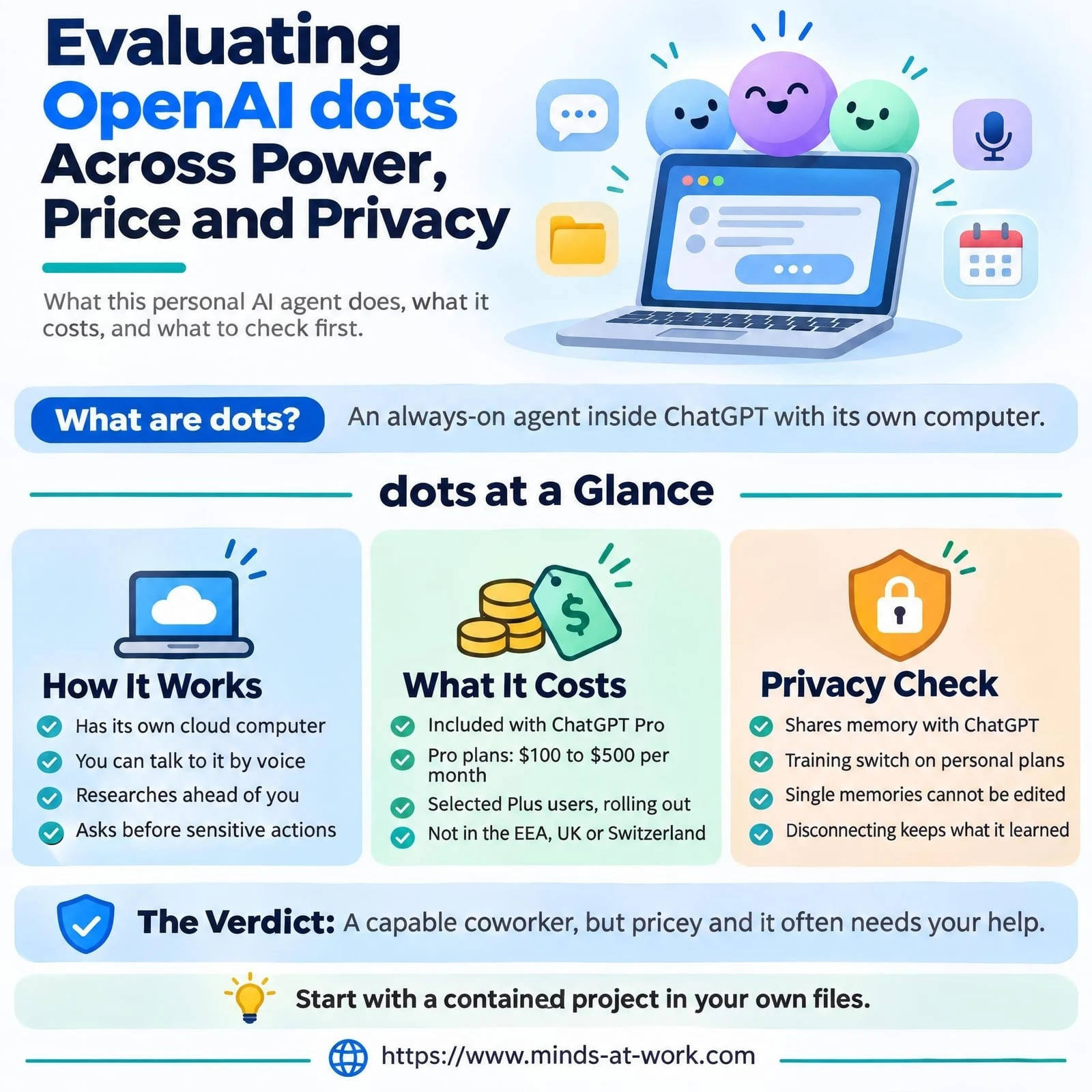
OpenAI dots at a glance
These are the facts most readers look for first, as of November 8, 2026. OpenAI dots is an always-on agent inside ChatGPT that works on its own cloud computer. The list covers the maker, the price, who can get it, the approval rules and the memory trade-off. The sections below give the sources and the caveats.
- Maker: OpenAI; released at its developer day in late September, according to TechCrunch
- What it does: Works on its own cloud computer, takes voice calls and keeps progress between conversations
- Price: Included with ChatGPT Pro, which costs $100, $200 or $500 per month, per Forbes
- Other plans: Selected ChatGPT Plus users, plus some Business, Enterprise and Edu plans
- Not available in: The EEA, Switzerland and the UK
- Approvals: The most sensitive actions, such as changing a password or transferring money, require you to take over
- Main risk: Memory is shared with ChatGPT, and you currently cannot view, delete or edit individual dot memories
- Reviewer verdict: Strongest on work in your own files and accounts; often blocked by human checks on public websites
What is OpenAI dots?
A dot is an always-on agent that lives inside ChatGPT. An agent here means software that takes actions for you, not just answers questions. OpenAI’s getting-started page describes a dot as an agent that can help take a project from an idea to usable work. It keeps making progress between conversations. It also uses its own computer plus the apps you connect. A dot starts with context from your ChatGPT memory and learns how you like to work.
You get one dot per person. You name it and give it an avatar. The Verge’s Allison Johnson named hers Dotty McDotface. She noted that OpenAI says you will be able to have several dots in the future. TechCrunch reported that the idea behind the design is that a dot is a single entity in a single conversation, rather than a pile of separate chats.
How does OpenAI dots work?
Four design choices matter if you are comparing dots with Muse. A dot has its own computer, it can take voice calls, it looks ahead on its own, and it can have its own accounts. The two sections below cover the first two together and the last two together, then name the models behind them.
Where does a dot run, and can you talk to it?
Like Muse, a dot works on a cloud virtual machine, which is a computer that runs in a data center and that you reach over the internet. The Verge’s reviewer watched it click around on that machine while she chatted with it in a separate window. She noted that it can open apps such as Blender and GIMP right away.
You can also connect your own computer through the ChatGPT desktop app, so the dot can work with files and apps there. To let a dot use your camera, microphone or screen, you need to connect your computer. You must also grant permission to the ChatGPT app in your device settings, per OpenAI’s privacy FAQ.
You can talk to a dot, too. The Verge reviewer called her dot on the phone and talked through changes to her personal website section by section. Then she got a ping when the next version was ready.
How does a dot look ahead, and what accounts can it have?
A dot looks ahead on its own, and OpenAI calls this proactive research. As product lead Alexander Embiricos explained to TechCrunch, the dot periodically thinks about what it knows about you and what you have given it access to. It also thinks about what it could do to be more useful, then proposes it.
OpenAI’s FAQ adds that this research can read from connected sources and save private notes. Its research tools cannot send messages to other people, change content through plugins, or control a browser or computer. A plugin is a connector that lets ChatGPT reach an outside app such as Slack.
A dot can also have its own accounts. You can set up a separate Slack account for your dot so it has its own identity there. It can also use plugins you have already connected to ChatGPT. According to the FAQ, dots run on models from OpenAI’s GPT-6 family, which names GPT-6 Astra and GPT-6.1 Terra.
What can OpenAI dots actually do?
OpenAI says a dot can research, create and follow through on tasks. The company told The Verge that dots “can do nearly anything” with a cloud computer and app access. Reviewers tested a narrower range, and results were mixed. The sections below start with the errands that went wrong, then cover what worked, and end with a table that sorts the reviews by task.
What went wrong on errands?
The Verge’s reviewer tried to have a dot schedule an internet installation appointment. According to The Verge, the dot found a $100 promotional discount in an old email. Then it got stuck on a “press and hold” human check that it could not complete itself, and asked the reviewer to take over.
At checkout it asked for bank details, and she decided to finish the task herself. Unlike Muse, the reviewer noted, there was no virtual-card integration to protect payment details.
On other errands, the same reviewer found that her dot missed a free-tour option at a coworking space and offered a $35 day pass instead. It got stuck in a looping security check on her Ikea account, and a local restaurant’s ordering page blocked it. She wrote that it tripped security checks more often than Muse or Instinct. She also wrote that OpenAI links to a help page on websites blocking its cloud browser traffic.
What worked, and what did other reviewers say?
The dot did better on work inside her own accounts. With access to her computer, it combined several video files into one social-media clip. It also rebuilt a redesign of her personal website block by block. She still concluded, in her review, that it was not “$100-a-month handy” in her line of work.
Vox’s Jonquilyn Hill said she enjoyed it. She spent about an hour talking to it on the phone while it put together a packet of options. She later said it flagged that one of them was 40 percent off.
TechCrunch found the dot’s ability to think ahead apparent and often useful, but not timely. It flagged calendar conflicts and deadlines, though not always in time. Embiricos told the same story about his own dot telling him about a conflict three minutes before it started.
How do the results sort by task?
A dot is strongest on work you can describe in your own accounts and files. It is weakest on websites that treat a cloud browser as a bot. The takeaway is similar to Muse, which Part 2 covers. Sorted by task, the reviews look like this:
| Kind of task | What reviewers reported | Source |
|---|---|---|
| Work in your own files and accounts | Combined several video files into one clip and rebuilt a website redesign block by block | The Verge |
| Phone and voice work | An hour-long call produced a packet of options; website changes were talked through section by section | Vox, The Verge |
| Errands on public websites | Blocked by a human check, a looping security check and an ordering page | The Verge |
| Looking ahead | Flagged calendar conflicts and deadlines, though not always in time | TechCrunch |
I call the pattern in that table the own-files-first rule. Give a dot work that lives in your own files and accounts before you give it errands on the open web.
How much does OpenAI dots cost, and who can get it?
Dots are included with higher-tier plans rather than sold separately. As of November 8, 2026, and according to OpenAI’s help center and announcement, access works like this:
| Plan | Access to dots |
|---|---|
| ChatGPT Pro ($100, $200 or $500 per month, per Forbes) | Included, for eligible users aged 18 and older |
| ChatGPT Plus | Selected users, rolling out gradually |
| ChatGPT Business | Standard and Premium seats in supported regions |
| Enterprise, Edu, Healthcare | Available to eligible workspaces; Enterprise dots are free through January 13, 2027, with billing starting January 14, 2027 |
Dots are not available in the European Economic Area (EEA), Switzerland or the UK. OpenAI says that downgrading from Pro to Plus means losing your dot. Your first dot is included at no extra cost, with an allowance for deeper work and extended limits for the first month after launch. Conversations with your dot do not count toward ChatGPT usage limits, but work it starts in Codex or ChatGPT Work does.
Is OpenAI dots safe for your data?
OpenAI’s privacy FAQ is detailed. These are the points most likely to matter to a non-developer. The sections below cover approvals, then memory and training, then what reviewers said about the controls. They come from OpenAI’s FAQ unless a reviewer is named, so you can tell company claims from outside reports.
How do approvals work?
The most sensitive actions, such as changing a password or transferring money, require you to take over and finish them yourself. Others, such as permanently deleting data or installing software, may need approval each time. Some, like recurring messages, can be approved in advance.
You can add Custom Rules, such as telling your dot never to send emails. These cannot override core safety requirements. A separate review system called Auto-review checks certain planned actions, such as the recipient and content of an email, before they run.
What does a dot remember, and is it used for training?
A dot shares memory with ChatGPT. Turning off Memory in ChatGPT stops further sharing but does not delete what the dot already received. OpenAI says you currently cannot view, delete or edit individual dot memories. Deleting your dot starts deletion of its own context. It does not delete the files and conversations the dot created. Disconnecting a plugin stops new access without deleting what the dot already learned.
For personal plans, the “Improve the model for everyone” setting controls whether dot conversations and work may be used to improve OpenAI’s models. Business, Enterprise and Edu workspaces are not used for training by default. OpenAI says a dot’s context does not retain credentials, images or screenshots.
What do reviewers say about the controls?
TechCrunch added that the controls are not granular and the app can be pushy. For example, the dot refuses to accept read-only access to cloud drives. Embiricos told TechCrunch that OpenAI knows it needs “super, super, super granular controls” and that it started with conservative defaults.
Whichever agent you pick, ask the same three data questions: what it can see, what it can change, and what you can take back. For a wider frame on adopting AI tools in a small company, see AI strategy for SMB owners.
Who should use OpenAI dots?
Dots fit people who already work inside ChatGPT and whose best tasks sit in their own files and accounts. They fit worse if you want a free agent or live where dots are not offered. The two lists below spell out each case, so you can check yourself against both before you pay for anything.
Who is OpenAI dots a good fit for?
Dots fit you if:
- You are a ChatGPT Pro or Business user who already works inside ChatGPT and wants an agent that carries context between tasks.
- Your most useful tasks involve your own documents, files, accounts or website, rather than ordering from many different websites.
- You like the idea of talking to your agent by voice.
Who should skip OpenAI dots?
Dots are a weaker fit if:
- You want a free agent. As of November 8, 2026, dots require at least a paid ChatGPT plan.
- You live in the EEA, Switzerland or the UK, where dots are not available.
- Your day-to-day tasks are consumer errands on sites that block cloud browsers.
So, is OpenAI dots worth it?
Dots is a capable agent with a clear idea of itself as a coworker. Reviewers liked the voice calling, the computer access, and the way it carries context. They disliked the number of human checks it ran into and the price for casual use. On privacy, the main trade-off is shared memory with ChatGPT, which you cannot inspect item by item.
My advice follows the own-files-first rule. If you already pay for Pro, start with a contained project in your own files and keep approvals on. If you do not, there is little reason to upgrade for dots alone, based on what reviewers have reported so far.
If you are weighing agents like this for a team and want a second opinion, that is the kind of call a Fractional CTO can run with you. The full list of reviews lives in the Personal AI Agents archive.
Frequently asked questions
These are the questions readers ask most often about OpenAI dots. The answers cover what a dot is, what it costs and where it is available. They also cover what it can do without asking, how its memory works and how it differs from Meta Muse. Each answer repeats the main point from the section above.
What is OpenAI dots?
OpenAI dots is an always-on personal agent inside ChatGPT. You get one dot per person, and you name it. It works on its own cloud computer, can use apps you connect, keeps making progress between conversations, and starts with context from your ChatGPT memory. OpenAI describes it as helping take a project from an idea to usable work.
How much does OpenAI dots cost?
Dots are included with higher-tier plans rather than sold separately. ChatGPT Pro, which Forbes lists at $100, $200 or $500 per month, includes it for eligible users aged 18 and older. Selected Plus users are getting access gradually. Business and Enterprise workspaces can get it, and OpenAI’s help center says Enterprise dots are free through January 13, 2027, with billing starting January 14, 2027.
Is OpenAI dots available in Europe or the UK?
No. OpenAI says dots are not available in the European Economic Area, Switzerland or the UK. Availability also depends on your plan, your age and, for Business seats, your region. If you are on Pro and downgrade to Plus, OpenAI says you lose your dot. So check your plan and location before you build a workflow around it.
Can OpenAI dots spend money or send messages without asking?
Not for the most sensitive actions. OpenAI says changing a password or transferring money requires you to take over and finish the step yourself. Permanently deleting data or installing software may need approval each time, and recurring messages can be approved in advance. An Auto-review system also checks some planned actions, such as an email’s recipient and content, before they run.
Does OpenAI dots remember everything I tell it?
A dot shares memory with ChatGPT, so it starts with what ChatGPT already knows about you. OpenAI says you currently cannot view, delete or edit individual dot memories. Turning off Memory in ChatGPT stops further sharing without deleting what the dot already received. Disconnecting a plugin stops new access without deleting what it already learned.
How is OpenAI dots different from Meta Muse?
Both work on a cloud virtual machine. Muse was pitched as an everyday helper for everyone, while dots has a higher price of entry and a more workplace feel. The Verge’s reviewer also noted that dots had no virtual-card integration to protect payment details. She added that it tripped website security checks more often than Muse. Part 2 covers Muse in full.
Up next
In Part 4, I’ll look at Anthropic’s Claude Duet, which runs on a schedule of its own and is built around approvals before it sends, pays or deletes anything. Keep the privacy section of this article handy, because Duet handles memory and disconnected apps a little differently. Part 4 is on the way.