Microsoft Autopilot Review: An Agent With Its Own Identity (Part 7 of 18)
A plain-English look at Microsoft's Autopilot: its own identity and mailbox, how access works, how it is billed, and why most people cannot try it yet.
By Dr. Sanju Abraham, Fractional CTO, investor, multiple exits. Published November 12, 2026.
The short answer: As of November 24, 2026, Microsoft Autopilot is a cloud-based work agent with its own identity, mailbox and workspace. It starts with access to nothing until someone grants it. It is rolling out only in a preview program, so most individuals cannot sign up. The idea is the strongest part. The evidence for reliability is the weakest part.
Microsoft Autopilot at a glance
These are the facts most readers look for first, as of November 24, 2026. Microsoft Autopilot is a cloud-based work agent with its own identity, and most individuals cannot try it yet. The list covers what it is, its status, its access rule, its billing and who can try it. The sections below give the sources and the caveats.
- What it is: A cloud-based work agent in Microsoft Copilot, one per person
- Announced: Ignite, mid-November
- Status: Prerelease, in the Frontier preview program (Microsoft’s early-access channel)
- Identity: Own name, email address and Microsoft Entra identity
- Access: Starts at nothing; each resource is granted separately
- Billing: Copilot Credits, usage-based; final pricing not published
- Who can try it: Customers with Microsoft Copilot, Agent 365 and usage-based billing, enabled by an admin
- Independent testing: None found; nearly everything comes from Microsoft’s own documentation
This is Part 7 of 18 in the Personal AI Agents series, written by Dr. Sanju Abraham of Minds at Work. Everything here reflects what was publicly reported as of November 24, 2026, when I last checked the sources. Missed the last one? Read Part 6, on Grok Bot. If you are new to the series, Part 2 on Meta Muse is a good place to see what a consumer agent looks like.
Why can most people not try Microsoft Autopilot yet?
Microsoft’s Autopilot is the one agent in this series you probably cannot try yet, and the reason is useful to understand. It is a personal agent built for companies, and Microsoft announced it at Ignite in mid-November. Per Microsoft’s own product page, it is rolling out in the Frontier preview program. The program is open to customers who already have Microsoft Copilot, Agent 365 and usage-based billing. Agent 365 is the Microsoft administration product the preview requires. An administrator has to switch Autopilot on.
Because of that, almost everything below comes from Microsoft’s own documentation, not independent testing. I flag that where it matters. Also, do not confuse Autopilot with Windows Autopilot, an unrelated Microsoft tool for setting up new computers.
What is Microsoft Autopilot?
Microsoft Autopilot is a constant, cloud-based agent inside Microsoft Copilot. Microsoft’s documentation says you describe the outcome you want, the sources it should use and the boundaries for its actions. It can prepare documents, review conversations you can access, follow up on work and run recurring tasks. The documentation labels it prerelease and in preview.
Each person can have one Autopilot. You work with it in Copilot on the web or desktop, where it appears by name. It also uses a private one-on-one chat in Teams for updates, questions and approvals. Other people can work with it too. Microsoft’s launch post says colleagues can message it in Teams. You can also delegate work to it in group chats and channels by bringing it into the conversation.
How does Autopilot work?
The distinctive idea is that an Autopilot is treated like a new colleague. Five behaviors follow from that. The first three describe how it joins your workplace: it gets its own identity, it starts with no access, and it reads what you can already see. The last two describe its daily work, because it keeps going when your device is off and an automated review checks actions before they run.
What identity and access does Autopilot start with?
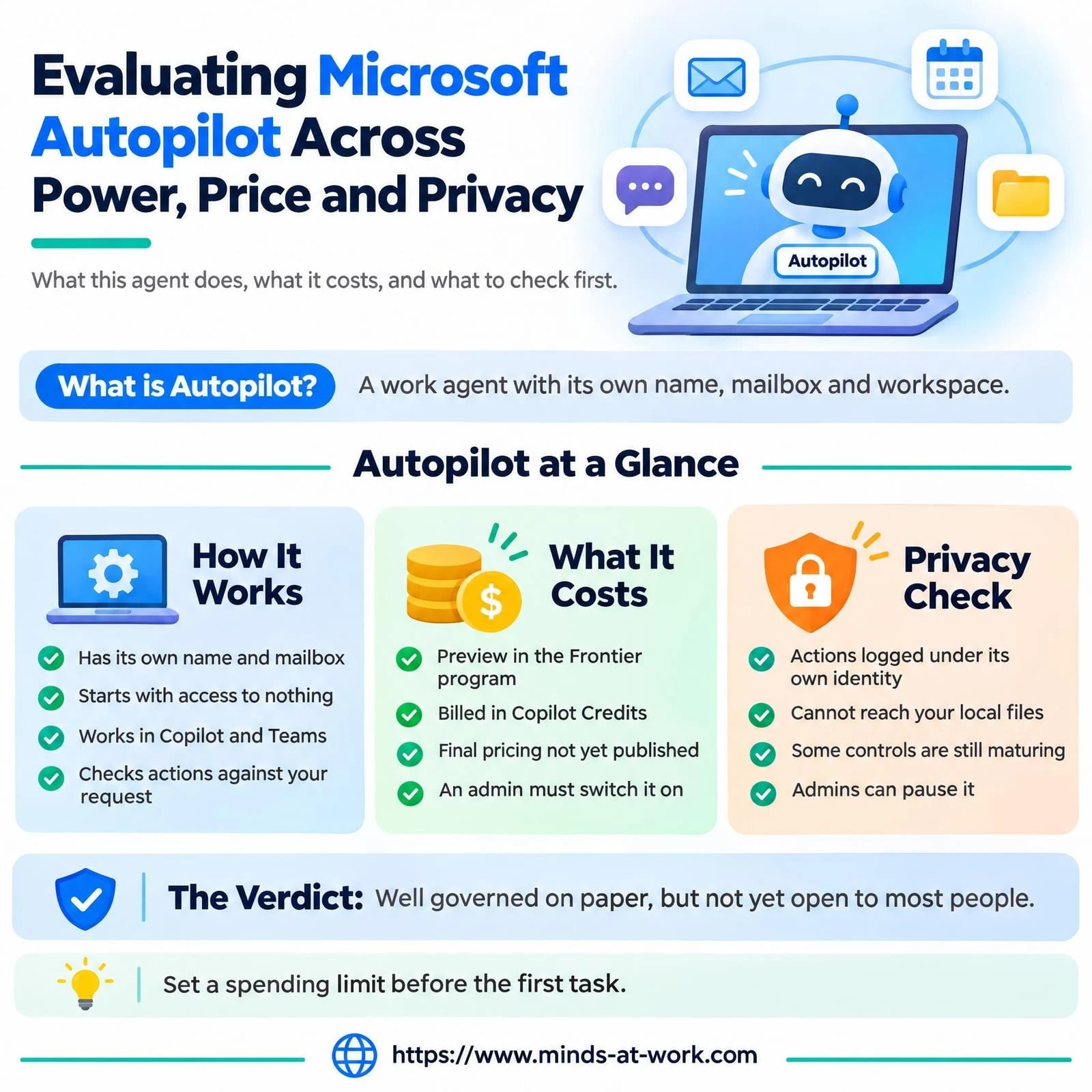
- Its own identity. Microsoft says Autopilot has its own name, appearance, email address and Microsoft Entra identity (Entra is Microsoft’s sign-in and access-management service), plus its own memory, computer and workspace. Microsoft’s IT team wrote that inside the company every Autopilot is a real identity in its tenant, with an Outlook mailbox and OneDrive storage, and the employee who sponsors it listed as its manager.
- Starts with nothing. Because it has its own identity, Microsoft says Autopilot starts with access to nothing. Someone has to grant access to each resource it needs, as they would for a new team member. In shared conversations it is limited to the context of that meeting, channel or group chat.
- Gets oriented first. When set up, Microsoft says it reads the last 30 days of email, meetings, chats and files you already have access to, without sending or changing anything.
I call the second behavior the zero-access start: the agent begins with nothing and earns each permission, the opposite of agents that begin with your whole inbox.
How does Autopilot keep working and stay in check?
- Keeps working. It can run scheduled work while your device is off, subject to access, approvals and service availability. It cannot access your local folders or apps, though it can work in Microsoft Edge on your device when you ask it to, where enabled.
- An automated review before action. Before it sends, shares, deletes or changes something, an automated review compares the action with your request. Actions that match run, and others wait for approval. Microsoft states that only your own requests authorize actions, and that instructions in email, files or web pages do not.
What can Autopilot do?
Microsoft’s examples are workplace tasks. They include preparing drafts, documents or analysis, following up on unresolved decisions, preparing for meetings, and running routines on a schedule or when an event occurs. It works across Teams, Outlook, OneDrive and SharePoint within the permissions you give it. It also works with shared tasks in Microsoft To Do and Planner.
What does Microsoft’s own example show?
The one detailed daily account comes from Microsoft itself. In an Ignite blog post, a Microsoft author describes working with an Autopilot named Sebastian in Teams and Outlook. While away from the office, the author asked Sebastian to help with unanswered Teams conversations. Sebastian prepared 40 reply drafts, grouped by priority, in a private, editable queue. The replies stayed as drafts, and the author remained responsible for what got sent.
In another example, Sebastian removed selected meetings from a calendar while preserving the recurring series. The author notes that reliability matters as much as capability, and that the team is still learning.
Is there independent evidence that it works?
As of November 24, 2026, I could not find an independent hands-on test of Autopilot. I also could not find a task completion rate or reliability figure published by Microsoft. The cost analysis I found, by Rajesh Beri in The Daily Brief, relies on documentation. It also uses a partner’s estimates for a different Copilot product. It does not use measured Autopilot results.
How much does Microsoft Autopilot cost, and who can get it?
Autopilot is not a product you buy on its own yet. Microsoft’s product page says it is available through usage-based billing with Copilot Credits, so cost scales with the work your Autopilot takes on. Admins can set budgets. Final pricing and packaging will be shared before general availability. The table below sets out what is known, with the reference prices that do exist for related products.
What do the reference prices say?
| Item | What is known |
|---|---|
| Access | Frontier preview, for customers with Microsoft Copilot, Agent 365 and usage-based billing, enabled by an admin |
| Billing | Copilot Credits, usage-based; final pricing not published |
| Reference prices | Microsoft’s Copilot Studio pricing page lists prepaid packs of 25,000 Copilot Credits at $200 per pack per month. Rajesh Beri’s analysis gives the Microsoft 365 Copilot seat as $30 per user per month and a credit at about one cent at list price. |
| Credits per task | Not published; Rajesh Beri’s analysis says nobody publishes what an Autopilot hour consumes |
What will it cost me today?
On the ordinary question of what it will cost you, the honest answer is that nobody outside Microsoft can say yet. In Episode 441 of the Microsoft Cloud IT Pro podcast, recorded live on November 18, 2026, one host called it a pay-as-you-go agent. He advised admins to work through the cost policy settings so nobody blows through thousands of dollars.
Is Microsoft Autopilot private and secure?
Microsoft’s governance story is its strongest feature. Three points matter: a separate identity, admin controls and the limits of a preview. The first two come from Microsoft’s documentation and rollout notes. The third is where Microsoft itself and one podcast host urge caution. Microsoft’s IT team also recommends a graduated approach. Start with review checkpoints and narrow permissions, then widen them as the agent proves reliable.
How do identity, audit and admin controls work?
- Identity and audit. Microsoft’s documentation says Autopilot’s own identity distinguishes its work from yours. Some operations use that identity and others use authorized access on your behalf, and it does not expand the data you can access. Microsoft cautions that Activity is not a guarantee of a complete administrative audit record. It also says sensitivity-label recognition does not establish that all generated files inherit labels or that every operation is covered by data loss prevention (DLP, the controls that stop sensitive data leaving approved places).
- Admin controls. Microsoft’s product page says admins can view usage and set budgets. Microsoft’s IT team says admins can pause or remove an individual instance.
What are the preview caveats?
- Preview caveats. On Episode 441 of the Microsoft Cloud IT Pro podcast, a host said he checked Microsoft’s data loss prevention coverage list and Autopilot was not on it. He also said DLP for prompts is being tested in some tenants. Not all the security controls you might expect work while it is in Frontier. Microsoft’s documentation is consistent with that caution, because it says preview features may have restricted functionality.
How does Autopilot compare with the other agents in this series?
Its main difference is a separate identity and a zero-access start. Here is how it sits against the agents covered so far.
| Compared with | What differs |
|---|---|
| Muse and Duet (Part 2, Part 4) | Those agents act through your own accounts and ask you to approve key steps. Autopilot also acts through your accounts for some tasks, but uses a separate identity for others. That makes it easier to see who did what, and it also means the audit trail can be split, because Microsoft’s documentation says some operations use Autopilot’s identity and others use authorized access on your behalf. |
| dots (Part 3) | Both are described as coworkers more than personal shoppers. Dots is available today to paying ChatGPT users, while Autopilot is gated to Microsoft’s preview program. |
| Grok Bot (Part 6) | Both can work alongside teammates in a chat tool, Grok Bot in Slack and Autopilot in Teams. Autopilot’s access starts at zero for each resource, while Grok Bot’s Bots share one computer’s logins. |
What should an organization decide before turning Autopilot on?
Decide who sponsors it, what it can reach, how much it may spend and who supervises it. I call these four questions the Autopilot readiness check: sponsor, access, spend and supervision. They come from the points Microsoft’s own rollout notes raise, and they are sensible ones for a non-developer to ask too.
- Sponsor. Who is the human sponsor of each Autopilot, and what is their responsibility?
- Access. Which resources does it get access to on day one, and who approves more?
- Spend. What is the monthly spending limit in Copilot Credits, and what happens when it is reached?
- Supervision. Which routines may run without a person reviewing the result?
Microsoft says it began with a voluntary deployment to a small group of employees and expanded in phases. That is a reasonable template for anyone else. If you want help setting those guardrails, a Fractional CTO can run the decision with your team. My AI strategy for SMB owners piece covers the planning side. For the builder’s view of how agents route and escalate work, see where decision models fit in an AI agent stack.
Who is Microsoft Autopilot for?
It fits companies on Microsoft 365 that are already in the Frontier program. Today that is a narrow group, so the lists below show which side of the line you are likely to fall on. They depend on whether you have an admin who will switch it on and whether your organization wants an agent that acts with its own identity.
Autopilot fits you if:
- You work at a company on Microsoft 365 that has joined the Frontier program and has an admin willing to switch it on.
- You have one recurring responsibility, such as follow-ups or meeting preparation, with a clear owner.
- Your organization values an agent with its own identity and audit trail.
It’s a weaker fit if:
- You are an individual user. You cannot sign up directly.
- You need price certainty or independent reliability data before trying it.
- You want an agent for personal errands such as shopping or travel.
What is the verdict on Microsoft Autopilot?
Autopilot is the most carefully governed personal agent from a big platform, based on its documentation, and the least available. The idea of giving an agent its own identity, with its own mailbox and a human sponsor, answers a hard question: who is responsible when an agent acts? Without outside testing, treat reliability as unproven. That is the main reason I would start small.
If your workplace is in the preview, start with drafts and briefings. Set a spending limit first, and count how often it prepares the right thing. Treat the first month as a pilot. Answer the four readiness questions before you widen access. They are the cheapest way to learn whether your team can supervise an agent that acts on its own.
What comes next in the series?
Part 8 covers Instinct, the first of the startup-hosted agents. It runs entirely over text messages, it was the buzziest launch of the year, and its privacy terms drew the most criticism. Autopilot is gated behind a company admin and a preview program. Instinct takes the opposite route, and the questions about it are mostly about privacy rather than access. Read Part 8 on Instinct when it publishes.
Frequently asked questions
These are the questions readers ask most often about Microsoft Autopilot. The answers cover what it is, whether you can sign up and what it costs. They also explain its own identity, how it differs from Windows Autopilot and whether it is safe at work. Each one rests on Microsoft’s own documentation, so the same preview caveats apply.
What is Microsoft Autopilot?
Microsoft Autopilot is a constant, cloud-based agent in Microsoft Copilot. You tell it the outcome you want, the sources to use and the limits on its actions, and it prepares documents, follows up on work and runs recurring tasks. Microsoft labels it prerelease and in preview, and each person can have one Autopilot.
Can I sign up for Microsoft Autopilot myself?
No. Microsoft’s product page says Autopilot is rolling out in the Frontier preview program. It is open to customers who already have Microsoft Copilot, Agent 365 and usage-based billing, and an administrator must enable it. Individual users cannot sign up directly, so the practical route is to ask your company’s Microsoft 365 administrator.
How much does Microsoft Autopilot cost?
Microsoft has not published final pricing. Billing is usage-based through Copilot Credits, so cost scales with the work your Autopilot takes on, and admins can set budgets. Microsoft says final pricing and packaging will be shared before general availability. I could not find a published credits-per-task figure, so no one outside Microsoft can give you a firm monthly number.
Why does Autopilot have its own identity and email address?
Microsoft treats each Autopilot like a new colleague. A separate Microsoft Entra identity, mailbox and workspace distinguish its work from yours, and it starts with access to nothing until someone grants each resource. Inside Microsoft, a sponsoring employee is listed as the agent’s manager, which makes responsibility explicit.
Is Microsoft Autopilot the same as Windows Autopilot?
No. Windows Autopilot is an unrelated Microsoft tool for setting up new computers. Microsoft Autopilot, the subject of this article, is a personal work agent inside Microsoft Copilot. The shared name is a coincidence of branding, so check which product a document or admin console refers to before acting on it.
Is Microsoft Autopilot safe to use at work?
Its governance design is strong on paper. It starts with no access, checks actions against your request, and lets admins see usage, set budgets and pause it. But it is in preview, Microsoft cautions that its activity log is not a complete audit record, and I found no independent reliability testing. Start with drafts and narrow permissions.