Perplexity Computer Review: What a Research Agent Really Costs (Part 13 of 18)
A plain-English look at Perplexity Computer: how it plans work, what independent testers spent in credits, and what its privacy settings mean for you.
By Dr. Sanju Abraham, Fractional CTO, investor, multiple exits. Published November 18, 2026.
The short answer: Perplexity Computer is a cloud agent that turns a goal into a plan, runs the steps and delivers a finished piece of work. It does best on bounded research jobs, where testers reported a few dollars in credits and a human edit at the end. As of November 18, 2026, it is the agent in this series with the most independently reported run costs.
This is Part 13 of 18 in the Personal AI Agents series. Missed the last one? Read Part 12, on Spiritt.
Perplexity is best known for its answer engine. Its agent, Computer, is the odd one out in this series for a pleasant reason. Several independent writers have tested it and written down what a job cost. That makes it a good place to see how credit pricing behaves in practice, which is the pricing model you have now met in Lindy, Viktor and Spiritt.
Perplexity Computer at a glance
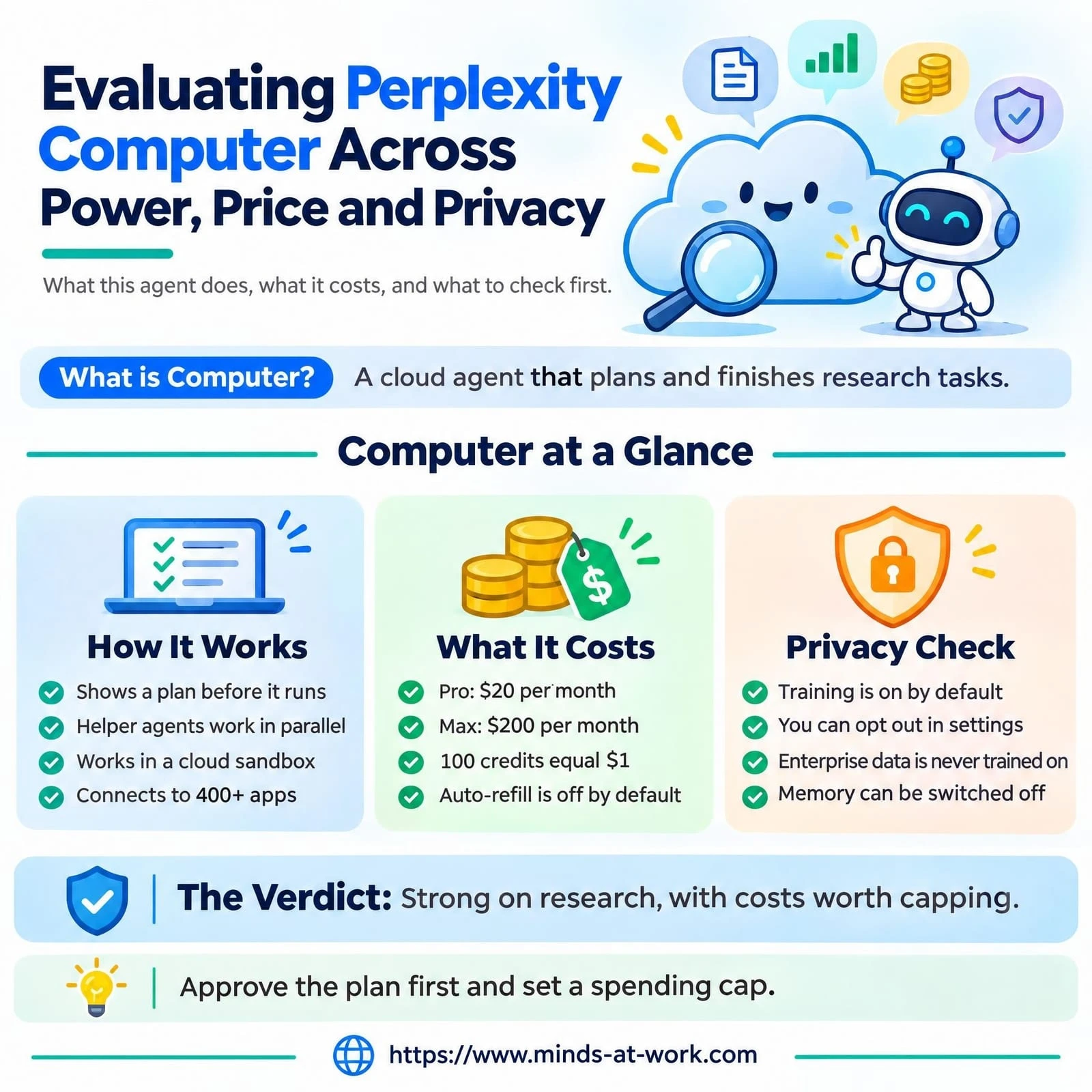
These are the facts most readers look for first, as of November 18, 2026. Perplexity Computer is a cloud agent that plans a job, runs it and hands back a result. The list covers the plans, the credit prices, what testers paid and the data default. The sections below give the sources and caveats.
- What it is: A cloud agent that turns a goal into a plan, runs the steps and delivers a finished piece of work, separate from Perplexity’s normal search
- Plans: Pro at $17 a month and Max at $167 a month, both billed annually, according to Perplexity’s pricing page
- Credit value: 100 credits equal $1, according to Perplexity’s credits page
- Typical research job: 350 to 950 credits, or about $3.50 to $9.50, according to Perplexity’s credits page
- Tester-reported costs: DataCamp’s eight-tool research run used 225.71 credits, and Susan Mernit’s session used $12.84 of purchased credits
- Biggest cost risk: Coding, according to DataCamp
- Data default: On Free, Pro and Max, AI data retention is on by default, so your data may be used for training unless you opt out
- Tested by me: No; the cost and quality reports come from independent testers
What is Perplexity Computer?
Perplexity Computer is a cloud agent: software that takes a goal and carries out the steps itself, on Perplexity’s servers. It is not a device, and it is not the same thing as Perplexity’s normal search. Search returns an answer, but Computer makes a plan and carries it out across the web, your files and your connected apps.
TechCrunch’s launch report, published February 27, said Computer was available only on the $200 a month Perplexity Max plan. It added that Computer runs entirely in the cloud, which “might spare it some of the security concerns” of agents such as OpenClaw. OpenClaw runs on your own machine, and it is the subject of Part 14.
Access has widened since then. DataCamp’s tester reported that Pro subscribers have had access since March 13, 2026. DataCamp also describes a separate product, Personal Computer, which runs locally on a Mac. It launched in mid-April and was rolling out from Max to Pro. This article covers the cloud product.
How does Perplexity Computer work?
DataCamp describes the flow this way. Computer drafts a plan, then routes the steps to specialized sub-agents inside an isolated cloud sandbox. In the tester’s research run, Computer paused on a written plan. The plan listed the sources, the order of work and a rough credit estimate. Approving it started the work, and a credit counter ran while the agents worked. By DataCamp’s April 17 update, you could stop a single sub-agent or type a follow-up mid-task.
Computer uses different AI models for different steps. XDA Developers’ tester reported that one model handled content gathering and another handled the coding for a portfolio site. Perplexity’s pricing page says Pro and Max members can also choose a preferred model. The page also advertises more than 400 app connectors.
One more detail comes from Perplexity’s help center. In its Comet browser, Search mode answers questions without using credits, but Work mode hands your request to Computer and does use them. Check which mode you are in before you press Enter.
What can Perplexity Computer do, according to independent testers?
The three independent accounts I found each tried a different kind of job. One tested scheduling and a website build, one ran a research comparison, and one ran policy research. Each tester also reported how long the work took or what it cost. I did not run Computer myself, so everything below comes from their write-ups.
A calendar and project helper
Mahnoor Faisal of XDA Developers asked Computer to review their Asana tasks, check Google Calendar, time-block the week and fill a Notion dashboard. Faisal disclosed that Perplexity gave them a three-month Max code.
Computer first assumed each article would take eight hours to write. After Faisal corrected it, they said it scheduled the work efficiently. They also had it build a portfolio site, which was ready in around ten minutes. Their biggest complaint was price.
A research workflow
DataCamp’s tester asked for a comparison of eight AI coding tools. The run took 7 minutes 59 seconds and used 225.71 credits. The comparison table was close to publishable and cited primary documentation and pricing pages.
About thirty minutes went into editing, almost all of it on the recommendation memo. The tester said to treat the output like a junior analyst’s first draft.
Policy research
Susan Mernit, writing on April 25, had Computer research child savings account programs in three states over a 90-minute session. She estimated the work might have taken twelve hours by hand and finished in four. She oversaw fact-checking rather than treating citations as verified.
According to Mernit’s post, the session used $12.84 of purchased credits. She also noted that Computer uploaded a deliverable to her Google Drive without offering a download, so she asked it to check with her before uploading anything.
What do the three accounts have in common?
Computer does best on bounded jobs with a clear shape, and the output still needs a human read. DataCamp called coding workflows its highest cost risk. It noted that the cloud version has no live preview, and that failed coding loops have crossed 10,000 credits.
How much does Perplexity Computer cost?
The cost has two parts: a subscription, and a separate balance of credits that Computer draws down. Perplexity prices the subscription by plan and the credits by job size. I show the plan prices first, then the job sizes, then the rules that decide how fast credits go. Testers’ real run costs appear above and in the comparison later on.
What do the plans cost?
Perplexity’s pricing page lists Pro at $17 a month billed annually and Max at $167 a month billed annually. DataCamp lists the monthly prices as $20 for Pro and $200 for Max. The table shows both figures.
| Plan | Price | Computer |
|---|---|---|
| Free | $0 | Some accounts get a limited one-time allowance of Computer turns, with no credits used |
| Pro | $20 a month ($17 a month billed annually) | Weekly Computer usage included, then credits you buy |
| Max | $200 a month ($167 a month billed annually) | 10,000 credits a month, plus a one-time bonus for new subscribers |
| Enterprise | See Perplexity’s Enterprise pricing page | Separate plans, covered in the privacy section below |
How many credits does a job use?
The credit ranges come from Perplexity’s credits page. The dollar column is my own arithmetic at the rate of 100 credits to the dollar.
| Job | Typical credits | Approximate cost |
|---|---|---|
| Quick fact or definition | 15 to 70 | $0.15 to $0.70 |
| Multi-step research report | 350 to 950 | $3.50 to $9.50 |
| Data dashboard | 2,400 to 9,800 | $24 to $98 |
| Entire app or multi-day build | 15,000 or more | $150 or more |
Which rules decide how fast credits go?
The same credits page sets out the rules that decide how fast the money goes:
- Credit value. One hundred credits equal one dollar, and Perplexity says that rate can change.
- Pro in practice. Paid Pro plans include weekly Computer usage and no monthly credit allowance. Once the weekly usage runs out, Computer uses credits you have bought.
- Bonus credits. New subscribers get a one-time bonus of 4,000 credits on Pro or 35,000 on Max, which expires in about 30 days.
- Rollover. Monthly credits do not roll over. Purchased credits expire if you do not use Computer for a year.
- When credits run out. Active tasks pause and resume once you add credits or your monthly credits reset.
- Guardrails. Auto-refill is off by default. Max has a monthly spending cap that defaults to $200 and can be raised to $5,000. Pro has a cap you cannot raise.
Why do older reviews show different credit prices?
Read older reviews with care, because the price of a credit has changed. Mernit bought hers at $0.004 each in April, and Perplexity’s current page says 100 credits per dollar, or $0.01 each. At that rate, DataCamp’s research run would cost about $2.26, again by my arithmetic. Check the current page before you budget.
What does Perplexity Computer do with your data?
Perplexity’s data collection page says it does not sell your data, and then draws a line between plans. Free, Pro and Max users get one set of defaults, and Enterprise customers get another. The memory feature, Brain, has its own rules. I cover each below, then the cautions I would keep in mind.
What changes between the plans?
- Free, Pro and Max. AI data retention is on by default, which means your data may be used to improve Perplexity’s models. You can turn it off under Settings, then Preferences. The opt-out applies only to data collected afterward, and previously collected training data cannot be deleted.
- Enterprise. Data is never used for AI training, and Enterprise Pro and Enterprise Max keep uploaded files for only seven days. Perplexity’s Enterprise Max help page says Perplexity Enterprise meets SOC 2 Type II, HIPAA, GDPR and PCI DSS standards.
What does Brain remember?
Perplexity’s help page on Brain, Computer’s memory feature, says it learns only from your own activity, has its own off switch, and lets you edit or delete any entry. Brain is a Research Preview for Max and Enterprise Max. The page says AI data retention covers searches used to improve models, not what Brain writes into Computer’s memory.
What cautions follow from this?
First, the compliance claims sit on the Enterprise pages, so an individual on Pro or Max should assume the consumer policy applies. Second, DataCamp noted that connector reliability is uneven and changes fast, so test any connector on a low-stakes job first.
Running in Perplexity’s cloud keeps the agent off your own machine, which removes one category of risk. It still acts through whatever accounts you connect.
How does Perplexity Computer compare with the agents so far?
Several outside testers have published what real jobs cost on Perplexity Computer. In Parts 11 and 12, the cost figures came mainly from the vendors’ own pricing pages. That makes Computer the first agent in this series where budgeting is less of a guess. Even so, DataCamp warns that run costs vary because agent runs are non-deterministic. The table sets Computer beside the closest agents so far.
| Agent | What it is | How you pay | Best for |
|---|---|---|---|
| Perplexity Computer | A cloud workspace that plans and runs a task | Subscription plus credits, with vendor ranges and tester-reported costs | One-off research and builds |
| Manus Cloud Computer (Part 10) | A rented server that stays on | A monthly price per machine, plus plan credits | Hosting things that keep running |
| Viktor and Spiritt (Parts 11 and 12) | Team agents that share a credit pool | Workspace credits | Work shared across a team |
What should you do before you start?
I use a simple check for credit-priced agents, which I call the three locks: approve the plan, cap the spend, edit the output. Computer supports the first two directly, and the third is on you.
- Try one bounded job, such as a competitor comparison, and approve the plan before it runs.
- Turn off AI data retention in your settings if you do not want your activity used for training.
- Leave auto-refill off, and on Max lower the monthly cap while you learn what jobs cost.
- Expect to edit the result. The writing and recommendations need a human read more than the tables do.
- Be cautious with coding and large builds, where credit use can climb quickly.
- Tell Computer to ask before it uploads or shares anything, as Mernit did.
If you are weighing agents like this for a company, our AI strategy for SMB owners piece covers where to start. A Fractional CTO can help you decide which accounts an agent should ever touch. More pieces on choosing and governing AI tools live in the Personal AI Agents archive.
Who is Perplexity Computer for?
Perplexity Computer suits people who do research and can manage a credit balance, and it suits others less. The two lists below show which group you are likely to be in, based on how you work and how much cost and data risk you can accept.
Computer fits you if:
- You do research, comparisons or reports and want parallel work with cited sources.
- You are comfortable managing a credit balance and a spending cap.
- You will check the output before it leaves your hands.
It’s a weaker fit if:
- You want a free, always-on assistant. Heavy use needs paid credits.
- You need predictable monthly costs for large builds.
- You want strong data protections on an individual plan. The strongest promises belong to Enterprise.
Is Perplexity Computer worth it?
Perplexity Computer is a capable research and building agent whose costs are unusually well documented. Testers report a few dollars for a research job and warn of far larger bills for coding. It is good at structured work with sources, but it still needs a human editor. Start with a bounded task, approve the plan, cap your spending, and opt out of training if that matters to you.
What is coming in Part 14?
In Part 14, I’ll start the open-source section with OpenClaw, the self-hosted agent that went viral in early 2026. It set off both a wave of imitators and a wave of security warnings. It is the project the next four articles are all, in some way, a response to. The article looks at what changes when an agent runs on your own machine.
Frequently asked questions
These are the questions readers ask most often about Perplexity Computer. The answers cover what it is, what it costs in plans and credits, how it uses your data, what happens when credits run out and whether it suits coding work. Each one uses the same sources as the sections above, so the figures and caveats match.
What is Perplexity Computer?
Perplexity Computer is a cloud agent that takes a goal, drafts a plan and runs the steps across the web, your files and connected apps. It is different from Perplexity’s normal search, which returns an answer. Computer does multi-step work, uses credits while it runs, and hands back a finished result such as a report or a spreadsheet.
How much does Perplexity Computer cost?
You need a paid plan plus credits. Perplexity’s pricing page lists Pro at $17 a month and Max at $167 a month billed annually, and DataCamp lists $20 and $200 monthly. Max includes 10,000 credits a month, while Pro includes weekly usage and then charges for credits. Perplexity says 100 credits equal $1, and a multi-step research report typically uses 350 to 950 credits.
How many credits does a typical job use?
Perplexity’s credits page gives ranges. A quick fact uses 15 to 70 credits and a research report uses 350 to 950. A data dashboard uses 2,400 to 9,800, and a whole app uses 15,000 or more. In DataCamp’s test, an eight-tool comparison used 225.71 credits. Perplexity says the credit rate can change, so check its credits page before you budget.
Does Perplexity use my data to train its models?
On Free, Pro and Max, AI data retention is on by default, so your data may be used to improve models. You can turn it off in Settings under Preferences, but the opt-out covers only data collected afterward. Perplexity says Enterprise data is never used for training. Individuals should assume the consumer policy applies to them.
What happens when my credits run out?
Perplexity says active tasks pause instead of being cancelled, and your work is saved. New credit-using tasks are blocked. Paused tasks resume once you add credits or your monthly credits reset. Auto-refill is off by default, so credits only top up automatically if you switch it on. On Max, you can also set a monthly spending cap.
Is Perplexity Computer good for coding?
Testers are cautious. DataCamp called coding workflows the highest cost risk. It noted that the cloud version has no live preview or hot reload, and that failed coding loops have crossed 10,000 credits. XDA’s tester did get a portfolio site built in about ten minutes. Try a small, well-defined build first, approve the plan, and watch the credit counter.