Viktor Review: An AI Employee for Slack and Teams (Part 11 of 18)
A plain-English look at Viktor: how it works inside Slack and Teams, how shared credits and plans work, and what its security page does and does not say.
By Dr. Sanju Abraham, Fractional CTO, investor, multiple exits. Published November 16, 2026.
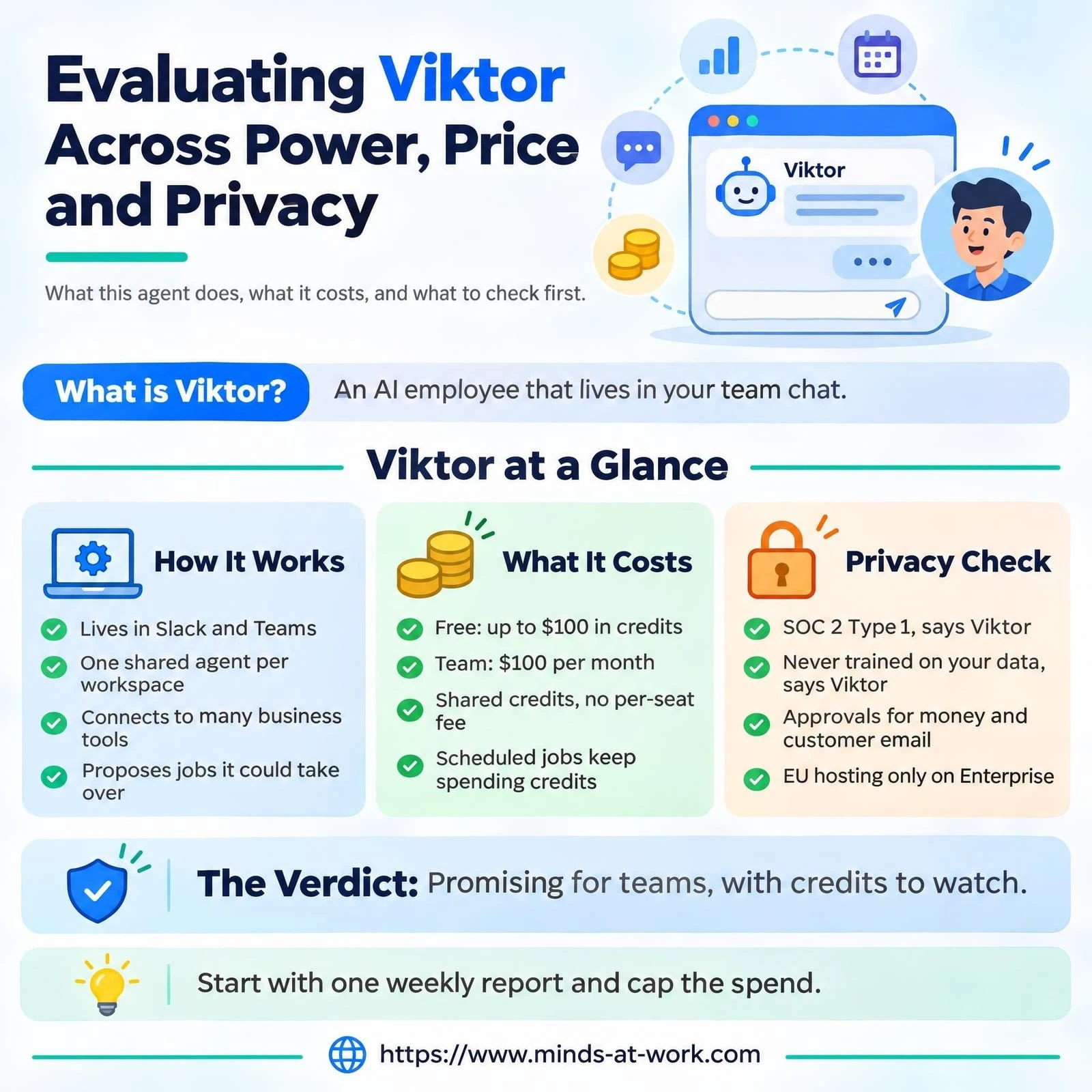
The short answer: Viktor is an AI agent that lives in Slack and Microsoft Teams and works like a shared team member. It connects to your business tools, takes jobs from anyone on the team and charges in shared credits. It is a good fit for a small team with repeatable chores and someone willing to supervise it. Pricing and security details below were checked against Viktor’s own pages in November 2026. The security claims are the company’s own, not an independent audit.
This is Part 11 of 18 in the Personal AI Agents series. Missed the last one? Read Part 10, on Manus Cloud Computer.
Most agents in this series are built for one person. Viktor is built for a team. That raises a question every owner should answer. How much of the daily running of a business would you hand to software that lives in your team chat? It behaves like an employee, so the question is a fair one.
Viktor at a glance
These are the facts most readers look for first, as of November 2026. Viktor is an AI agent that lives in Slack and Microsoft Teams and works like a shared team member. The list covers the funding, the price, the real bills, the safety claims and the main risks. The sections below give the sources and caveats.
- What it is: One shared AI agent per Slack or Microsoft Teams workspace
- Built for: Teams rather than individuals, according to Accel’s announcement
- Funding: A $75 million Series A led by Accel in May 2026, according to Fortune
- Free start: Up to $100 in credits, according to Viktor’s pricing page
- Team plan: From $50 a month, and the $100 tier gives 40,000 shared credits with no per-seat fee, according to Viktor’s pricing page
- Real bills: Roughly $750 a month, reported by The Savvy Couple and Efficient, because scheduled and repeated jobs keep using credits
- Safety design: Sensitive actions wait for approval, and the AI model never sees your keys; SOC 2 Type 1 held, Type 2 in progress, all self-reported
- Main risk: Everyone on the plan shares one instance, so keep sensitive personal details out of direct messages
What is Viktor?
Viktor is an AI agent that lives in Slack and Microsoft Teams and works like a shared team member. An AI agent is software that takes a goal and carries out the steps itself. Viktor describes itself as an AI employee. You message it like a colleague, add it to a channel, or pick up a thread someone else started.
Who built Viktor, and who is it for?
Fortune reported that Fryderyk Wiatrowski (CEO) and Peter Albert (CTO) built it. The same founders earlier made JaceAI, an email assistant. Viktor’s About page says the two met at Meta and left in 2023. It says they needed three tries: first a browser agent, then an email assistant, then an agent they added to their own Slack to run their ads. That last one became Viktor.
Fortune dates the public launch to February 2026, while the About page says March 2026, so treat “early 2026” as the safe version. In May 2026, according to Fortune, the company raised a $75 million Series A led by Accel.
What sets Viktor apart is who it is for. Accel’s announcement says it is meant for teams rather than individuals. Accel partner Zhenya Loginov told Fortune that most products in this space focus on individual assistance.
How reliable are the traction numbers?
The traction numbers are the founders’ own. Fortune reported more than 2,000 organizations and a $15 million annualized revenue run rate about three months after launch. The Next Web said the company reached the $15 million figure in roughly ten weeks. It also counted more than 12,000 teams that had installed Viktor, and described a team of six engineers in Warsaw and Munich. The counts differ because they measure different things, and none of them is audited.
How does Viktor work?
Viktor works on a cloud computer and through the tools your business already uses. Accel says it connects to more than 3,000 workplace tools, such as Google Drive, Airtable, Notion and Meta Ads. It adds that an average team connects 30 or more. Viktor’s own homepage now claims 9,800 or more, so read the count as a marketing figure that keeps growing.
What three details matter for a small business?
Three details matter most for a small business:
- One shared Viktor per workspace. Viktor’s FAQ says all team members on a plan share the same instance and context. It recommends treating Viktor as a shared team resource and avoiding sensitive personal information in direct messages.
- It only sees what it is invited to. Its security page says Viktor reads only channels it has been added to, threads where it is mentioned, and messages sent to it directly.
- It proposes work. Accel says Viktor proactively notices tasks that need doing. The reviewers at Efficient said it introduced itself within about an hour of being added, after reading the channel, and laid out jobs it could take on. Fortune reported a company example of Viktor reviewing a complex Meta Ads setup and flagging a change worth about $10,000 a week. That is the company’s own illustration, not a typical result.
What can Viktor do?
Viktor’s examples are business chores: pulling a report, following up on open deals, checking ad spend, building a small internal tool or preparing a briefing. Accel’s announcement adds writing code, editing CRM data and planning an offsite. User accounts of how well it does these jobs are mixed, and the mix is useful to know about.
What do hands-on users report?
- A hands-on review at Efficient by Alex Bass and Andra Vomir said Viktor offered to take over their YouTube publishing prep. According to Efficient, they gave it a lazy instruction with no examples and expected maybe 60 percent to be usable. In Efficient’s write-up, the result was about 90 percent right, and it also caught a link formatting error nobody had flagged for a long time. They kept their GitHub connection read-only on purpose.
- A video review by The Savvy Couple, who ran Viktor across three small businesses, said the first task came back generic and mostly unusable. Things changed once they treated Viktor like a new hire and gave it procedures and feedback.
- Reviewers on G2 rated it 4.8 out of 5 across 127 reviews when I checked in November 2026. Praise centered on how it feels like a team member. The recurring complaint was credits running out faster than expected on heavy jobs. One agency owner wrote that a cold-email campaign quietly stopped sending and they only noticed later.
How far should you trust these accounts?
Two cautions apply to those sources. Efficient offers its readers a Viktor discount code, and The Savvy Couple’s video points to a free-credits link in its description. Read both as enthusiastic user accounts, not neutral tests. G2 also summarizes ratings from users who chose to review, so it skews toward people who stuck with the product.
Fortune also reported a small failure. When an internal layoff announcement was posted, Viktor reacted to it with a skull emoji in a public channel. It is a minor story, but it shows why a person should read what an agent does in shared spaces.
How much does Viktor cost?
Viktor charges for credits that are shared across the whole workspace, with no per-seat fee. A credit is a unit of usage that Viktor spends each time it does work. The figures below come from Viktor’s pricing page, which I checked in November 2026. Plan details can change, so confirm them there before you pay.
What do the plans cost?
| Plan | Price | What you get |
|---|---|---|
| Free | $0 | Up to $100 in credits, no credit card, every feature and integration; free credits never expire |
| Team | From $50 per month (the $100 tier has 40,000 credits) | Credits shared across the workspace; a slider runs from 20,000 credits at $50 to much larger tiers |
| Enterprise | Custom | Invoicing and custom billing terms, security review support and a data processing agreement, onboarding |
Two details are worth checking before you pay. First, the Team plan is a slider, not one price. On Viktor’s pricing page, the 40,000-credit tier is $100, and the next tier up is 80,000 credits at $200. So confirm which size is selected at checkout. Second, the pricing page says unused monthly credits roll over for one month, not indefinitely. Free and bonus credits never expire.
What does one job cost?
The pricing page says a quick Slack question might use 50 to 100 credits. It puts a deep research report or multi-step task at 500 to 2,000. My calculation: $100 ÷ 40,000 credits = $2.50 per 1,000 credits, so the quick question costs roughly 13 to 25 cents and the bigger job $1.25 to $5. The inputs come from Viktor’s page, and the arithmetic is mine.
What do real users pay?
The bills reported by real users run higher because scheduled and repeated work keeps spending credits. The Savvy Couple said they were on a 300,000-credit plan at $750 a month for their busiest business. Efficient said its bill was about $750 to $1,000 a month. Efficient’s own “1,000 credits a day” figure would cost far less at the listed rate, so treat its usage numbers as rough. Fortune reported that Viktor’s CEO said some teams now spend more on Viktor than they would on a junior hire.
Is Viktor safe and private?
Viktor can reach email, ad accounts and code, so its safety design matters. The company publishes a security page that describes its controls, and the table below summarizes it. Everything in the table is Viktor’s own description. None of it is an independent audit, so treat it as a list of claims to verify before you connect anything sensitive.
What does Viktor say about its security?
| Topic | What Viktor says | Where |
|---|---|---|
| Compliance | SOC 2 Type 1 certified, Type 2 and ISO 27001 in progress; listed in the Slack App Directory after Slack’s security review; approved by Microsoft for Teams | Security page, homepage |
| Credentials | A backend gateway injects API keys and tokens at the moment of use, so the AI model never sees them | Security page |
| Approvals | Sensitive actions such as sending emails, pushing code, changing ad campaigns or charging cards wait for approval in Slack; admins choose which action types need approval and can disconnect an integration, pause a user or stop a task in one click | Security page |
| Training | Customer data is not used to train models, and the model providers (Anthropic, OpenAI and Google) operate under no-training, zero-retention agreements for Viktor traffic | Security page |
| Location | Hosted on Amazon Web Services in the US by default; EU data residency only on Enterprise contracts | Security page |
| Reporting problems | No paid bug bounty; acknowledgement within five business days and fixes for confirmed critical issues within 90 days | Security page |
What else should you ask Viktor?
Fortune added that Viktor flags integrations that look personal, such as a private email account, and nudges people to keep them private. If you serve clients who ask about your vendors, ask Viktor for the SOC 2 report and its sub-processor list first.
How does Viktor compare with the agents so far?
Viktor sits between the personal agents and the team agents covered earlier in this series. This table compares it with four of them.
| Agent | Where it works | How it is shared or billed | Main difference from Viktor |
|---|---|---|---|
| Lindy (Part 9) | Slack, text, voice, email | Credits, billed per active user, with pooled credits | Leans on routines you set up one at a time |
| Grok Bot (Part 6) | Slack, Teams, calls | A roster of Bots on one shared computer | Several Bots with separate jobs, not one agent for the whole workspace |
| Autopilot (Part 7) | Microsoft tools and Teams | Each person gets an agent with its own identity | Per-person agent, preview access only |
| Instinct (Part 8) | Text messages | Personal, free during an invite-only beta | A personal errand runner, not shared team context |
Viktor is simpler than most: one agent per workspace, in Slack as well as Teams, with shared business context. That is more useful for a team. It is also a bigger risk if the wrong things are connected.
What should you do before you start?
These five steps keep the first month cheap and safe, and none of them is hard. Do them in this order, and give Viktor only one job and a small set of channels at the start.
- Begin on the free credits with one repeating job, such as a weekly report, and write down the credits it used.
- Invite Viktor only into the channels that job needs.
- Keep approvals on for anything that sends email, moves money or changes an ad account.
- Check recurring jobs after a week. Scheduled tasks keep spending credits whether or not anyone is watching, and a stalled job may fail quietly.
- Give it your procedures the way you would train a new hire. Both hands-on reviewers said that made the difference.
What is the one-job credit trial?
I call this the one-job credit trial, a MAW framing. Pick one repeating job, cap the spend, and judge Viktor on that job before widening what it can touch.
Deciding what an agent like this should and should not be connected to is the kind of question a fractional CTO handles. My AI strategy guide for small and midsize business owners covers the broader plan.
Who is Viktor for?
Viktor suits some teams well and others poorly. The two lists below show which group you are likely in, based on how your team works and how much cost and data risk you can accept.
Viktor fits you if:
- Your team already works in Slack or Teams and has repeatable tasks like reports, follow-ups and spend checks.
- You are comfortable managing an employee-like helper and giving it feedback.
- You can watch a credit balance and keep an eye on recurring jobs.
It is a weaker fit if:
- You want a personal assistant for your own errands. It is built for shared team use.
- You need a fixed monthly cost. Usage-based credits make that hard.
- You hold regulated or very sensitive data and need a completed SOC 2 Type 2 report, or EU hosting without an Enterprise contract.
Is Viktor worth it?
Viktor is a well-funded, team-first agent. Early praise is solid from people who trained it like an employee, but there is a real cost question for those who did not. Its safety design is sensible, with approvals for sensitive actions and credentials kept away from the model. Still, that design comes from the company’s own pages. If you try it, start small, keep approvals on, and watch the credits for a month before widening what it can touch.
What is coming in Part 12?
In Part 12, I’ll look at Spiritt, another business-minded agent in the series. It started life as a no-code app builder. It now describes itself as an autonomous workspace with its own cloud computer. That makes it a good test of how much of a business one agent can really run.
Frequently asked questions
These are the questions readers ask most often about Viktor. The answers cover what it is, what it costs and whether it is safe to connect to company tools. They also cover whether it trains on your data and how it differs from Lindy. Each one uses the same sources as the sections above.
What is Viktor?
Viktor is an AI agent that lives inside Slack and Microsoft Teams and works like a shared team member. You message it, add it to a channel or hand it a thread. It connects to business tools such as Google Drive, Notion and Meta Ads, and keeps one shared instance and context for the whole workspace.
How much does Viktor cost?
Viktor’s pricing page lists a free start of up to $100 in credits, a Team plan from $50 a month, and custom Enterprise pricing. On the same page, the 40,000-credit tier is $100 a month. Credits are shared across the workspace with no per-seat fee. Heavy users, such as The Savvy Couple, report paying about $750 a month, so watch recurring jobs.
Is Viktor safe to connect to company tools?
Viktor says sensitive actions such as sending emails or pushing code wait for approval in Slack. It also says a gateway keeps your API keys away from the AI model. It holds a SOC 2 Type 1 report, with Type 2 in progress. These are company claims, not an independent audit, so start with read-only access.
Does Viktor train AI models on my data?
Viktor says it does not use customer data to train models. It also says its model providers, Anthropic, OpenAI and Google, operate under no-training, zero-retention agreements for Viktor’s traffic. That comes from Viktor’s own security page, so for client work ask for its sub-processor list and SOC 2 report before you connect anything sensitive.
What is the difference between Viktor and Lindy?
Both live in team chat and charge in credits. Lindy bills each active user and leans on routines you set up one at a time. Viktor shares one credit balance across the workspace, with no per-seat fee, and one agent that the whole team talks to. Viktor is simpler to roll out, but shared context raises the stakes on what you connect.