API Integration and Workflow Compatibility: AI Coding Tools Compared (Part 10 of 15)
Part 10 of 15. How Opencode, Claude Code, Codex, and Cursor plug into your existing stack — APIs, IDE integrations, CI, data residency, and the switching cost each one carries.
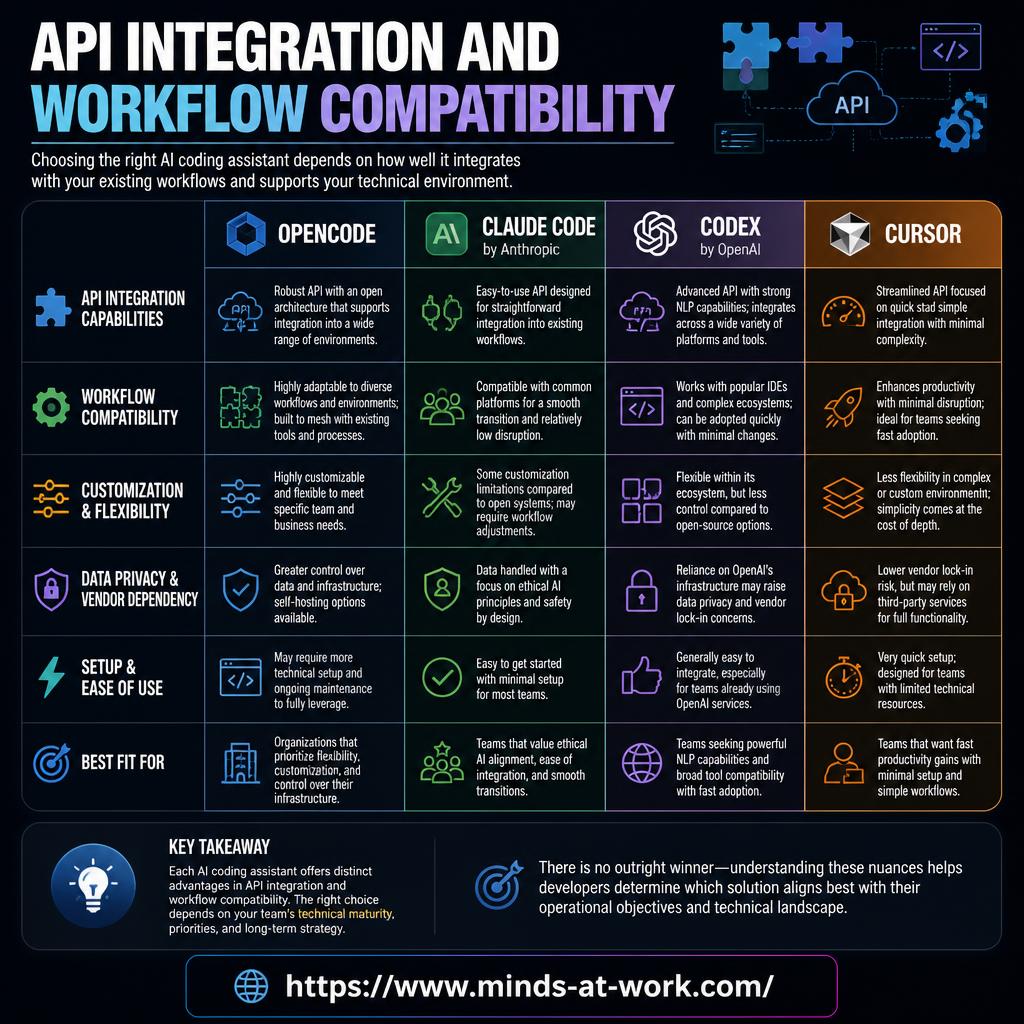
By Dr. Sanju Abraham, Fractional CTO, investor, multiple exits. Published October 26, 2026. Part 10 of a 15-part series: Comparing Opencode, Claude Code, Codex, and Cursor: Is There a Clear Winner?
New to the series? Part 1 — AI Code Generation and Developer Productivity. Part 2 — Overview of the four tools. Part 3 — The Role of Language Models. Part 4 — Deep Learning Foundations. Part 5 — Training Data and Code Quality. Part 6 — Code Completion Compared. Part 7 — Synthesis Techniques. Part 8 — NLP and Context Understanding. Part 9 — Speed and Efficiency — what to measure. This part asks the next question: how well does the tool actually plug into the stack you already run?
Key takeaways
- “API integration” is six concrete axes, not one. API surface, IDE integrations, CI integrations, data residency, extensibility (MCP + custom tools), and switching cost. Any serious procurement conversation names all six.
- Opencode and Cursor cover opposite ends of the integration spectrum. Opencode is a composable terminal agent with an open MCP surface — maximum extensibility, maximum setup. Cursor is a packaged IDE with a managed integration surface — minimum setup, minimum lock-out options.
- Claude Code and Codex are the enterprise defaults. Both ship SSO, audit, usage-based billing, and formal data policies. Codex adds a managed cloud agent as a first-class integration surface.
- Switching cost is the under-weighted axis. It is low for Opencode (model agnostic, MCP tools you keep) and high for Cursor (editor state, custom rules, team settings). Plan for the exit from day one.
- The right pick depends on where you integrate. Terminal-first stacks default to Opencode or Claude Code; IDE-first teams default to Cursor; teams that integrate the agent into CI or long-running jobs default to Codex.
The short answer: In late 2026, AI coding tool “integration” splits into six axes: (1) the API surface the tool exposes, (2) IDE integrations (VS Code, JetBrains, Neovim), (3) CI integrations (GitHub Actions, GitLab CI, Buildkite), (4) data residency and privacy (where your code goes), (5) extensibility (MCP servers, custom tools, hooks), and (6) switching cost (how hard it is to leave). The four tools in this series — Opencode, Claude Code, Codex, Cursor — each win on different axes, and the honest pick depends on the stack you already run. This piece defines each axis, scores the tools, and ends with the four-question procurement checklist you can take into any vendor call.
What are the six axes of integration and workflow compatibility?
Any honest comparison of AI coding tool integration starts by naming the axes being compared — otherwise “it integrates well” collapses into vendor marketing. The six axes that matter in late 2026:
- API surface. Does the tool expose a stable, documented API (REST, SDK, CLI) you can script against? Is it available in all plans or only enterprise?
- IDE integrations. First-class plugins for VS Code, JetBrains, Neovim, Vim, Emacs, Sublime — and how deeply they integrate (just completions? Composer? Agent?).
- CI integrations. Can the tool run inside GitHub Actions, GitLab CI, Buildkite, Jenkins, or your own self-hosted runner? Is there an official action, or do you build it yourself?
- Data residency and privacy. Where does your code go? Does the vendor train on it by default? What is the enterprise-plan contract on that question?
- Extensibility. Can you add custom tools, custom context providers, custom prompts, custom guardrails? Does it support the Model Context Protocol (MCP) or an equivalent?
- Switching cost. If you want to leave in six months, how much does it hurt? Config files that are vendor-specific, trained user preferences, proprietary indexes — all count.
For the earlier parts that set the context layer this integration rides on, see Part 5 on training data and Part 8 on NLP and context understanding.
How does the API surface compare across the four tools?
The API surface is the integration axis most under-asked about during vendor calls — because teams forget they will eventually want to script the tool, not just use it.
- Opencode — fully open, model-agnostic. The entire tool is MIT-licensed; the “API” is the project’s own CLI plus whatever model API you point it at. Scriptability is a given.
- Claude Code — CLI + Anthropic Messages API. The Claude Code CLI is scriptable; the underlying Claude API is well-documented and available on all paid plans. Enterprise plans add SSO-protected administrative APIs.
- Codex — CLI + OpenAI API. The Codex CLI is scriptable; the OpenAI Responses and Chat APIs are the model-side surface. The cloud agent is itself an API surface — hand off a task via API, poll for the PR.
- Cursor — IDE-first, limited public API. Cursor’s API surface is narrower by design; the product is the IDE, not the API. Rules files and
.cursorconfig give some scripting hooks, but there is no “Cursor API” to automate against the way there is for the other three.
The practical implication: teams that need to script the tool itself (run it from a CI job, chain it into a release workflow) will find Opencode, Claude Code, and Codex far more flexible than Cursor.
How well do the tools fit into existing IDE and CI workflows?
Two different workflow questions — IDE integration is where developers live; CI integration is where releases live.
IDE integrations in late 2026:
- Cursor — the IDE itself. Based on VS Code; most VS Code extensions and keybindings work. If VS Code is your IDE, you already know how to use it.
- Claude Code — official plugins for VS Code and JetBrains; the terminal is the first-class surface. Neovim community plugins exist.
- Codex — IDE extensions for VS Code and other major editors; the CLI remains the deeper surface. Jump-to-cloud-agent from the IDE is a nice touch.
- Opencode — terminal-native. No official IDE plugin as of late 2026, but tmux + a split terminal give most IDE developers a workable flow.
CI integrations in late 2026:
- Codex — the cloud agent is the de facto CI integration. Hand it a task via API, poll for the PR, merge when green.
- Opencode — scripting-friendly; teams run it inside a container step in GitHub Actions for codemods, migration helpers, bulk refactors.
- Claude Code — the Anthropic API is CI-friendly; a thin wrapper step in GitHub Actions runs well.
- Cursor — not designed for CI. Running Cursor in a CI container is possible but awkward, and most Cursor-powered workflows stay interactive.
For the broader deployment-automation framing, see Where decision models fit in an agent stack.
Where does the code actually go, and what does the vendor do with it?
Data residency and privacy is the integration axis most load-bearing in enterprise procurement — and the one with the clearest public answers.
- Opencode — the agent runs on your machine; your code goes only to whichever model API you configure. Point it at a local model and nothing leaves your perimeter. Point it at an API, and your code goes to that vendor under their policy.
- Claude Code — Anthropic’s acceptable use and data policy governs. Business API traffic (which Claude Code uses) is not trained on by default. Enterprise plans make this a contractual commitment with audit logs.
- Codex — OpenAI’s data-use policy governs. API traffic (which Codex uses) is not used for training by default. Enterprise plans add SSO, SAML, and SCIM.
- Cursor — a mix. The IDE sends prompts and context snippets to its own backend, which then calls frontier models or routes to cursor-small. Cursor’s privacy mode opts out of training. Enterprise plans add admin controls.
The procurement nuance: “not trained on by default” varies by plan and by product tier. The pattern that holds across all four: read the enterprise plan, not the marketing page, and insist on the data policy in the contract rather than in the FAQ.
What is MCP, and why does it matter for extensibility?
The Model Context Protocol (MCP) is the open protocol for connecting AI tools to external context sources — files, databases, docs, APIs, internal services. It is the integration layer that decides whether a tool can be meaningfully extended by your team.
- Opencode — first-class MCP support. Add a server for your internal docs, your embeddings index, your symbol graph, your own secret store, and the agent uses them like any other tool.
- Claude Code — strong MCP support, with Anthropic as one of the protocol’s co-authors. Enterprise-grade MCP server catalogs are rapidly becoming standard.
- Codex — MCP support is maturing in late 2026; the cloud agent surface emphasizes OpenAI’s own tool ecosystem.
- Cursor — supports MCP servers inside the IDE for custom context; the surface is smaller than Opencode’s or Claude Code’s but growing.
The practical consequence: if your team has internal context the tool needs to see (a wiki, a service catalog, a domain-specific DSL), MCP support is not a nice-to-have — it is the integration axis. Opencode and Claude Code are the clearest fits today; Codex and Cursor are closing the gap.
How much does switching cost — and what carries over?
Switching cost is the integration axis that teams discover only after they want to leave. The honest 2026 ranking, lowest cost to highest:
- Opencode (lowest). Model-agnostic by design; your prompts, your MCP servers, your config files all survive a swap. Switching to a different Opencode-compatible tool is a config change.
- Claude Code. The CLI’s commands, your prompts, and your MCP servers mostly carry over; subscription state and audit history stay with Anthropic.
- Codex. CLI prompts carry over; cloud-agent task history and sandbox-stored artifacts stay with OpenAI. Enterprise agreements may add portability clauses.
- Cursor (highest). The editor’s internal state, custom rules, trained user preferences, and
.cursorconfig files are all vendor-specific. The further you lean in, the more there is to replicate elsewhere.
The practical move: plan the exit on day one. Keep prompts, context providers, and custom tools in a vendor-neutral place (your repo, your wiki) rather than inside the tool’s config. The teams that find switching painful are the ones who let vendor-specific config accumulate silently for a year.
What four questions should procurement ask about integration?
Four questions, every one of which has a verifiable answer. If a vendor cannot answer them, that itself is signal.
- Does the tool expose a stable, documented API we can script? Pin down the version-stability guarantee and the SLA on breaking changes.
- How does the tool integrate with our CI, and is there an official action/plugin? If no, you own the glue code; budget for it.
- What is the full data-residency and training policy for our plan? Insist on the contract language, not the marketing copy. Enterprise plans differ from the free tier.
- What is our six-month exit plan if we need to switch? What config/state carries over, what has to be rebuilt, and how long will it take?
These four questions take under an hour across the four tools, and they decide more than any demo. For a related framing on vendor-selection questions in a similar market, see Choosing a decision API in 2026.
A clean, product-forward 'pick-by-integration' infographic on an off-white background. Four pill-shaped tiles in two rows, each a soft shade: pale emerald 'OPEN API + MCP + LOW LOCK-IN → Opencode', pale blue 'ENTERPRISE API + SSO + AUDIT → Claude Code', pale slate 'CI-NATIVE + CLOUD AGENT → Codex', pale sand 'IDE-NATIVE + FAST SETUP → Cursor'. A thin emerald rule connects them. Short tagline above: 'Pick by where you integrate'. Palette: off-white background, pale slate borders, pale emerald accent, pale blue accent, pale sand accent, navy ink. Linear or Stripe editorial feel. No AI robots.
- Aspect ratio: 16:9
- Source size: 1280 × 720 px (sharp on retina at 760 px display width)
- Format: PNG
- Target file size: under 500 KB
Save to /public/images/blog/<slug>/, then set
src and alt on this <MediaFigure /> to swap it in. Keep the ratio prop so the browser reserves the right space.
Frequently asked questions
Does Opencode have an API?
Yes — Opencode itself is MIT-licensed and scriptable through its CLI, and because it is model-agnostic the “model API” is whichever vendor you configure (Anthropic, OpenAI, Google, Groq, local Ollama). There is no proprietary Opencode SaaS API because the agent runs locally. Teams that need to script Opencode into CI typically run it inside a container step with the model credentials passed in.
Which AI coding tool integrates best with GitHub Actions?
Codex is the strongest default because its cloud agent is designed as a hand-off surface — API in, PR out, poll for completion. Opencode is also strong because it is scriptable and container-friendly. Claude Code works well via a thin GitHub Action wrapper around the Anthropic API. Cursor is the weakest fit because it is an IDE first; running it headless in CI is possible but awkward.
Does Claude Code work with VS Code and JetBrains?
Yes, Anthropic ships official plugins for VS Code and JetBrains IDEs, documented at claude.com/claude-code. The terminal remains the first-class surface, but inline suggestions, chat edits, and agent runs are all available inside the editor. Neovim community plugins exist for terminal-aligned developers who want tighter editor integration without leaving their TUI.
Where does Codex send my code?
Codex sends prompts, context snippets, and files it reads to OpenAI’s infrastructure, which runs the GPT-5-codex model and the cloud sandbox. OpenAI’s data-use policy states that API traffic (including Codex) is not used to train models by default; enterprise plans add SSO, SAML, SCIM, and formal contractual commitments on data use. Teams with strict residency requirements should read OpenAI’s enterprise terms and configure the “no training” settings explicitly.
Can I use Opencode without sending my code to any vendor?
Yes. Opencode is model-agnostic and supports local models through Ollama or any OpenAI-compatible local endpoint. Pointed at a local model, your code never leaves your perimeter. The trade is model capability — frontier models (Claude Opus, GPT-5-codex) are still ahead of open-weight ones on most tasks, so the “fully local” path trades some quality for maximum privacy. For many enterprise-sensitive workloads that trade is worth it.
What is the switching cost between these tools?
Opencode is the lowest because it is model-agnostic and config-forward. Cursor is the highest because so much of its value lives in editor-specific state. Claude Code and Codex sit in the middle — their APIs are well-documented and portable, but subscription history and admin configuration stay with the vendor. Plan the exit on day one: keep prompts, context providers, and custom tools in your repo or wiki rather than inside the tool’s config.
What is MCP, and does every tool support it?
The Model Context Protocol (MCP) is an open protocol for connecting AI tools to external context sources — internal docs, databases, embeddings indexes, custom APIs. Opencode has first-class MCP support. Claude Code has strong support with Anthropic as a co-author of the spec. Codex support is maturing in late 2026. Cursor supports MCP servers inside the IDE for custom context. If your team has internal context the agent needs, MCP support decides most of the integration conversation.
If you are picking an AI coding tool for a team in the next ninety days and the integration surface decides whether the tool fits your stack or sits unused, that is the kind of nuance a one-hour Fractional CTO call is for. For more pieces in this series as it publishes, follow the AI Strategy archive; the broader frame on where AI fits in a small or mid-market software business sits in AI strategy for SMB owners.