Collaboration Features in AI Coding Tools: Teamwork Compared (Part 12 of 15)
Part 12 of 15. How Opencode, Claude Code, Codex, and Cursor actually support team coding — PR integration, shared prompts and rules, admin and billing, review loops, and what they do not do.
By Dr. Sanju Abraham, Fractional CTO, investor, multiple exits. Published October 28, 2026. Part 12 of a 15-part series: Comparing Opencode, Claude Code, Codex, and Cursor: Is There a Clear Winner?
New to the series? Part 1 — AI Code Generation and Developer Productivity. Part 2 — Overview of the four tools. Part 3 — The Role of Language Models. Part 4 — Deep Learning Foundations. Part 5 — Training Data and Code Quality. Part 6 — Code Completion Compared. Part 7 — Synthesis Techniques. Part 8 — NLP and Context Understanding. Part 9 — Speed and Efficiency. Part 10 — API Integration and Workflow Compatibility. Part 11 — Programming Languages Supported — the three-tier language ranking. This part turns to the question every team of more than one developer eventually asks: how well does the tool collaborate?
Key takeaways
- “Collaboration” in AI coding tools is six concrete capabilities, not one. PR-shaped output, shared prompts and rules, shared sessions, admin and billing, review-loop integration, and knowledge sharing — any serious comparison names all six.
- PR-shaped output is nearly uniform. All four tools produce reviewable diffs on branches you can push and PR. The differences are in diff quality and review-time friction — covered in Part 7.
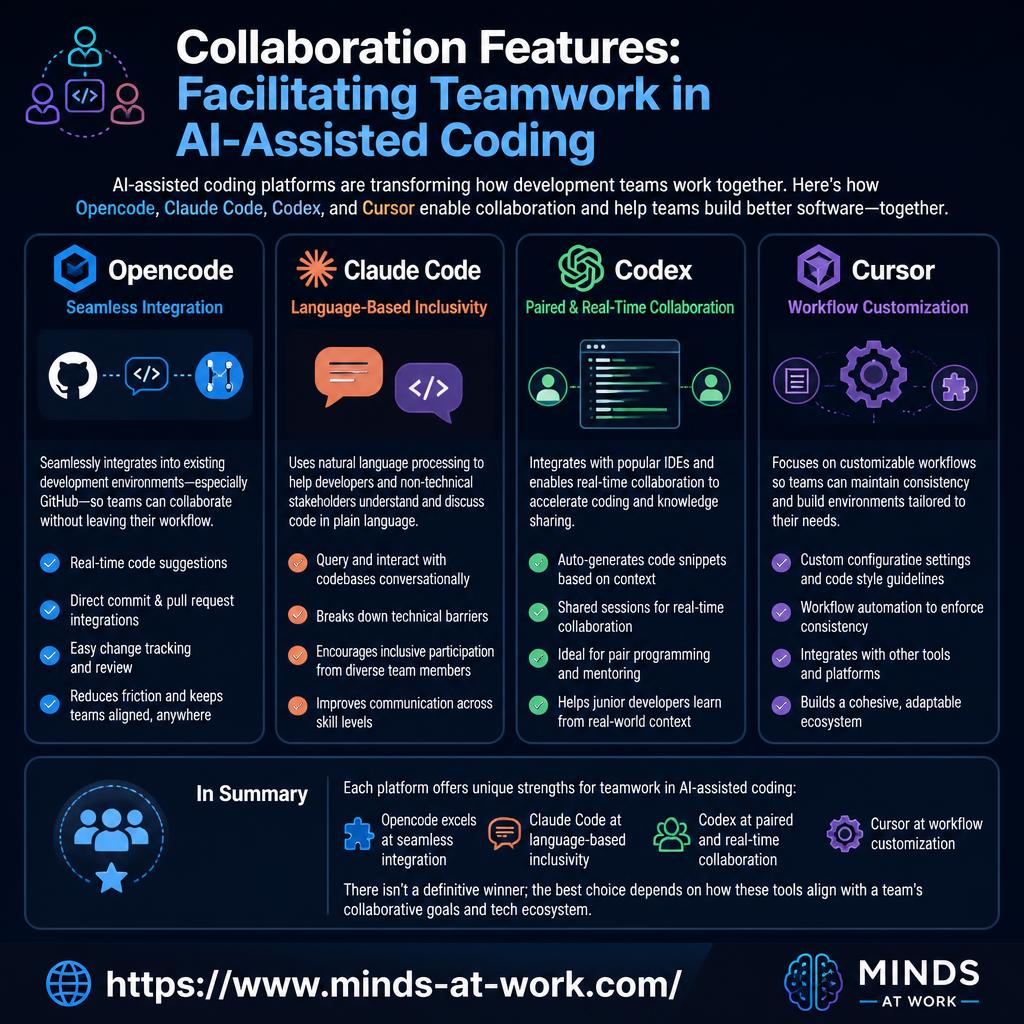
- The biggest myth: AI coding tools are not Live Share. None of the four ships real-time, cursor-tracking shared editing sessions. Codex does not have shared live sessions, and Opencode has no native GitHub integration — the source essay for this part is wrong on both counts.
- Shared prompts and rules in-repo are the real collaboration surface.
AGENTS.md,.cursor/rules,.claude/config, and MCP servers checked into the repo are how teams actually share AI context today.- Admin and billing is where enterprise collaboration lives. Claude Code and Codex ship SSO, SCIM, and usage reporting on team plans. Cursor’s team plan has SSO and shared billing. Opencode is DIY.
The short answer: AI coding tool “collaboration” in late 2026 is not Google-Docs-for-code. None of the four tools in this series — Opencode, Claude Code, Codex, Cursor — ships real-time shared editing with cursor presence. What they actually do for teams is six concrete things: produce PR-shaped output you can review, support shared prompts and rules checked into the repo, offer admin/SSO/billing for larger teams, hook into code-review loops, and let teams share knowledge (custom tools, prompts, MCP servers). This piece defines each capability, scores the tools, and corrects the two most common misconceptions carried by vendor marketing and third-party comparisons.
What are the six real collaboration capabilities for AI coding tools?
Collaboration in AI coding tools is less about synchronous editing and more about asynchronous handoffs between human developers. The six capabilities that matter in late 2026:
- PR-shaped output. The agent produces a reviewable diff on a branch that a human can approve, request changes on, and merge. The baseline capability that every AI coding tool has to match a human contributor.
- Shared prompts and rules. Teams check prompt templates, agent rules, and style guidance into the repo so every developer gets the same AI behavior.
AGENTS.md,.cursor/rules,.claude/config directories, and in-repo MCP server configs are the common patterns. - Shared sessions and context. Can one developer hand off an agent session to another with the context intact? Can a reviewer see the agent’s full plan and tool-call history? This is where tools diverge.
- Admin, SSO, billing. For teams past five developers, how the tool handles identity, access control, usage caps, and consolidated billing becomes load-bearing.
- Review-loop integration. Does the agent play well with code review — small diffs, clear commit messages, test-suite runs, PR-description generation? This decides whether AI output speeds up or slows down the whole team.
- Knowledge sharing. Custom tools, MCP servers, prompt libraries, and agent configurations that one developer builds and the whole team benefits from.
For the related framing on which collaboration surface the output flows into, see Part 10 on API integration and workflow compatibility.
Do any of the four tools support real-time shared editing?
No. This is the single most common misconception about AI coding tools in late 2026, and it is worth stating plainly: none of Opencode, Claude Code, Codex, or Cursor ships Google-Docs-style real-time shared editing with cursor presence.
The pattern that does work: VS Code Live Share, JetBrains Code With Me, or Zed’s collaboration features sit above the editor and handle real-time collaboration. The AI coding tool runs inside one developer’s session. Teams who want “two developers typing in the same file” use the editor’s collab layer, not the AI tool’s.
Three claims commonly repeated that are not accurate in late 2026:
- “Codex has shared session capabilities for real-time collaboration.” No. Codex is a CLI plus a managed cloud agent. The cloud agent runs a task in a sandbox and surfaces a PR; multiple developers can trigger separate tasks, but they do not share a live session.
- “Opencode offers real-time code suggestions with native GitHub integration.” No. Opencode is a terminal-native agent with MCP support. It can be scripted into GitHub Actions, and its output can be pushed as a PR, but there is no proprietary GitHub integration in the product.
- “Cursor is a shared editor like Live Share.” Partially. Cursor supports collaboration through its underlying VS Code roots, but Cursor’s distinctive AI features (Composer, Agent, inline chat) are per-developer, not shared live.
The real collaboration surface for all four tools is asynchronous and PR-based, with shared config checked into the repo. For a related piece on the agentic pattern this flows through, see Code Synthesis Techniques (Part 7).
How do the tools support shared prompts, rules, and agent config?
The real collaboration surface for AI coding tools in late 2026 is in-repo config. Teams check prompt templates, agent instructions, custom tools, and MCP server configs into Git, and every developer picks them up automatically on next pull.
- Cursor —
.cursor/rulesdirectory. Rules files written in Markdown that the agent reads automatically; each rule has a scope (always, auto-attached, model-decides, or manual). Checked into the repo; team-wide behavior stays consistent. - Claude Code —
.claude/directory +CLAUDE.md. Project instructions inCLAUDE.mdat the repo root plus commands, subagents, and MCP server configs in.claude/. All version-controlled; everyone on the team shares them. - Codex —
AGENTS.mdand config files. OpenAI standardizedAGENTS.mdat the repo root as the shared instruction surface; the Codex CLI reads it. Additional config in.codex/as the product matures. - Opencode — repo-level config + MCP servers.
opencode.jsonor equivalent for agent config; MCP server configs checked in. Model freedom means teams can standardize on a model choice via config, not just culture.
The practical pattern: teams that treat these config files as first-class code — reviewed in PRs, tested in CI, documented in the README — get the most leverage. Teams that let individual developers maintain private config drift into inconsistent agent behavior.
Which tools have the strongest admin, SSO, and billing for teams?
Admin and billing is where enterprise collaboration lives. For teams past the five-developer line, the SSO/SCIM/audit question decides more than any model benchmark.
- Claude Code — enterprise defaults. SSO (SAML, OIDC), SCIM user provisioning, seat-based billing with centralized administration, usage reports per user and per project, audit logs. Available on team and enterprise plans.
- Codex — ChatGPT Enterprise tie-in. SSO, SCIM, admin console, usage dashboards. Teams already on ChatGPT Enterprise inherit the identity and audit surface; standalone Codex plans add the same controls.
- Cursor — Teams plan. SSO, shared billing, admin console for member management, usage reporting. Smaller feature surface than the two labs above but covers the common cases.
- Opencode — DIY. No managed admin surface — Opencode is open-source. Teams on Opencode self-host whatever admin layer they need, or integrate with their existing SSO on the API-provider side (Anthropic, OpenAI, Google) rather than on Opencode itself.
The practical implication: Opencode is a hard sell for teams that need “turn on SSO and audit by lunch.” Claude Code and Codex are the enterprise defaults. Cursor sits between for mid-sized teams who want IDE-first ergonomics with enterprise-grade identity.
How well do the tools integrate into code-review loops?
Code review is the single highest-leverage collaboration point, and it is where AI tools either save hours or create them.
Three review-loop dimensions where tools differ:
- PR description generation. Codex and Claude Code both ship patterns for generating PR titles and descriptions from the agent’s own plan. Cursor has similar patterns through its Composer workflow. Opencode supports this via custom MCP tools.
- Commit message quality. Does the agent produce commit messages that explain why, not just what? Varies more by the prompt and the model than by the tool; teams converge via shared prompts/rules.
- Reviewer context handoff. When a human reviewer picks up an agent-generated PR, can they see the plan the agent followed, the tools it ran, the failures it recovered from? Claude Code’s explicit diffs are strong here; Codex’s cloud-agent transcript is strong; Cursor’s in-editor review is strong inside Cursor itself but awkward outside; Opencode varies by setup.
The under-weighted axis: small, focused PRs beat large, sprawling ones for review speed. Tools that favor diff synthesis over full-file rewrites (see Part 7) save reviewer minutes. Teams running serious AI-coding programs track reviewer-minutes-per-PR per tool and pick accordingly.
How do teams actually share knowledge about AI tool use?
The best teams in late 2026 treat AI tool configuration as first-class code — committed to the repo, reviewed in PRs, documented in the README. Three artifacts carry most of the knowledge:
- Shared prompt libraries. A
prompts/directory in the repo with named prompts for recurring tasks (“add a feature flag,” “write a unit test for this function,” “run a security review of this diff”). Everyone benefits from the senior engineer’s prompt engineering. - Custom MCP servers. Internal tools exposed to the agent via MCP — the internal doc site, the service catalog, the deployment history, the alerts dashboard. Written once, used by everyone’s agent runs. See Part 10 for the MCP framing.
- Agent rules checked into the repo.
.cursor/rules,CLAUDE.md,AGENTS.md,opencode.json— the agent-behavior config that captures “how we do things here” for the AI. New hires onboard faster; the agent produces more consistent output.
The pattern is simple: anything a senior engineer figures out about the AI should be captured in config, not left in a Slack message. For the broader framing on where this fits in an AI-adopting SMB, see AI strategy for SMB owners.
When does each tool win on collaboration?
Pick by the collaboration shape your team actually has.
- Default to Claude Code when you need enterprise identity (SSO, SCIM, audit) on day one, terminal-first developers dominate the team, and shared
CLAUDE.md+ MCP server config is the way you want to codify AI behavior. - Default to Codex when you already run on OpenAI/ChatGPT Enterprise, your workflow pattern is “hand off a long task to a background agent and review the PR later,” and
AGENTS.mdfits your team’s existing conventions. - Default to Cursor when the IDE is the center of gravity, Teams-plan SSO is sufficient, and
.cursor/rulescaptures your style guidance well. Pair with a shared editor-collab tool (Live Share, Zed) for synchronous work. - Default to Opencode when model freedom is a hard requirement, you have the engineering capacity to self-host the admin surface, and the open-source + MCP-first collaboration model fits your team’s culture.
For teams that need enterprise admin + a specific tool: the common 2026 pattern is to put identity and billing with Claude Code or Codex, and let individual developers also use Cursor on their IDE if they prefer it — with shared AGENTS.md + CLAUDE.md + .cursor/rules all in the repo.
A clean, product-forward 'pick-by-collaboration-shape' infographic on an off-white background. Four pill-shaped tiles in two rows, each a soft shade: pale emerald 'TERMINAL + ENTERPRISE SSO → Claude Code', pale blue 'HAND-OFF TO BACKGROUND AGENT → Codex', pale slate 'IDE-FIRST TEAM, TEAMS PLAN → Cursor', pale sand 'MODEL FREEDOM + DIY ADMIN → Opencode'. A thin emerald rule connects them. Short tagline above: 'Pick by the collaboration shape your team actually has'. Palette: off-white background, pale slate borders, pale emerald accent, pale blue accent, pale sand accent, navy ink. Linear or Stripe editorial feel. No AI robots.
- Aspect ratio: 16:9
- Source size: 1280 × 720 px (sharp on retina at 760 px display width)
- Format: PNG
- Target file size: under 500 KB
Save to /public/images/blog/<slug>/, then set
src and alt on this <MediaFigure /> to swap it in. Keep the ratio prop so the browser reserves the right space.
Frequently asked questions
Do AI coding tools support real-time collaborative editing?
Not natively, no. None of Opencode, Claude Code, Codex, or Cursor ships Google-Docs-style real-time shared editing with cursor presence. For synchronous “two developers typing in the same file,” teams use VS Code Live Share, JetBrains Code With Me, or Zed’s built-in collaboration — all of which sit above the editor independently of the AI tool. The AI collaboration surface in late 2026 is asynchronous and PR-based.
Does Codex have shared live sessions?
No. Codex is OpenAI’s CLI plus managed cloud agent. The cloud agent runs tasks in a sandbox and surfaces PRs; multiple developers can trigger separate tasks, but they do not share a live editing session. Any claim that “Codex features shared session capabilities for real-time collaboration” is confusing Codex with VS Code Live Share or a similar editor-collab layer. The real Codex collaboration pattern is async: hand off, come back to a PR.
Does Opencode have native GitHub integration?
Not as a built-in product feature. Opencode is a terminal-native agent with MCP support. Teams integrate it with GitHub via scripts and GitHub Actions — Opencode can be run inside a CI step to codemod a PR, open follow-up PRs for refactors, or run on a schedule — but there is no proprietary GitHub Opencode button. The integration pattern is “scriptable building block,” not “native integration.”
How do teams share prompts and agent behavior across a team?
By checking agent config into the repo as code. Cursor uses .cursor/rules; Claude Code uses CLAUDE.md plus a .claude/ directory with commands, subagents, and MCP configs; Codex uses AGENTS.md at the repo root; Opencode uses opencode.json and MCP server configs. The pattern that works across tools: treat these files as first-class code — reviewed in PRs, tested in CI, documented in the README. Private per-developer config leads to inconsistent agent behavior.
Which tool has the strongest SSO and admin for enterprise teams?
Claude Code and Codex are tied for enterprise defaults, both shipping SSO (SAML, OIDC), SCIM user provisioning, usage reporting, and audit logs on team/enterprise plans. Cursor’s Teams plan covers SSO and shared billing with a smaller admin surface. Opencode has no managed admin — teams on Opencode build their own layer or rely on the underlying model provider’s identity controls (Anthropic, OpenAI). Pick based on where your identity provider and audit pipeline already live.
How do AI coding tools fit into code review?
As a contributor to the review process, not a replacement for it. The agent produces a PR; a human reviewer reads it; the usual review flow applies. The practical improvements in late 2026: PR descriptions and commit messages generated from the agent’s plan (strong on Codex and Claude Code), small-and-focused diffs over full-file rewrites (see Part 7), and reviewer context handoff (ability to see the plan the agent followed, which Claude Code and Codex both expose).
Can non-technical team members contribute through these tools?
Partially. All four tools let a non-engineer phrase a request in English and get a code response; whether that response is useful depends on how much domain context the tool has. For a non-engineer to meaningfully contribute, the team needs to invest in shared rules and prompts that encode “how we do things here” — otherwise the agent generates plausible-looking code the engineering team then has to rework. The honest 2026 picture: AI coding tools lower the barrier, but code review and judgment still require engineering experience.
If you are rolling AI coding tools out to a team in the next ninety days and the collaboration shape — admin, review loops, shared config — needs to be right the first time, that is the kind of nuance a one-hour Fractional CTO call is for. For more pieces in this series as it publishes, follow the AI Strategy archive; the broader frame on where AI fits in a small or mid-market software business sits in AI strategy for SMB owners.